GoNavi Logo

GoNavi

Navigate every data source — native speed, agent-ready, zero Electron bloat.

A high-performance cross-platform database client built with Wails (Go) + React. Desktop-first. MCP-ready. ~30MB class binaries.

Release Downloads Stars License

Go Wails React Build

Language: English · 简体中文  ·  ⬇ Download · ⚡ Quick Start · ✨ Features · 🤖 MCP

Sponsored by 华龙中转站 / Hualong Transfer Station

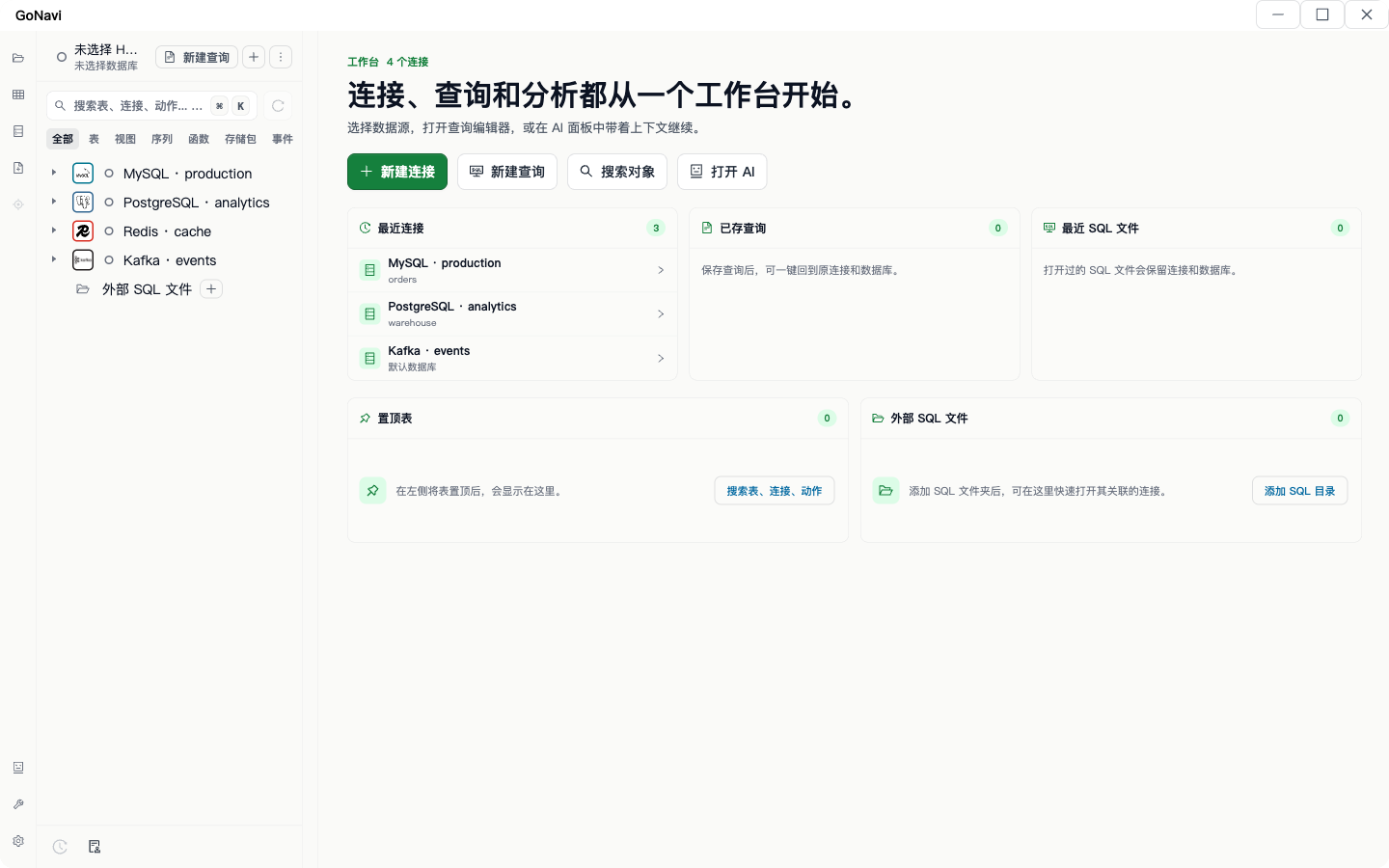
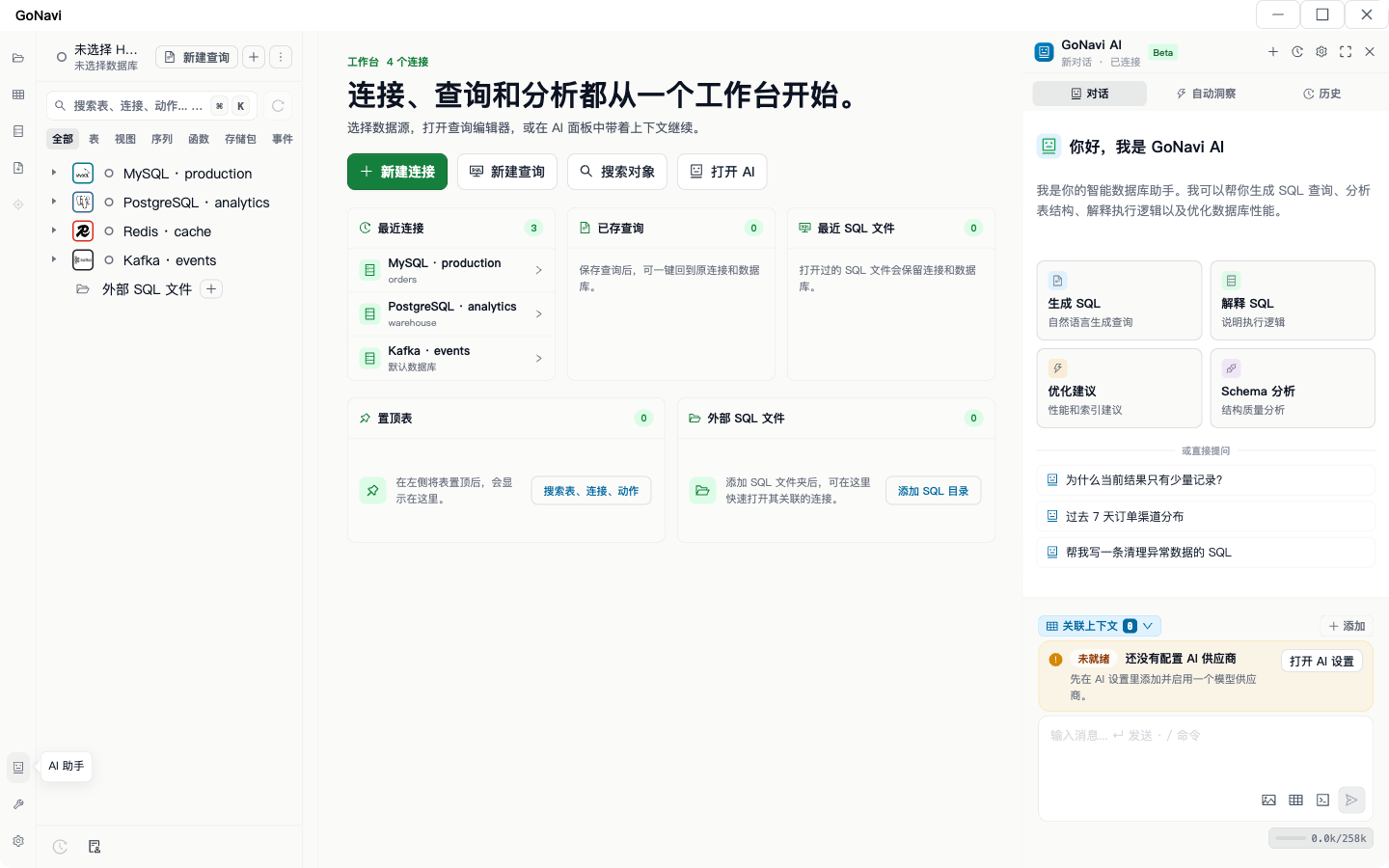
--- ## Why GoNavi? Most database GUIs are Electron shells with megabytes of tax. GoNavi takes a different path: | | Typical Electron client | **GoNavi** | |---|---|---| | Runtime | Chromium + Node | **Go + native WebView** | | Binary size | Hundreds of MB | **~30MB class** | | Startup | Heavy | **Fast** | | Memory | High baseline | **Lean** | | AI / Agents | Bolt-on or absent | **First-class MCP + multi-provider AI** | | Data sources | Mostly RDBMS | **SQL · Cache · Vector · MQ · Search · Time-series · Domestic DBs** | > **One cockpit for MySQL, Postgres, Redis, Kafka, Milvus, OceanBase, ClickHouse…** > Query, edit, audit, sync — and hand structured context to coding agents without leaking passwords off-host. --- ## At a Glance ```text ┌──────────────────────────────────────────────────────────────────────┐ │ GoNavi Workbench │ │ ┌─────────────┐ ┌──────────────────┐ ┌─────────────────────────┐ │ │ │ Connections │ │ Monaco SQL + AI │ │ Virtualized DataGrid │ │ │ │ SSH / Proxy │ │ Schema context │ │ Batch edit · Export │ │ │ │ Drivers │ │ Slash commands │ │ Txn submit / rollback │ │ │ └─────────────┘ └────────┬─────────┘ └─────────────────────────┘ │ │ │ │ │ ┌─────────────▼─────────────┐ │ │ │ Go core · Audit · Sync │ │ │ │ MCP HTTP · Web Server │ │ │ └───────────────────────────┘ │ └──────────────────────────────────────────────────────────────────────┘ ``` ### Product screenshots Each image is a **full GoNavi application window**, scaled proportionally for README display.

GoNavi full window — connections, queries, and workbench   GoNavi full window — AI assistant with schema context

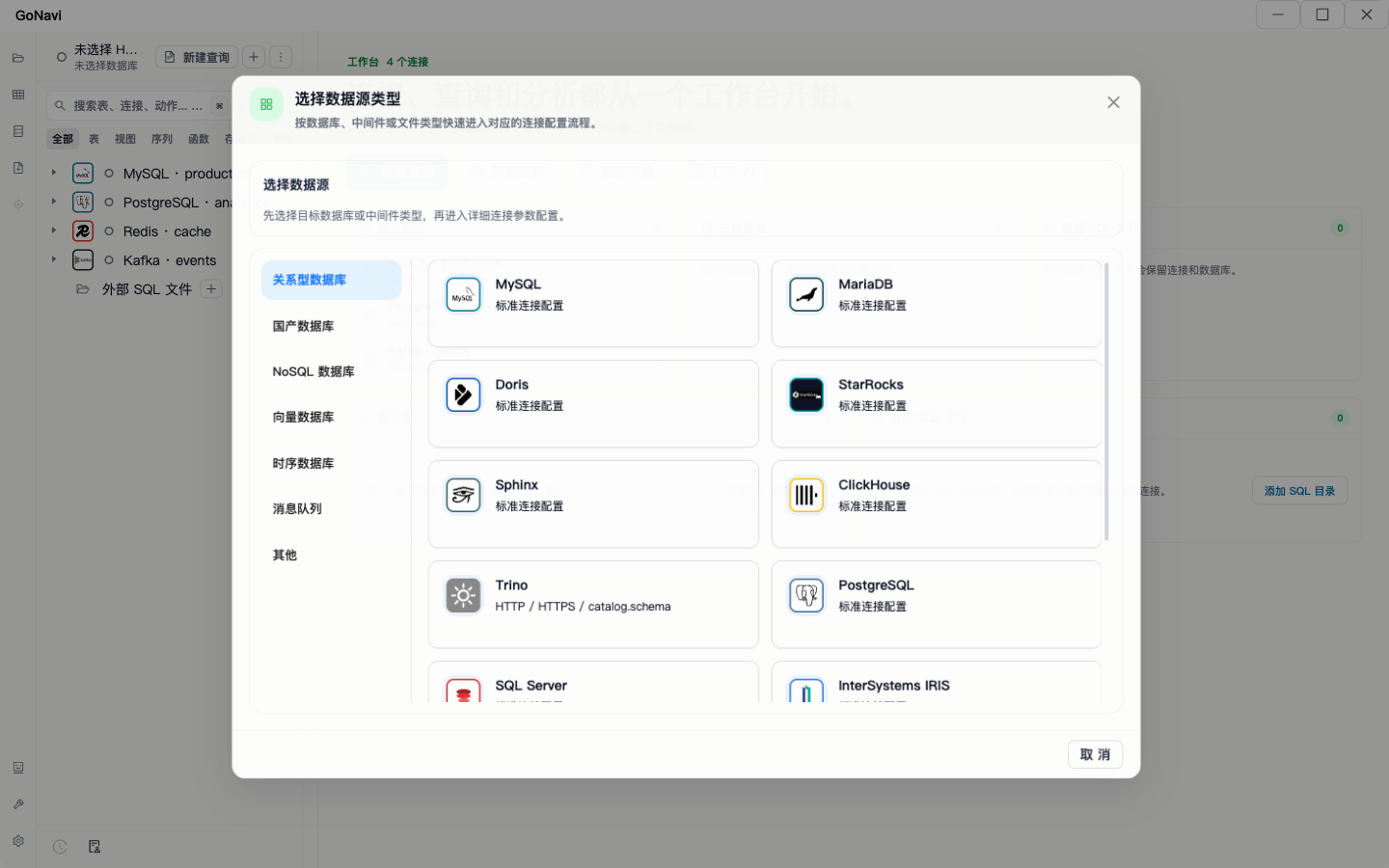
GoNavi full window — new connection data-source selector

Real desktop captures · full window

--- ## ✨ Key Features
### 🤖 AI that knows your schema - OpenAI · Gemini · Claude · custom OpenAI-compatible APIs - Attach live table schemas as context - Slash commands: generate SQL, explain, optimize, review - **MCP**: install into Claude Code / Codex, or Streamable HTTP for remote agents - Secrets stay on the GoNavi host — agents get tools, not raw passwords ### ⚡ Built for large data - Virtualized DataGrid for heavy result sets - In-place cell edit · batch CRUD · transaction submit/rollback - Large-field popup editor · smart read/write modes - Export: CSV · XLSX · JSON · Markdown - Monaco editor with context-aware completion
### 🔌 Connectivity without drama - URI generate / parse - SSH tunnel · proxy - Connection JSON import / export - On-demand optional driver agents - Custom Driver + DSN extensibility ### 🛡️ Observable & shippable - SQL execution logs with timing - Audit center (redacted by default, retention, export) - Desktop + experimental **Web Server** mode - Docker / K8s / Helm / Podman packaging - Auto update checks · multi-arch releases
### 🧩 Stack `Go 1.24` · `Wails v2` · `React 18` · `TypeScript` · `Vite` · `Ant Design 5` · `Zustand` · `Monaco` --- ## 🗄 Supported Data Sources > **Built-in** — ready out of the box · **Optional agent** — install via Driver Manager | | | |---|---| | **Built-in** | MySQL · GoldenDB · PostgreSQL · Oracle · Redis · Chroma · Qdrant · Milvus · RocketMQ · MQTT · Kafka · RabbitMQ | | **Optional** | MariaDB · Doris · StarRocks · Sphinx · SQL Server · SQLite · DuckDB · OceanBase · Dameng · Kingbase · HighGo · Vastbase · OpenGauss · GaussDB · IRIS · MongoDB · TDengine · IoTDB · ClickHouse · Trino · Elasticsearch · Custom Driver/DSN |
Full capability matrix | Category | Data Source | Driver Mode | Typical Capabilities | |---|---|---|---| | Relational | MySQL | Built-in | Schema browsing, SQL query, data editing, export/backup | | Domestic DB | GoldenDB | Built-in | MySQL-compatible query workflow and distributed transaction scenarios | | Relational | PostgreSQL | Built-in | Schema browsing, SQL query, data editing, object management | | Relational | Oracle | Built-in | Query execution, object browsing, data editing | | Cache | Redis | Built-in | Key browsing, command execution, encoding/view switch | | Vector Database | Chroma | Built-in | Collection browsing, vector retrieval, metadata filtering | | Vector Database | Qdrant | Built-in | Collection browsing, vector search, payload filtering | | Vector Database | Milvus | Built-in | Collection browsing, vector search, scalar filtering | | Message Queue | RocketMQ | Built-in | Topic browsing, consumer-group inspection, message-oriented workflow | | Message Queue | MQTT | Built-in | Broker and topic-filter workflow with QoS-aware connection settings | | Message Queue | Kafka | Built-in | Topic browsing, broker metadata, consumer-group workflow | | Message Queue | RabbitMQ | Built-in | Queue/exchange browsing, virtual host inspection, management API workflow | | Relational | MariaDB | Optional driver agent | Querying, object management, data editing | | Relational | Doris | Optional driver agent | Querying, object browsing, SQL execution | | Columnar Analytics | StarRocks | Optional driver agent | Querying, object browsing, SQL execution | | Search | Sphinx | Optional driver agent | SphinxQL querying and object browsing | | Relational | SQL Server | Optional driver agent | Schema browsing, SQL query, object management | | File-based | SQLite | Optional driver agent | Local DB browsing, editing, export | | File-based | DuckDB | Optional driver agent | Large-table query, pagination, file-DB workflow | | Domestic DB | OceanBase | Optional driver agent | MySQL / Oracle tenant access, object browsing, query workflow | | Domestic DB | Dameng | Optional driver agent | Querying, object browsing, data editing | | Domestic DB | Kingbase | Optional driver agent | Querying, object browsing, data editing | | Domestic DB | HighGo | Optional driver agent | Querying, object browsing, data editing | | Domestic DB | Vastbase | Optional driver agent | Querying, object browsing, data editing | | Domestic DB | OpenGauss | Optional driver agent | PostgreSQL-like schema browsing, SQL query, object management | | Domestic DB | GaussDB | Optional driver agent | PostgreSQL-like schema browsing, SQL query, object management | | Multi-model | InterSystems IRIS | Optional driver agent | Namespace browsing, SQL query, object management | | Document | MongoDB | Optional driver agent | Document query, collection browsing, connection management | | Time-series | TDengine | Optional driver agent | Time-series schema browsing and querying | | Time-series | Apache IoTDB | Optional driver agent | Storage group / device / timeseries browsing and querying | | Columnar Analytics | ClickHouse | Optional driver agent | Analytical query, object browsing, SQL execution | | Federated Query | Trino | Optional driver agent | Cross-source SQL via multiple catalogs, `catalog.schema` browsing, SQL execution | | Search | Elasticsearch | Optional driver agent | Index browsing, mapping inspection, JSON DSL / query_string search | | Extensibility | Custom Driver/DSN | Custom | Extend to more data sources via Driver + DSN |
--- ## 🚀 Quick Start ### Prerequisites - [Go](https://go.dev/dl/) 1.21+ - [Node.js](https://nodejs.org/) 18+ - [Wails CLI](https://wails.io/docs/gettingstarted/installation) ```bash go install github.com/wailsapp/wails/v2/cmd/wails@v2.11.0 ``` ### Develop ```bash git clone https://github.com/Syngnat/GoNavi.git cd GoNavi wails dev # full hot reload node tools/wails-fast-dev.mjs # faster when Go exports unchanged node tools/wails-fast-dev.mjs --refresh-bindings # after Go export signature changes ``` ### Build ```bash wails build wails build -clean # clean build before release ``` Artifacts → `build/bin`. ### Prefer a binary? Grab the latest build from **[Releases](https://github.com/Syngnat/GoNavi/releases)** (macOS AMD64/ARM64 · Windows AMD64 · Linux WebKitGTK 4.0/4.1). --- ## 🌐 Web Server (Experimental) Same Go backend + React UI over HTTP — **not** a containerized Wails window. ```powershell go build . .\GoNavi-Wails.exe web-server --addr 127.0.0.1:34116 ``` - First visit → `/setup` (admin password; optional Google Authenticator) - Bridge: `window.go.*` / `window.runtime.*` → HTTP / SSE - Sessions, recovery codes, login rate limits #### Docker / Podman ```bash cp docker.web-server.env.example docker.web-server.env # set GONAVI_HOST_DATA_ROOT (absolute path) # optional: GONAVI_WEB_PASSWORD (min 6 chars) docker compose --env-file docker.web-server.env -f docker-compose.web-server.yml up -d ``` Open `http://127.0.0.1:34116`. Mount the active data root at `/data` (`connections.json`, `daily_secrets.json`, optional `drivers/`). Auth state → `web_auth.json`. > **Do not expose an unhardened web entry to the public internet.** Use reverse proxy + HTTPS in production. Health: `GET /__gonavi/healthz` Local source build: add `-f docker-compose.web-server.local.yml --build`. After changing env passwords: ```bash docker compose --env-file docker.web-server.env -f docker-compose.web-server.yml up -d --force-recreate ``` (`docker restart` does **not** reload env files.) --- ## 🤖 MCP & Agents Ship schema tools to agents without shipping your vault: ```bash cp docker.mcp-server.env.example docker.mcp-server.env docker compose --env-file docker.mcp-server.env -f docker-compose.mcp-server.yml up -d ``` | Surface | Entry | |---|---| | MCP container | `docker-compose.mcp-server.yml` → `ghcr.io/syngnat/gonavi-mcp-server` | | Web UI container | `docker-compose.web-server.yml` → `ghcr.io/syngnat/gonavi-web-server` | | Podman / Quadlet | [deploy/podman/gonavi-mcp-server](deploy/podman/gonavi-mcp-server) | | Kubernetes | [deploy/k8s/gonavi-mcp-server](deploy/k8s/gonavi-mcp-server) | | Helm | [deploy/helm/gonavi-mcp-server](deploy/helm/gonavi-mcp-server) | | Build-only image | `Dockerfile.build-env` → `ghcr.io/syngnat/gonavi-build-env` | Safety defaults: remote `schema-only` omits `execute_sql`; mutating SQL requires explicit `allowMutating=true`. Details: [cmd/gonavi-mcp-server/README.md](cmd/gonavi-mcp-server/README.md). ### Linux build environment only ```bash docker build -f Dockerfile.build-env -t gonavi-build-env:local . docker run --rm -it -v "$PWD:/workspace" -w /workspace gonavi-build-env:local bash ``` --- ## 📦 Release Pipeline Push a `v*` tag → GitHub Actions builds multi-arch releases. Notes auto-generated from merged PRs via `.github/release.yaml`. --- ## 🛠 Troubleshooting
Windows: missing Microsoft Edge WebView2 Runtime (common on intranet images) The GoNavi desktop app on Windows depends on the **Microsoft Edge WebView2 Runtime** (a system component, not full Chrome). Some intranet / thin / Server / LTSC images ship without it. Symptoms: - Process exits immediately, blank/white window - Errors about missing WebView2 / WebView2 Runtime - Installer blocked by AV or group policy ### 1. Check whether Runtime is installed In **PowerShell**: ```powershell # Common Evergreen install path (64-bit Windows) Test-Path "${env:ProgramFiles(x86)}\Microsoft\EdgeWebView\Application" # Registry (a `pv` version usually means installed) Get-ItemProperty -Path "HKLM:\SOFTWARE\WOW6432Node\Microsoft\EdgeUpdate\Clients\{F3017226-FE2A-4295-8BDF-00C3A9A7E4C5}" ` -ErrorAction SilentlyContinue | Select-Object pv, name ``` If the path is missing and registry has no `pv`, install the Runtime. ### 2. Online install (simplest) 1. Open the official download page: [Microsoft Edge WebView2](https://developer.microsoft.com/microsoft-edge/webview2/) 2. Download the **Evergreen Bootstrapper** (small; needs network during install) 3. Run as Administrator, then **restart GoNavi** ### 3. Offline / intranet: Standalone installer (recommended for IT) The Bootstrapper fails on fully air-gapped machines. Use the **Evergreen Standalone Installer** instead: 1. On a machine with internet, download the matching architecture package, e.g.: - `MicrosoftEdgeWebView2RuntimeInstallerX64.exe` (most 64-bit PCs) - `…X86.exe` / `…ARM64.exe` as needed 2. Copy the installer into the intranet (USB, software center, share) 3. Install **as Administrator** on the target PC: ```powershell # Interactive .\MicrosoftEdgeWebView2RuntimeInstallerX64.exe # Silent (batch / SCCM friendly) .\MicrosoftEdgeWebView2RuntimeInstallerX64.exe /silent /install ``` 4. Start GoNavi again. If it still fails, sign out or reboot Windows once. ### 4. Group policy / locked-down PCs - Needs local admin, or IT push via SCCM / software center - Ensure policies do not block Edge/WebView2 install or updates - Enterprises may pin a [Fixed Version](https://developer.microsoft.com/microsoft-edge/webview2/) Runtime (most users should prefer Evergreen) ### 5. Temporary workaround: Web Server mode If the desktop WebView cannot be installed yet, run the experimental Web Server and use a normal browser: ```powershell .\GoNavi.exe web-server --addr 127.0.0.1:34116 ``` Open `http://127.0.0.1:34116`. See the **Web Server** section above. Do **not** expose an unhardened Web endpoint to the public internet. Tracker / discussion: [#672](https://github.com/Syngnat/GoNavi/issues/672).
macOS: “App is damaged and can’t be opened” Without Apple notarization, Gatekeeper may block the app: ```bash sudo xattr -rd com.apple.quarantine /Applications/GoNavi.app ``` Or right-click → Open (Control-click flow). Move the app to **Applications** first.
Linux: missing WebKitGTK ```bash # Debian 13 / Ubuntu 24.04+ sudo apt-get update sudo apt-get install -y libgtk-3-0 libwebkit2gtk-4.1-0 libjavascriptcoregtk-4.1-0 # Ubuntu 22.04 / Debian 12 sudo apt-get update sudo apt-get install -y libgtk-3-0 libwebkit2gtk-4.0-37 libjavascriptcoregtk-4.0-18 ``` Artifacts with `-WebKit41` prefer Debian 13 / Ubuntu 24.04+.
Linux: Chinese glyphs as tofu boxes ```bash sudo apt-get update sudo apt-get install -y fonts-noto-cjk fonts-wqy-microhei fc-cache -fv ```
--- ## 💖 Sponsors

华龙中转站 Hualong Transfer Station

华龙中转站 · Hualong Transfer Station
AI API Gateway · multi-model routing · domestic high-speed endpoint

Special thanks to **[华龙中转站 (Hualong Transfer Station)](https://api-fast.hualong.online/)** for sponsoring GoNavi open-source development. | | | |---|---| | **What they are** | An **AI API Gateway** that unifies multi-model access behind an OpenAI-compatible surface — so you can ship LLM features without fighting provider fragmentation and network friction. | | **What you get** | Multi-model routing · OpenAI-compatible API · **domestic high-speed direct endpoint** · practical for indie devs and open-source projects that need reliable LLM access | | **Why we recommend them** | GoNavi is AI/MCP-first. Stable model access is core infrastructure for coding agents, schema-aware assistants, and day-to-day development. | **Looking for a solid LLM relay?** 👉 [https://api-fast.hualong.online/](https://api-fast.hualong.online/) — console, docs, and the domestic high-speed endpoint. > Hualong also sponsored a **shared 50B token pool** for GoNavi **co-maintainers**, used via **API Key** (not 50B per person). Rules and how to apply: [Issue #671](https://github.com/Syngnat/GoNavi/issues/671). --- ## 🤝 Contributing Issues and PRs welcome. Branch from **`dev`**, PR against **`dev`**. - [CONTRIBUTING.md](CONTRIBUTING.md) - Call for contributors (incl. sponsored token pool): [Issue #671](https://github.com/Syngnat/GoNavi/issues/671) --- ## 💬 Contact & Feedback | Channel | Notes | |---|---| | **GitHub Issues** | Preferred for bugs, feature requests, and docs — easier to track and reproduce | | **WeChat** | `ygf1140302783` (note “GoNavi”) — maintainer can invite you to the community group for discussion | > For technical reports, include version, OS, and repro steps when possible. Windows blank/crash on intranet images: [WebView2 guide](https://github.com/Syngnat/GoNavi/issues/672). --- ## ⭐ Star History Star history --- ## Links - [华龙中转站 · Hualong Transfer Station](https://api-fast.hualong.online/) — AI API Gateway (GoNavi sponsor) - [linux.do](https://linux.do/) - [AIBook](https://aibook.ren/) ## License [Apache-2.0](LICENSE)

Built for people who live in SQL, schemas, and agent loops.