PicList Logo

PicList

强大的云存储与图床管理工具

Code Style Downloads Release License

简体中文 | English


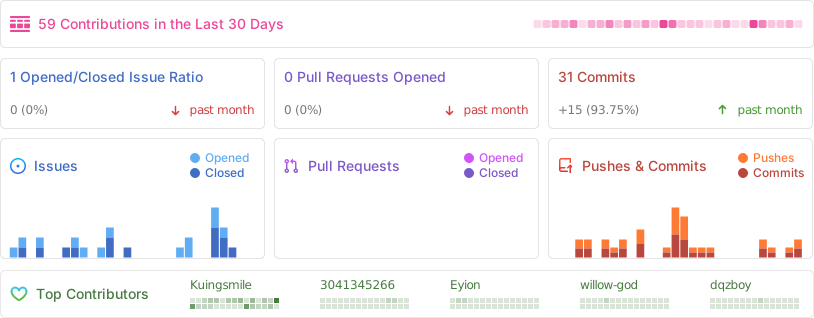
Repobeats analytics image
## 📖 简介 **PicList** 是一款高效的云存储和图床平台管理工具,基于 PicGo 深度二次开发。它保留了 PicGo 的所有功能,同时新增了全面的云存储管理能力。 无论你是需要整理云端文件、同步 Markdown 图片,还是轻松管理多个存储平台,PicList 都能通过其美观的界面和强大的插件系统,简化你的工作流程。 ## ✨ 特色功能 - **📂 全面的云存储管理**:支持在云端查看目录、搜索文件、批量操作以及使用正则表达式批量重命名。 - **🔄 高级同步功能**:支持相册云删除同步,以及通过 WebDAV/Git 在多台设备间同步软件配置/相册。 - **🎨 内置图像处理**:开箱即用的水印添加、图片压缩、缩放、旋转和格式转换功能,单图床粒度控制。 - **🔌 广泛的兼容性**:完美兼容 **Typora**、**Obsidian** 以及大多数现有的 PicGo 插件。 - **🛠️ 强大的实用工具**:支持上传队列、本地/SFTP 图床、预签名 URL 生成等。 - **🌐 全平台支持**:支持 Web 端表单上传,并可与移动端 APP **PicHoro** 配合使用。 ## 📸 应用截图
上传与管理界面
Upload Interface
更多视图 (相册、设置、任务系统)
Gallery Cloud Storage
Settings Task
## 📥 下载安装 ### 💻 桌面端应用 | 操作系统 | 安装方式 | 命令 / 链接 | | :---------: | :----------: | :----------------------------------------------------------------------------------------------- | | **Windows** | **Winget** | `winget install Kuingsmile.PicList` | | | **Scoop** | `scoop bucket add lemon https://github.com/hoilc/scoop-lemon`
`scoop install lemon/piclist` | | | **安装包** | [下载 .exe](https://github.com/Kuingsmile/PicList/releases/latest) | | **macOS** | **Homebrew** | `brew install piclist --cask` | | | **DMG** | [下载 .dmg](https://github.com/Kuingsmile/PicList/releases/latest) | | **Linux** | **安装包** | [下载 AppImage/Snap/Deb](https://github.com/Kuingsmile/PicList/releases/latest) | ### 🐳 Docker 使用 `docker` 或 `docker-compose` 运行 PicList-core。 ```bash docker pull kuingsmile/piclist:latest ``` ```bash docker run -d \ --name piclist \ --restart always \ -p 36677:36677 \ -v "./piclist:/root/.piclist" \ kuingsmile/piclist:latest \ node /usr/local/bin/picgo-server -k piclist123456 ``` ## 🔌 集成与使用 PicList 可以与常用的 Markdown 编辑器无缝集成。 ### VSCode 安装 **[VS-PicList](https://marketplace.visualstudio.com/items?itemName=Kuingsmile.vs-piclist)** 插件以获得最佳体验。 ### Typora - **版本 ≥ 1.6.0**:在图像设置中直接选择 **PicList**。 - **版本 < 1.6.0**:设置“上传服务” -> “PicGo(app)”,并将路径指向 PicList 的可执行文件。 ### Obsidian 1. 安装 **Image Auto Upload Plugin** 插件。 2. 设置默认上传器为 **PicGo(app)**。 3. API 地址设置:`http://127.0.0.1:36677/upload` ## ☁️ 已支持平台 PicList 支持广泛的存储提供商。 | 存储平台 | 相册云删除 | 云存储管理 | | :---------------------- | :--------: | :--------: | | **AWS S3** (及兼容 API) | ✅ | ✅ | | **阿里云 OSS** | ✅ | ✅ | | **腾讯云 COS** | ✅ | ✅ | | **GitHub / Gitee** | ✅ | ✅ | | **SM.MS / Imgur** | ✅ | ✅ | | **WebDAV / SFTP** | ✅ | ✅ | | **本地文件系统** | ✅ | ✅ | | **兰空图床 / 多吉云** | ✅ | ✅ | *注意:自定义 API 图床不支持云存储管理功能。* ## 🚀 开发说明 欢迎提交代码!详情请参阅 [贡献指南](https://github.com/Kuingsmile/PicList/blob/dev/CONTRIBUTING.md)。 ### 前提条件 - Node.js 20+ - Git - Xcode (macOS) 或 Visual Studio (Windows) 用于编译原生模块 ### 源码构建 ```bash # 1. 克隆仓库 git clone https://github.com/Kuingsmile/PicList.git cd PicList # 2. 安装依赖 yarn # 3. 启动开发模式 yarn run dev # 4. 生产环境构建 yarn run build ``` ## 🔗 相关项目 - **[PicList-Core](https://github.com/Kuingsmile/PicList-Core)**:PicList 的核心 CLI 库。 - **[PicHoro](https://github.com/Kuingsmile/PicHoro)**:PicList 的 Android 移动端 APP。 ## 📄 开源协议 本项目遵循 **MIT License** 开源协议。 Copyright (c) 2017-present Molunerfinn Copyright (c) 2023-present Kuingsmile ---

Star Me! ⭐️

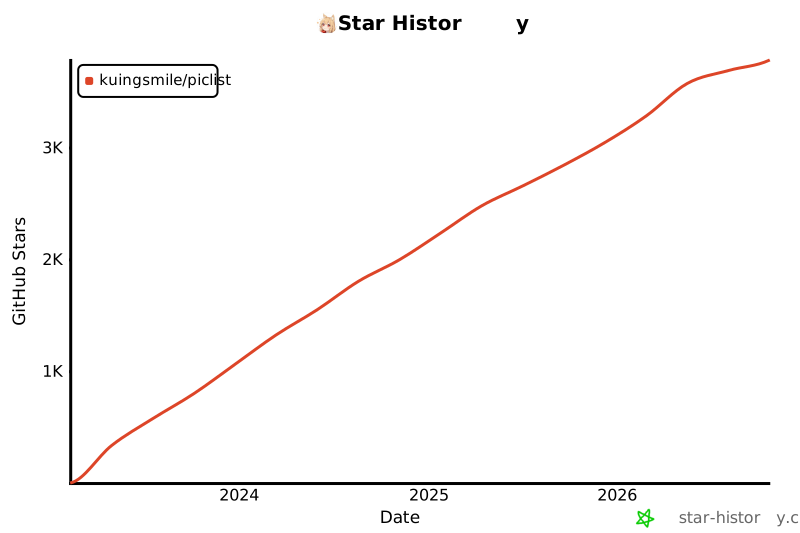
[![Star History Chart](https://api.star-history.com/svg?repos=Kuingsmile/PicList&type=Date)](https://star-history.com/#Kuingsmile/PicList&Date)