12 KiB

PicList
Powerful cloud storage and image hosting management tool



简体中文 | English
📑 Table of Contents
- 📑 Table of Contents
- Introduction
- Official Website
- How to Migrate from PicGo
- PicList-Core
- Key Features
- Integration Guides
- Supported Platforms
- Download and Install
- Screenshots
- Development
- Related Projects
- License
- Star Me
Introduction
PicList is an efficient cloud storage and image hosting management tool built upon PicGo with extensive enhancements. It combines complete image hosting capabilities with comprehensive cloud storage management features, offering:
- All original PicGo functionality plus compatibility with most PicGo plugins
- Extended built-in image hosting platforms (WebDav, local hosting, SFTP, etc.)
- Configuration and album database cloud synchronization (WebDAV/GitHub/Gitee/Gitea)
- Cloud-synchronized file deletion in album view
- Comprehensive cloud storage management with file operations, search, and previews
- Built-in image processing tools (watermarks, compression, scaling, rotation, format conversion)
Official Website
Please visit the PicList official website piclist.cn for more information.
You can also visit the DeepWiki of PicList to learn more about the project architecture and development.
How to Migrate from PicGo
PicList V1.5.0 and above provide a one-click migration function. Enter the Settings page, click the button next to Migrate from PicGo, then restart the application for changes to take effect.
PicList-Core
PicList uses a modified version of PicGo-Core called PicList-core, adapted for cloud deletion and extended with features like:
- Watermark addition
- Image compression, scaling, rotation, and format conversion
- CLI command support
- Built-in upload server via
picgo-servercommand
To use PicList-core separately, visit GitHub repo or the npm package.
Key Features
- Complete Compatibility: Works with Typora, Obsidian, and most PicGo plugins
- Extended Platform Support: Added WebDav, Lsky Pro, local hosting, SFTP, and account-based Imgur uploads
- Cloud-Sync Album: Delete images from storage alongside local entries
- Advanced Album Features: Search, sort, and batch URL modification
- Built-in Image Tools: Add watermarks, compress, scale, rotate, and convert formats
- Form Upload: Share across multiple computers
- Config Synchronization: Save settings and album database to WebDAV/GitHub/Gitee/Gitea repositories
- Cloud Management: Browse directories, search files, batch operations, and more
- Multi-format Previews: View images, videos, text files, and Markdown files (see supported formats)
- Batch Operations: Rename cloud files with regular expressions
- Link Sharing: Generate pre-signed URLs for private storage buckets
- Usability Improvements: Auto-updates, multiple startup modes, UI enhancements, and more
Integration Guides
VSCode Integration
Install the VS-PicList plugin, which integrates directly with PicList desktop software and supports a variety of uploads and cloud deletion operations in VSCode.
Typora Integration
Version 1.6.0-dev and above
Typora 1.6.0-dev and later versions natively support PicList. For versions below 1.10.6, set Typora's language to Chinese.
If your Typora version is below 1.8.0, set both the PicList and PicGo (app) upload service paths to your PicList installation path.
Version < 1.6.0-dev
For Windows, in Typora settings:
- Set upload service to
PicGo(app) - Set
PicGo pathto your PicList installation path
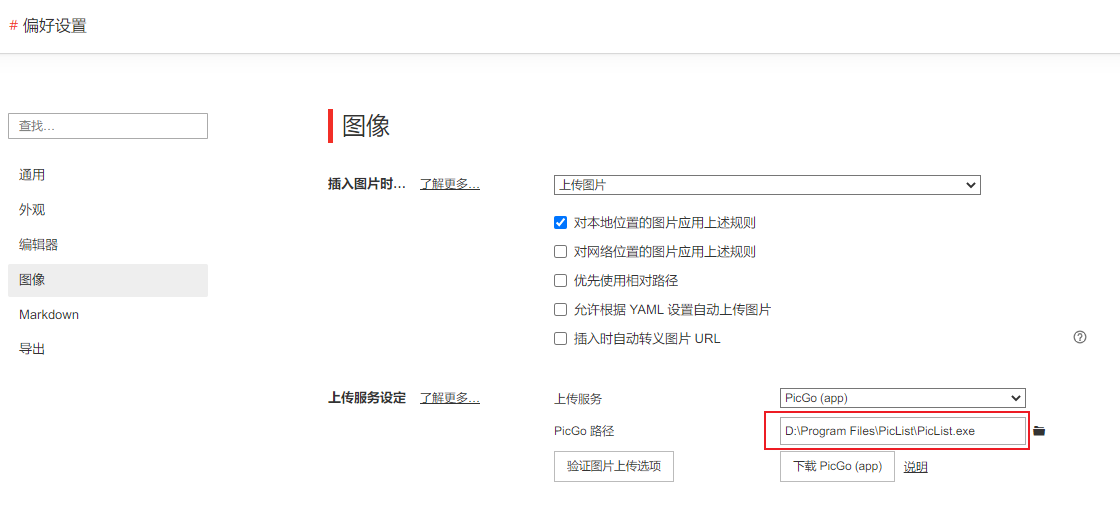
Alternatively, install PicList-core with npm install piclist and set the upload service to PicGo-Core (command line).
Obsidian Integration
- Install the "Image auto upload Plugin" from community plugins
- Set the default uploader to PicGo(app)
- Configure PicGo server as
http://127.0.0.1:36677/upload - For cloud deletion support, set the deletion interface to
http://127.0.0.1:36677/delete

Docker Integration
Using docker run
docker pull kuingsmile/piclist:latest
docker run -d \
  --name piclist \
  --restart always \
  -p 36677:36677 \
  -v "./piclist:/root/.piclist" \
  kuingsmile/piclist:latest \
  node /usr/local/bin/picgo-server -k piclist123456
Change ./piclist to your config directory path and piclist123456 to your preferred secret key.
Using docker-compose
version: '3.3'

services:
  node:
    image: 'kuingsmile/piclist:latest'
    container_name: piclist
    restart: always
    ports:
      - 36677:36677
    volumes:
      - './piclist:/root/.piclist'
    command: node /usr/local/bin/picgo-server -k piclist123456
Run with docker-compose up -d
Supported Platforms
| Platform | Album Cloud Deletion | Cloud Storage Management |
|---|---|---|
| Built-in AList | ✔️ | ✔️ |
| SM.MS | ✔️ | ✔️ |
| Github | ✔️ | ✔️ |
| Imgur | ✔️ | ✔️ |
| Tencent COS V5 | ✔️ | ✔️ |
| Aliyun OSS | ✔️ | ✔️ |
| Upyun | ✔️ | ✔️ |
| Qiniu | ✔️ | ✔️ |
| S3 API compatible platform | ✔️ | ✔️ |
| WebDAV | ✔️ | ✔️ |
| Local | ✔️ | ✔️ |
| Built-in SFTP | ✔️ | ✔️ |
| Doge Cloud | ✔️ | ✔️ |
| PicList(Lasso-Doll) | ✔️ | ✔️ |
| Lsky Pro | ✔️ | ✔️ |
| Custom API platform | × | × |
Supported Plugins with Cloud Deletion:
Download and Install
Direct Download
Scoop (Windows)
scoop bucket add lemon https://github.com/hoilc/scoop-lemon
scoop install lemon/piclist
Winget (Windows)
winget install Kuingsmile.PicList
Homebrew (macOS)
# Install
brew install piclist --cask

# Uninstall
brew uninstall piclist
OS Requirements
Windows
- Supported Versions: Windows 10 and later
- Architectures:
ia32(x86),x64(amd64),arm64
macOS
- Supported Versions: macOS Big Sur (11) and later
- Architectures: Intel (x64) and Apple Silicon (arm64)
Linux
- Supported Versions:
- Ubuntu 18.04 and later
- Fedora 32 and later
- Debian 10 and later
Screenshots


Development
Prerequisites
- Node.js 20 + and Git
- Knowledge of npm
- Xcode for Mac or Visual Studio for Windows
Getting Started
git clone https://github.com/Kuingsmile/PicList.git
cd PicList
yarn  # Do not use npm install
To contribute, see the contribution guide.
Development Mode
yarn run dev
Development mode has hot-reload but may be unstable. If the process crashes, exit with Ctrl+C and restart.
Note: The PicList application icon will appear in your taskbar/system tray while in development mode.
Production Build
yarn run build
The built installer will be available in the dist_electron directory.
For network issues with electron-builder, set the mirror:
Linux/macOS:
export ELECTRON_MIRROR="https://npmmirror.com/mirrors/electron/"
Windows:
set ELECTRON_MIRROR=https://npmmirror.com/mirrors/electron/
Related Projects
- PicList-Core: Core library based on PicGo-Core for CLI and development
- PicHoro: Mobile app companion for PicList
- VS-PicList: VSCode plugin for PicList
License
This project is open source under the MIT license.
Copyright (c) 2017-present Molunerfinn Copyright (c) 2023-present Kuingsmile
Star Me