mirror of
https://github.com/JefferyHcool/BiliNote.git
synced 2026-05-06 20:42:52 +08:00

148 lines
4.6 KiB
Markdown
148 lines
4.6 KiB
Markdown
<div style="display: flex; justify-content: center; align-items: center; gap: 10px;
|
||
">
|
||
<p align="center">
|
||
<img src="./doc/icon.svg" alt="BiliNote Banner" width="50" height="50" />
|
||
</p>
|
||
<h1 align="center" > BiliNote v1.7.5</h1>
|
||
</div>
|
||
|
||
<p align="center"><i>AI 视频笔记生成工具 让 AI 为你的视频做笔记</i></p>
|
||
|
||
<p align="center">
|
||
<img src="https://img.shields.io/badge/license-MIT-blue.svg" />
|
||
<img src="https://img.shields.io/badge/frontend-react-blue" />
|
||
<img src="https://img.shields.io/badge/backend-fastapi-green" />
|
||
<img src="https://img.shields.io/badge/GPT-openai%20%7C%20deepseek%20%7C%20qwen-ff69b4" />
|
||
<img src="https://img.shields.io/badge/docker-compose-blue" />
|
||
<img src="https://img.shields.io/badge/status-active-success" />
|
||
<img src="https://img.shields.io/github/stars/jefferyhcool/BiliNote?style=social" />
|
||
</p>
|
||
|
||
|
||
|
||
## ✨ 项目简介
|
||
|
||
BiliNote 是一个开源的 AI 视频笔记助手,支持通过哔哩哔哩、YouTube、抖音等视频链接,自动提取内容并生成结构清晰、重点明确的 Markdown 格式笔记。支持插入截图、原片跳转等功能。
|
||
## 📝 使用文档
|
||
详细文档可以查看[这里](https://docs.bilinote.app/)
|
||
|
||
|
||
|
||
## 📦 Windows 打包版
|
||
本项目提供了 Windows 系统的 exe 文件,可在[release](https://github.com/JefferyHcool/BiliNote/releases/tag/v1.1.1)进行下载。**注意一定要在没有中文路径的环境下运行。**
|
||
|
||
|
||
## 🔧 功能特性
|
||
|
||
- 支持多平台:Bilibili、YouTube、本地视频、抖音(后续会加入更多平台)
|
||
- 支持返回笔记格式选择
|
||
- 支持笔记风格选择
|
||
- 支持多模态视频理解
|
||
- 支持多版本记录保留
|
||
- 支持自行配置 GPT 大模型
|
||
- 本地模型音频转写(支持 Fast-Whisper)
|
||
- GPT 大模型总结视频内容
|
||
- 自动生成结构化 Markdown 笔记
|
||
- 可选插入截图(自动截取)
|
||
- 可选内容跳转链接(关联原视频)
|
||
- 任务记录与历史回看
|
||
|
||
## 📸 截图预览
|
||

|
||

|
||

|
||

|
||

|
||
|
||
## 🚀 快速开始
|
||
|
||
### 1. 克隆仓库
|
||
|
||
```bash
|
||
git clone https://github.com/JefferyHcool/BiliNote.git
|
||
cd BiliNote
|
||
mv .env.example .env
|
||
```
|
||
|
||
### 2. 启动后端(FastAPI)
|
||
|
||
```bash
|
||
cd backend
|
||
pip install -r requirements.txt
|
||
python main.py
|
||
```
|
||
|
||
### 3. 启动前端(Vite + React)
|
||
|
||
```bash
|
||
cd BillNote_frontend
|
||
pnpm install
|
||
pnpm dev
|
||
```
|
||
|
||
访问:`http://localhost:5173`
|
||
|
||
## ⚙️ 依赖说明
|
||
### 🎬 FFmpeg
|
||
本项目依赖 ffmpeg 用于音频处理与转码,必须安装:
|
||
```bash
|
||
# Mac (brew)
|
||
brew install ffmpeg
|
||
|
||
# Ubuntu / Debian
|
||
sudo apt install ffmpeg
|
||
|
||
# Windows
|
||
# 请从官网下载安装:https://ffmpeg.org/download.html
|
||
```
|
||
> ⚠️ 若系统无法识别 ffmpeg,请将其加入系统环境变量 PATH
|
||
|
||
### 🚀 CUDA 加速(可选)
|
||
若你希望更快地执行音频转写任务,可使用具备 NVIDIA GPU 的机器,并启用 fast-whisper + CUDA 加速版本:
|
||
|
||
具体 `fast-whisper` 配置方法,请参考:[fast-whisper 项目地址](http://github.com/SYSTRAN/faster-whisper#requirements)
|
||
|
||
### 🐳 使用 Docker 一键部署
|
||
|
||
确保你已安装 Docker 和 Docker Compose:
|
||
|
||
[docker 部署](https://github.com/JefferyHcool/bilinote-deploy/blob/master/README.md)
|
||
|
||
## 🧠 TODO
|
||
|
||
- [x] 支持抖音及快手等视频平台
|
||
- [x] 支持前端设置切换 AI 模型切换、语音转文字模型
|
||
- [x] AI 摘要风格自定义(学术风、口语风、重点提取等)
|
||
- [ ] 笔记导出为 PDF / Word / Notion
|
||
- [x] 加入更多模型支持
|
||
- [x] 加入更多音频转文本模型支持
|
||
|
||
### Contact and Join-联系和加入社区
|
||
- BiliNote 交流QQ群:785367111
|
||
- BiliNote 交流微信群:
|
||
|
||
<img src="https://common-1304618721.cos.ap-chengdu.myqcloud.com/20250604202557.png" alt="wechat" style="zoom:33%;" />
|
||
|
||
|
||
|
||
## 🔎代码参考
|
||
- 本项目中的 `抖音下载功能` 部分代码参考引用自:[Evil0ctal/Douyin_TikTok_Download_API](https://github.com/Evil0ctal/Douyin_TikTok_Download_API)
|
||
|
||
## 📜 License
|
||
|
||
MIT License
|
||
|
||
---
|
||
|
||
💬 你的支持与反馈是我持续优化的动力!欢迎 PR、提 issue、Star ⭐️
|
||
## Buy Me a Coffee / 捐赠
|
||
如果你觉得项目对你有帮助,考虑支持我一下吧
|
||
<div style='display:inline;'>
|
||
<img width='30%' src='https://common-1304618721.cos.ap-chengdu.myqcloud.com/8986c9eb29c356a0cfa3d470c23d3b6.jpg'/>
|
||
<img width='30%' src='https://common-1304618721.cos.ap-chengdu.myqcloud.com/2a049ea298b206bcd0d8b8da3219d6b.jpg'/>
|
||
</div>
|
||
|
||
## ⭐ Star History
|
||
|
||
[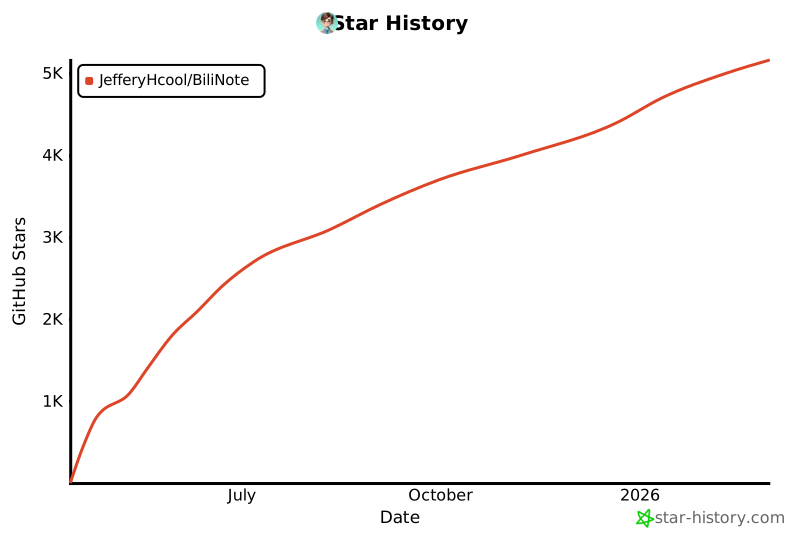](https://www.star-history.com/#JefferyHcool/BiliNote&Date)
|