mirror of
https://github.com/Kuingsmile/PicList.git
synced 2026-05-06 20:42:57 +08:00

192 lines
7.3 KiB
Markdown
192 lines
7.3 KiB
Markdown
<div align="center">
|
||
<a href="https://piclist.cn">
|
||
<img src="https://imgx.horosama.com/admin_uploads/2022/10/2022_10_05_633d79e401694.png" alt="PicList Logo" width="120" height="120">
|
||
</a>
|
||
|
||
<h1>PicList</h1>
|
||
|
||
<p>
|
||
<strong>A powerful cloud storage and image hosting management tool.</strong>
|
||
</p>
|
||
|
||
<p>
|
||
<a href="https://github.com/Kuingsmile/PicList/actions">
|
||
<img src="https://img.shields.io/badge/code%20style-standard-green.svg?style=flat-square" alt="Code Style">
|
||
</a>
|
||
<a href="https://github.com/Kuingsmile/PicList/releases">
|
||
<img src="https://img.shields.io/github/downloads/Kuingsmile/PicList/total.svg?style=flat-square" alt="Downloads">
|
||
</a>
|
||
<a href="https://github.com/Kuingsmile/PicList/releases/latest">
|
||
<img src="https://img.shields.io/github/release/Kuingsmile/PicList.svg?style=flat-square" alt="Release">
|
||
</a>
|
||
<a href="https://github.com/Kuingsmile/PicList/blob/dev/LICENSE">
|
||
<img src="https://img.shields.io/github/license/Kuingsmile/PicList?style=flat-square" alt="License">
|
||
</a>
|
||
</p>
|
||
|
||
<p>
|
||
<a href="https://github.com/Kuingsmile/PicList/blob/dev/README_cn.md">简体中文</a> |
|
||
<a href="https://github.com/Kuingsmile/PicList/blob/dev/README.md">English</a>
|
||
</p>
|
||
</div>
|
||
|
||
<br>
|
||
|
||
<div align="center">
|
||
<img src="https://repobeats.axiom.co/api/embed/9e4ec90b7b50f8e9c10d77439e49e26b303fabed.svg" alt="Repobeats analytics image" width="100%">
|
||
</div>
|
||
|
||
## 📖 Introduction
|
||
|
||
**PicList** is an efficient cloud storage and image hosting management tool built upon the foundation of PicGo. It retains all the original features while adding comprehensive cloud storage management capabilities.
|
||
|
||
Whether you need to organize your cloud files, sync markdown images, or manage multiple storage platforms effortlessly, PicList is designed to streamline your workflow with a beautiful interface and robust plugin system.
|
||
|
||
## ✨ Key Features
|
||
|
||
- **📂 comprehensive Cloud Management**: Browse, search, cloud-delete, and batch rename files in your cloud storage.
|
||
- **🔄 Advanced Sync**: Cloud-sync album deletion and configuration/gallery synchronization across multiple devices (via WebDAV/Git).
|
||
- **🎨 Built-in Image Tools**: Watermark, compress, scale, rotate, and format conversion out of the box, controllable at individual image bed level.
|
||
- **🔌 Wide Compatibility**: Compatible with **Typora**, **Obsidian**, and most existing PicGo plugins.
|
||
- **🛠️ Power User Features**: Regex-based batch renaming, upload queues, local/sftp hosting, and more.
|
||
- **🌐 Web & Mobile**: Support for form uploads and integration with the mobile app **PicHoro**.
|
||
|
||
## 📸 Screenshots
|
||
|
||
<details open>
|
||
<summary><strong>Upload & Management Interface</strong></summary>
|
||
<br>
|
||
<div align="center">
|
||
<img src="https://github.com/Kuingsmile/PicList/blob/dev/imgs/upload.png?raw=true" alt="Upload Interface" width="100%">
|
||
</div>
|
||
</details>
|
||
|
||
<details>
|
||
<summary><strong>More Views (Gallery, Settings, Task)</strong></summary>
|
||
<br>
|
||
<table align="center">
|
||
<tr>
|
||
<td><img src="https://github.com/Kuingsmile/PicList/blob/dev/imgs/gallery.png?raw=true" alt="Gallery"></td>
|
||
<td><img src="https://github.com/Kuingsmile/PicList/blob/dev/imgs/cloud_storage.png?raw=true" alt="Cloud Storage"></td>
|
||
</tr>
|
||
<tr>
|
||
<td><img src="https://github.com/Kuingsmile/PicList/blob/dev/imgs/settings.png?raw=true" alt="Settings"></td>
|
||
<td><img src="https://github.com/Kuingsmile/PicList/blob/dev/imgs/task.png?raw=true" alt="Task"></td>
|
||
</tr>
|
||
</table>
|
||
</details>
|
||
|
||
## 📥 Download & Install
|
||
|
||
### 💻 Desktop Applications
|
||
|
||
| OS | Method | Command / Link |
|
||
| :---------: | :-----------: | :----------------------------------------------------------------------------------------------- |
|
||
| **Windows** | **Winget** | `winget install Kuingsmile.PicList` |
|
||
| | **Scoop** | `scoop bucket add lemon https://github.com/hoilc/scoop-lemon` <br> `scoop install lemon/piclist` |
|
||
| | **Installer** | [Download .exe](https://github.com/Kuingsmile/PicList/releases/latest) |
|
||
| **macOS** | **Homebrew** | `brew install piclist --cask` |
|
||
| | **DMG** | [Download .dmg](https://github.com/Kuingsmile/PicList/releases/latest) |
|
||
| **Linux** | **Installer** | [Download AppImage/Snap/Deb](https://github.com/Kuingsmile/PicList/releases/latest) |
|
||
|
||
### 🐳 Docker
|
||
|
||
Run PicList with `docker` or `docker-compose`.
|
||
|
||
```bash
|
||
docker pull kuingsmile/piclist:latest
|
||
```
|
||
|
||
```bash
|
||
docker run -d \
|
||
--name piclist \
|
||
--restart always \
|
||
-p 36677:36677 \
|
||
-v "./piclist:/root/.piclist" \
|
||
kuingsmile/piclist:latest \
|
||
node /usr/local/bin/picgo-server -k piclist123456
|
||
```
|
||
|
||
## 🔌 Integrations
|
||
|
||
PicList integrates seamlessly with your favorite markdown editors.
|
||
|
||
### VSCode
|
||
|
||
Install the **[VS-PicList](https://marketplace.visualstudio.com/items?itemName=Kuingsmile.vs-piclist)** extension for full integration.
|
||
|
||
### Typora
|
||
|
||
- **Version ≥ 1.6.0**: Select **PicList** directly in the Image settings settings.
|
||
- **Version < 1.6.0**: Set 'Image Upload' -> 'PicGo(app)' and point the path to your PicList executable.
|
||
|
||
### Obsidian
|
||
|
||
1. Install **Image Auto Upload Plugin**.
|
||
2. Set Default Uploader to **PicGo(app)**.
|
||
3. API Endpoint: `http://127.0.0.1:36677/upload`
|
||
|
||
## ☁️ Supported Platforms
|
||
|
||
PicList supports a wide range of storage providers.
|
||
|
||
| Storage Provider | Album Delete | Cloud Management |
|
||
| :-------------------------- | :----------: | :--------------: |
|
||
| **AWS S3** (and compatible) | ✅ | ✅ |
|
||
| **Aliyun OSS** | ✅ | ✅ |
|
||
| **Tencent COS** | ✅ | ✅ |
|
||
| **GitHub / Gitee** | ✅ | ✅ |
|
||
| **SM.MS / Imgur** | ✅ | ✅ |
|
||
| **WebDAV / SFTP** | ✅ | ✅ |
|
||
| **Local File System** | ✅ | ✅ |
|
||
| **Lsky Pro / Doge Cloud** | ✅ | ✅ |
|
||
|
||
*Note: Custom API platforms do not support cloud management features.*
|
||
|
||
## 🚀 Development
|
||
|
||
We welcome contributions! Please see [Contributing Guide](https://github.com/Kuingsmile/PicList/blob/dev/CONTRIBUTING_EN.md) for details.
|
||
|
||
### Prerequisites
|
||
|
||
- Node.js 20+
|
||
- Git
|
||
- Xcode (macOS) or Visual Studio (Windows) for native modules
|
||
|
||
### Build from Source
|
||
|
||
```bash
|
||
# 1. Clone the repository
|
||
git clone https://github.com/Kuingsmile/PicList.git
|
||
cd PicList
|
||
|
||
# 2. Install dependencies
|
||
yarn
|
||
|
||
# 3. specific start dev mode
|
||
yarn run dev
|
||
|
||
# 4. Build for production
|
||
yarn run build
|
||
```
|
||
|
||
## 🔗 Related Projects
|
||
|
||
- **[PicList-Core](https://github.com/Kuingsmile/PicList-Core)**: The CLI core of PicList.
|
||
- **[PicHoro](https://github.com/Kuingsmile/PicHoro)**: Android mobile client.
|
||
|
||
## 📄 License
|
||
|
||
This project is licensed under the **MIT License**.
|
||
|
||
Copyright (c) 2017-present Molunerfinn
|
||
Copyright (c) 2023-present Kuingsmile
|
||
|
||
---
|
||
|
||
<div align="center">
|
||
<p>Star Me! ⭐️</p>
|
||
|
||
[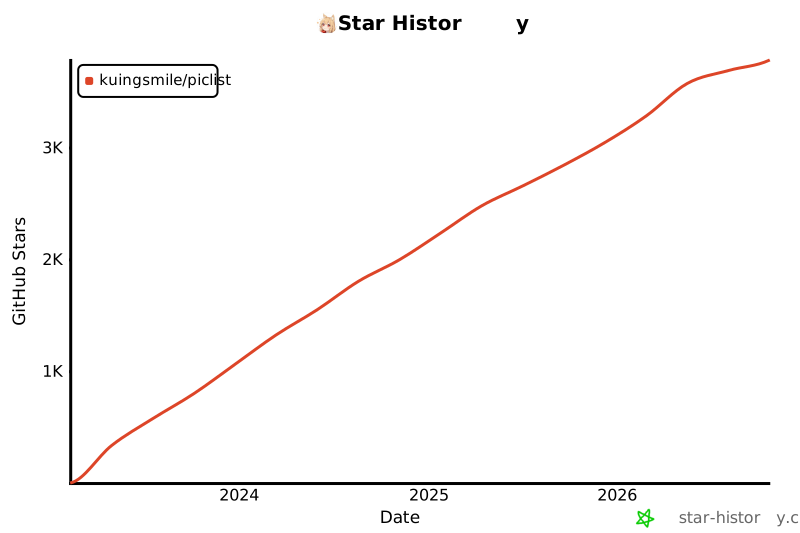](https://star-history.com/#Kuingsmile/PicList&Date)
|
||
</div>
|