mirror of
https://github.com/snailyp/gemini-balance.git
synced 2026-07-04 06:11:32 +08:00
Compare commits
24 Commits
| Author | SHA1 | Date | |
|---|---|---|---|

|
ebc5dc571b | ||
|
|
9a7a1d7c2f | ||
|
|
c99e090ea9 | ||
|
|
eb311de0c2 | ||
|
|
c254077a66 | ||
|
|
ef4a528611 | ||
|
|
f593d97381 | ||
|
|
053ef631c4 | ||
|
|
075d20c62d | ||
|
|
0768aed179 | ||
|
|
c2eac24175 | ||
|
|
1c6dabcea7 | ||
|
|
76937aa24f | ||
|
|
b96ce8f15a | ||
|
|
87d60117c5 | ||
|
|
a53a30fd38 | ||
|
|
98e7fb62d5 | ||
|
|
6a59b4f847 | ||
|
|
d1ba2c4ae9 | ||
|
|
0693a5c245 | ||
|
|
742db744d1 | ||
|
|
12a84921c1 | ||
|
|
73e98a185d | ||
|
|
73a7c81f85 |
14
.env.example
14
.env.example
@@ -1,13 +1,15 @@
|
||||
# MySQL数据库配置
|
||||
MYSQL_HOST=
|
||||
MYSQL_PORT=
|
||||
MYSQL_USER=
|
||||
MYSQL_PASSWORD=
|
||||
MYSQL_HOST=gemini-balance-mysql
|
||||
MYSQL_PORT=3306
|
||||
MYSQL_USER=gemini
|
||||
MYSQL_PASSWORD=change_me
|
||||
MYSQL_DATABASE=default_db
|
||||
API_KEYS=["AIzaSyxxxxxxxxxxxxxxxxxxx","AIzaSyxxxxxxxxxxxxxxxxxxx"]
|
||||
ALLOWED_TOKENS=["sk-123456"]
|
||||
# AUTH_TOKEN=sk-123456
|
||||
TEST_MODEL=gemini-1.5-flash
|
||||
THINKING_MODELS=["gemini-2.5-flash-preview-04-17"]
|
||||
THINKING_BUDGET_MAP={"gemini-2.5-flash-preview-04-17": 4000}
|
||||
IMAGE_MODELS=["gemini-2.0-flash-exp"]
|
||||
SEARCH_MODELS=["gemini-2.0-flash-exp","gemini-2.0-pro-exp"]
|
||||
FILTERED_MODELS=["gemini-1.0-pro-vision-latest", "gemini-pro-vision", "chat-bison-001", "text-bison-001", "embedding-gecko-001"]
|
||||
@@ -38,3 +40,7 @@ STREAM_SHORT_TEXT_THRESHOLD=10
|
||||
STREAM_LONG_TEXT_THRESHOLD=50
|
||||
STREAM_CHUNK_SIZE=5
|
||||
##########################################################################
|
||||
######################### 日志配置 #######################################
|
||||
# 日志级别 (debug, info, warning, error, critical),默认为 info
|
||||
LOG_LEVEL=info
|
||||
##########################################################################
|
||||
|
||||
17
LICENSE
Normal file
17
LICENSE
Normal file
@@ -0,0 +1,17 @@
|
||||
知识共享署名-非商业性使用 4.0 国际 (CC BY-NC 4.0) 协议
|
||||
|
||||
您可以自由地:
|
||||
- 共享 — 在任何媒介以任何形式复制、发行本作品
|
||||
- 演绎 — 修改、转换或以本作品为基础进行创作
|
||||
|
||||
惟须遵守下列条件:
|
||||
- 署名 — 您必须给出适当的署名,提供指向本协议的链接,并指明是否(对原作)作了修改。您可以以任何合理方式进行,但不得以任何方式暗示许可方认可您或您的使用。
|
||||
- 非商业性使用 — 您不得将本作品用于商业目的,包括但不限于任何形式的商业倒卖、SaaS、API 付费接口、二次销售、打包出售、收费分发或其他直接或间接盈利行为。
|
||||
|
||||
如需商业授权,请联系原作者获得书面许可。违者将承担相应法律责任。
|
||||
|
||||
Creative Commons Attribution-NonCommercial 4.0 International Public License
|
||||
|
||||
By exercising the Licensed Rights (defined below), You accept and agree to be bound by the terms and conditions of this Creative Commons Attribution-NonCommercial 4.0 International Public License ("Public License"). To the extent this Public License may be interpreted as a contract, You are granted the Licensed Rights in consideration of Your acceptance of these terms and conditions, and the Licensor grants You such rights in consideration of benefits the Licensor receives from making the Licensed Material available under these terms and conditions.
|
||||
|
||||
Full license text: https://creativecommons.org/licenses/by-nc/4.0/legalcode
|
||||
36
README.md
36
README.md
@@ -1,5 +1,7 @@
|
||||
# Gemini Balance - Gemini API 代理和负载均衡器
|
||||
|
||||
> ⚠️ 本项目采用 CC BY-NC 4.0(署名-非商业性使用)协议,禁止任何形式的商业倒卖服务,详见 LICENSE 文件。
|
||||
|
||||
[](https://www.python.org/)
|
||||
[](https://fastapi.tiangolo.com/)
|
||||
[](https://www.uvicorn.org/)
|
||||
@@ -154,19 +156,22 @@ app/
|
||||
| `TOOLS_CODE_EXECUTION_ENABLED` | 可选,是否启用代码执行工具 | `false` |
|
||||
| `SHOW_SEARCH_LINK` | 可选,是否在响应中显示搜索结果链接 | `true` |
|
||||
| `SHOW_THINKING_PROCESS` | 可选,是否显示模型思考过程 | `true` |
|
||||
| `THINKING_MODELS` | 可选,支持思考功能的模型列表 | `[]` |
|
||||
| `THINKING_BUDGET_MAP` | 可选,思考功能预算映射 (模型名:预算值) | `{}` |
|
||||
| `BASE_URL` | 可选,Gemini API 基础 URL,默认无需修改 | `https://generativelanguage.googleapis.com/v1beta` |
|
||||
| `MAX_FAILURES` | 可选,允许单个key失败的次数 | `3` |
|
||||
| `MAX_RETRIES` | 可选,API 请求失败时的最大重试次数 | `3` |
|
||||
| `CHECK_INTERVAL_HOURS` | 可选,检查禁用 Key 是否恢复的时间间隔 (小时) | `1` |
|
||||
| `TIMEZONE` | 可选,应用程序使用的时区 | `Asia/Shanghai` |
|
||||
| `TIME_OUT` | 可选,请求超时时间 (秒) | `300` |
|
||||
| `LOG_LEVEL` | 可选,日志级别,例如 DEBUG, INFO, WARNING, ERROR, CRITICAL | `INFO` |
|
||||
| **图像生成相关** | | |
|
||||
| `PAID_KEY` | 可选,付费版API Key,用于图片生成等高级功能 | `your-paid-api-key` |
|
||||
| `CREATE_IMAGE_MODEL` | 可选,图片生成模型 | `imagen-3.0-generate-002` |
|
||||
| `UPLOAD_PROVIDER` | 可选,图片上传提供商: `smms`, `picgo`, `cloudflare_imgbed` | `smms` |
|
||||
| `SMMS_SECRET_TOKEN` | 可选,SM.MS图床的API Token | `your-smms-token` |
|
||||
| `PICGO_API_KEY` | 可选,PicoGo图床的API Key | `your-picogo-apikey` |
|
||||
| `CLOUDFLARE_IMGBED_URL` | 可选,CloudFlare 图床上传地址 | `https://xxxxxxx.pages.dev/upload` |
|
||||
| `PICGO_API_KEY` | 可选,[PicoGo](https://www.picgo.net/)图床的API Key | `your-picogo-apikey` |
|
||||
| `CLOUDFLARE_IMGBED_URL` | 可选,[CloudFlare](https://github.com/MarSeventh/CloudFlare-ImgBed) 图床上传地址 | `https://xxxxxxx.pages.dev/upload` |
|
||||
| `CLOUDFLARE_IMGBED_AUTH_CODE`| 可选,CloudFlare图床的鉴权key | `your-cloudflare-imgber-auth-code` |
|
||||
| **流式优化器相关** | | |
|
||||
| `STREAM_OPTIMIZER_ENABLED` | 可选,是否启用流式输出优化 | `false` |
|
||||
@@ -197,17 +202,28 @@ app/
|
||||
|
||||
欢迎提交 Pull Request 或 Issue。
|
||||
|
||||
## 🎉 特别鸣谢
|
||||
|
||||
特别鸣谢以下项目和平台为本项目提供图床服务:
|
||||
|
||||
* [PicGo](https://www.picgo.net/)
|
||||
* [SM.MS](https://smms.app/)
|
||||
* [CloudFlare-ImgBed](https://github.com/MarSeventh/CloudFlare-ImgBed) 开源项目
|
||||
|
||||
## 🙏 感谢贡献者
|
||||
|
||||
感谢所有为本项目做出贡献的开发者!
|
||||
|
||||
<a href="https://github.com/toddyoe" title="toddyoe"><img src="https://avatars.githubusercontent.com/u/167494546?s=64&v=4" width="64" height="64"></a>
|
||||
<a href="https://github.com/yangtb2024" title="yangtb2024"><img src="https://avatars.githubusercontent.com/u/164613316?s=64&v=4" width="64" height="64"></a>
|
||||
<a href="https://github.com/cr-zhichen" title="cr-zhichen"><img src="https://avatars.githubusercontent.com/u/57337795?s=64&v=4" width="64" height="64"></a>
|
||||
<a href="https://github.com/BetterAndBetterII" title="BetterAndBetterII"><img src="https://avatars.githubusercontent.com/u/141388234?s=96&v=4" width="64" height="64"></a>
|
||||
<a href="https://github.com/yanhao98" title="yanhao98"><img src="https://avatars.githubusercontent.com/u/37316281?s=64&v=4" width="64" height="64"></a>
|
||||
<a href="https://github.com/Haoyu99" title="Haoyu99"><img src="https://avatars.githubusercontent.com/u/93185981?s=60&v=4" width="64" height="64"></a>
|
||||
[](https://github.com/snailyp/gemini-balance/graphs/contributors)
|
||||
|
||||
## 📄 许可证
|
||||
## ⭐ Star History
|
||||
|
||||
本项目采用 MIT 许可证。
|
||||
[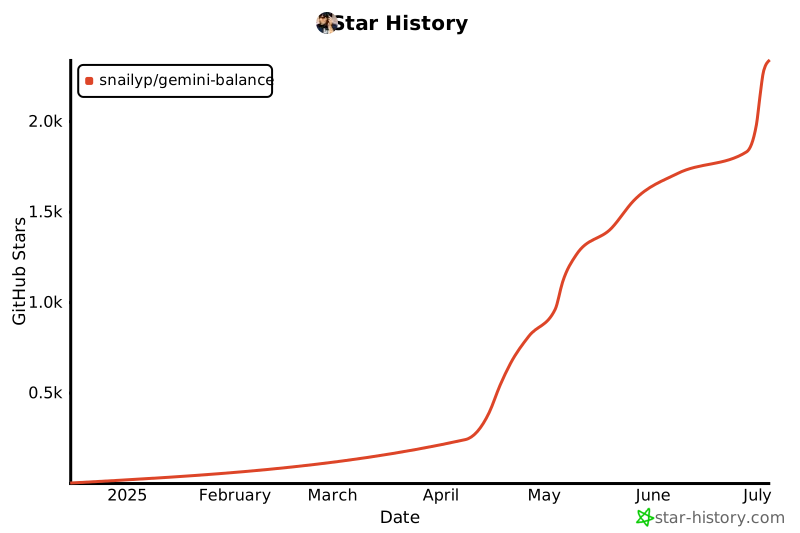](https://star-history.com/#snailyp/gemini-balance&Date)
|
||||
|
||||
## 💖 友情项目
|
||||
|
||||
* **[OneLine](https://github.com/chengtx809/OneLine)** by [chengtx809](https://github.com/chengtx809) - OneLine一线:AI驱动的热点事件时间轴生成工具
|
||||
|
||||
## 许可证
|
||||
|
||||
本项目采用 CC BY-NC 4.0(署名-非商业性使用)协议,禁止任何形式的商业倒卖服务,详见 LICENSE 文件。
|
||||
|
||||
@@ -10,17 +10,17 @@ from pydantic_settings import BaseSettings
|
||||
from sqlalchemy import insert, update, select
|
||||
|
||||
from app.core.constants import API_VERSION, DEFAULT_CREATE_IMAGE_MODEL, DEFAULT_FILTER_MODELS, DEFAULT_MODEL, DEFAULT_STREAM_CHUNK_SIZE, DEFAULT_STREAM_LONG_TEXT_THRESHOLD, DEFAULT_STREAM_MAX_DELAY, DEFAULT_STREAM_MIN_DELAY, DEFAULT_STREAM_SHORT_TEXT_THRESHOLD, DEFAULT_TIMEOUT, MAX_RETRIES
|
||||
from app.log.logger import get_config_logger
|
||||
from app.log.logger import Logger
|
||||
# from app.log.logger import get_config_logger # 移除顶层导入
|
||||
# 延迟导入以避免循环依赖,仅在 sync_initial_settings 中使用
|
||||
# from app.database.connection import database
|
||||
# from app.database.models import Settings as SettingsModel
|
||||
# from app.database.services import get_all_settings # get_all_settings 可能不适合启动时调用,直接查询
|
||||
|
||||
logger = get_config_logger()
|
||||
# logger = get_config_logger() # 移除顶层初始化
|
||||
|
||||
|
||||
class Settings(BaseSettings):
|
||||
"""应用程序配置"""
|
||||
# 数据库配置
|
||||
MYSQL_HOST: str
|
||||
MYSQL_PORT: int
|
||||
@@ -45,6 +45,8 @@ class Settings(BaseSettings):
|
||||
TOOLS_CODE_EXECUTION_ENABLED: bool = False
|
||||
SHOW_SEARCH_LINK: bool = True
|
||||
SHOW_THINKING_PROCESS: bool = True
|
||||
THINKING_MODELS: List[str] = [] # 新增:用于思考过程的模型列表
|
||||
THINKING_BUDGET_MAP: Dict[str, float] = {} # 新增:模型对应的预算映射
|
||||
|
||||
# 图像生成相关配置
|
||||
PAID_KEY: str = ""
|
||||
@@ -66,6 +68,13 @@ class Settings(BaseSettings):
|
||||
# 调度器配置
|
||||
CHECK_INTERVAL_HOURS: int = 1 # 默认检查间隔为1小时
|
||||
TIMEZONE: str = "Asia/Shanghai" # 默认时区
|
||||
|
||||
# github
|
||||
GITHUB_REPO_OWNER: str = "snailyp"
|
||||
GITHUB_REPO_NAME: str = "gemini-balance"
|
||||
|
||||
# 日志配置
|
||||
LOG_LEVEL: str = "INFO" # 默认日志级别
|
||||
|
||||
def __init__(self, **kwargs):
|
||||
super().__init__(**kwargs)
|
||||
@@ -78,26 +87,57 @@ settings = Settings()
|
||||
|
||||
def _parse_db_value(key: str, db_value: str, target_type: Type) -> Any:
|
||||
"""尝试将数据库字符串值解析为目标 Python 类型"""
|
||||
from app.log.logger import get_config_logger # 函数内导入
|
||||
logger = get_config_logger() # 函数内初始化
|
||||
try:
|
||||
# 处理 List[str]
|
||||
if target_type == List[str]:
|
||||
# 尝试解析 JSON 列表,如果失败则按逗号分割
|
||||
try:
|
||||
parsed = json.loads(db_value)
|
||||
if isinstance(parsed, list):
|
||||
return [str(item) for item in parsed]
|
||||
except json.JSONDecodeError:
|
||||
# 回退到逗号分割,去除空格
|
||||
return [item.strip() for item in db_value.split(',') if item.strip()]
|
||||
# 如果解析后不是列表或解析失败,返回空列表或进行其他处理
|
||||
logger.warning(f"Could not parse '{db_value}' as List[str] for key '{key}', falling back to comma split or empty list.")
|
||||
return [item.strip() for item in db_value.split(',') if item.strip()] # Fallback
|
||||
return [item.strip() for item in db_value.split(',') if item.strip()]
|
||||
# 处理 Dict[str, float]
|
||||
elif target_type == Dict[str, float]:
|
||||
parsed_dict = {}
|
||||
try:
|
||||
# First attempt: standard JSON parsing
|
||||
parsed = json.loads(db_value)
|
||||
if isinstance(parsed, dict):
|
||||
parsed_dict = {str(k): float(v) for k, v in parsed.items()}
|
||||
else:
|
||||
logger.warning(f"Parsed DB value for key '{key}' is not a dictionary type. Value: {db_value}")
|
||||
except (json.JSONDecodeError, ValueError, TypeError) as e1:
|
||||
# Second attempt: try replacing single quotes if JSONDecodeError occurred
|
||||
if isinstance(e1, json.JSONDecodeError) and "'" in db_value:
|
||||
logger.warning(f"Failed initial JSON parse for key '{key}'. Attempting to replace single quotes. Error: {e1}")
|
||||
try:
|
||||
corrected_db_value = db_value.replace("'", '"')
|
||||
parsed = json.loads(corrected_db_value)
|
||||
if isinstance(parsed, dict):
|
||||
parsed_dict = {str(k): float(v) for k, v in parsed.items()}
|
||||
else:
|
||||
logger.warning(f"Parsed DB value (after quote replacement) for key '{key}' is not a dictionary type. Value: {corrected_db_value}")
|
||||
except (json.JSONDecodeError, ValueError, TypeError) as e2:
|
||||
logger.error(f"Could not parse '{db_value}' as Dict[str, float] for key '{key}' even after replacing quotes: {e2}. Returning empty dict.")
|
||||
else:
|
||||
# Log other errors (ValueError, TypeError) or JSON errors without single quotes
|
||||
logger.error(f"Could not parse '{db_value}' as Dict[str, float] for key '{key}': {e1}. Returning empty dict.")
|
||||
return parsed_dict # Return the parsed dict or an empty one if all attempts fail
|
||||
# 处理 bool
|
||||
elif target_type == bool:
|
||||
return db_value.lower() in ('true', '1', 'yes', 'on')
|
||||
# 处理 int
|
||||
elif target_type == int:
|
||||
return int(db_value)
|
||||
# 处理 float
|
||||
elif target_type == float:
|
||||
return float(db_value)
|
||||
else: # 默认为 str 或其他 pydantic 能处理的类型
|
||||
# 默认为 str 或其他 pydantic 能直接处理的类型
|
||||
else:
|
||||
return db_value
|
||||
except (ValueError, TypeError, json.JSONDecodeError) as e:
|
||||
logger.warning(f"Failed to parse db_value '{db_value}' for key '{key}' as type {target_type}: {e}. Using original string value.")
|
||||
@@ -110,6 +150,8 @@ async def sync_initial_settings():
|
||||
2. 将数据库设置合并到内存 settings (数据库优先)。
|
||||
3. 将最终的内存 settings 同步回数据库。
|
||||
"""
|
||||
from app.log.logger import get_config_logger # 函数内导入
|
||||
logger = get_config_logger() # 函数内初始化
|
||||
# 延迟导入以避免循环依赖和确保数据库连接已初始化
|
||||
from app.database.connection import database
|
||||
from app.database.models import Settings as SettingsModel
|
||||
@@ -153,20 +195,18 @@ async def sync_initial_settings():
|
||||
# 比较解析后的值和内存中的值
|
||||
# 注意:对于列表等复杂类型,直接比较可能不够健壮,但这里简化处理
|
||||
if parsed_db_value != memory_value:
|
||||
# 检查类型是否匹配,以防解析函数返回了不兼容的类型
|
||||
# 优先处理 List[str] 类型,避免直接对泛型使用 isinstance
|
||||
if target_type == List[str]:
|
||||
if isinstance(parsed_db_value, list):
|
||||
# 可以选择性地添加对列表元素的检查,但这里保持简化
|
||||
setattr(settings, key, parsed_db_value)
|
||||
logger.info(f"Updated setting '{key}' in memory from database value (List[str]).")
|
||||
updated_in_memory = True
|
||||
else:
|
||||
logger.warning(f"Parsed DB value type mismatch for key '{key}'. Expected List[str], got {type(parsed_db_value)}. Skipping update.")
|
||||
# 对于其他非泛型类型,使用常规的 isinstance 检查
|
||||
elif isinstance(parsed_db_value, target_type):
|
||||
# 检查类型是否匹配,以防解析函数返回了不兼容的类型
|
||||
type_match = False
|
||||
if target_type == List[str] and isinstance(parsed_db_value, list):
|
||||
type_match = True
|
||||
elif target_type == Dict[str, float] and isinstance(parsed_db_value, dict):
|
||||
type_match = True
|
||||
elif target_type not in (List[str], Dict[str, float]) and isinstance(parsed_db_value, target_type):
|
||||
type_match = True
|
||||
|
||||
if type_match:
|
||||
setattr(settings, key, parsed_db_value)
|
||||
logger.info(f"Updated setting '{key}' in memory from database value.")
|
||||
logger.info(f"Updated setting '{key}' in memory from database value ({target_type}).")
|
||||
updated_in_memory = True
|
||||
else:
|
||||
logger.warning(f"Parsed DB value type mismatch for key '{key}'. Expected {target_type}, got {type(parsed_db_value)}. Skipping update.")
|
||||
@@ -197,10 +237,12 @@ async def sync_initial_settings():
|
||||
|
||||
for key, value in final_memory_settings.items():
|
||||
# 序列化值为字符串或 JSON 字符串
|
||||
if isinstance(value, list):
|
||||
db_value = json.dumps(value)
|
||||
if isinstance(value, (list, dict)): # 处理列表和字典
|
||||
db_value = json.dumps(value, ensure_ascii=False) # 使用 ensure_ascii=False 以支持非 ASCII 字符
|
||||
elif isinstance(value, bool):
|
||||
db_value = str(value).lower()
|
||||
elif value is None: # 处理 None 值
|
||||
db_value = "" # 或者根据需要设为 NULL 或其他标记
|
||||
else:
|
||||
db_value = str(value)
|
||||
|
||||
@@ -258,6 +300,9 @@ async def sync_initial_settings():
|
||||
else:
|
||||
logger.info("No setting changes detected between memory and database during initial sync.")
|
||||
|
||||
# 刷新日志等级
|
||||
Logger.update_log_levels(final_memory_settings.get("LOG_LEVEL"))
|
||||
|
||||
except Exception as e:
|
||||
logger.error(f"An unexpected error occurred during initial settings sync: {e}")
|
||||
finally:
|
||||
|
||||
@@ -4,6 +4,7 @@
|
||||
from contextlib import asynccontextmanager
|
||||
from fastapi import FastAPI
|
||||
from fastapi.staticfiles import StaticFiles
|
||||
from fastapi.templating import Jinja2Templates
|
||||
|
||||
from app.config.config import settings, sync_initial_settings
|
||||
from app.log.logger import get_application_logger
|
||||
@@ -15,9 +16,41 @@ from app.core.initialization import initialize_app
|
||||
from app.database.connection import connect_to_db, disconnect_from_db
|
||||
from app.database.initialization import initialize_database
|
||||
from app.scheduler.key_checker import start_scheduler, stop_scheduler # 导入调度器函数
|
||||
from app.service.update.update_service import check_for_updates # 导入更新检查服务
|
||||
|
||||
logger = get_application_logger()
|
||||
|
||||
VERSION_FILE_PATH = "VERSION" # Path relative to project root
|
||||
|
||||
def _get_current_version(default_version: str = "0.0.0") -> str:
|
||||
"""Reads the current version from the VERSION file."""
|
||||
try:
|
||||
# Assuming execution from project root d:/develop/pythonProjects/gemini-balance
|
||||
with open(VERSION_FILE_PATH, 'r', encoding='utf-8') as f:
|
||||
version = f.read().strip()
|
||||
if not version:
|
||||
logger.warning(f"VERSION file ('{VERSION_FILE_PATH}') is empty. Using default version '{default_version}'.")
|
||||
return default_version
|
||||
return version
|
||||
except FileNotFoundError:
|
||||
logger.warning(f"VERSION file not found at '{VERSION_FILE_PATH}'. Using default version '{default_version}'.")
|
||||
return default_version
|
||||
except IOError as e:
|
||||
logger.error(f"Error reading VERSION file ('{VERSION_FILE_PATH}'): {e}. Using default version '{default_version}'.")
|
||||
return default_version
|
||||
|
||||
# 初始化模板引擎,并添加全局变量
|
||||
templates = Jinja2Templates(directory="app/templates")
|
||||
|
||||
# 定义一个函数来更新模板全局变量
|
||||
def update_template_globals(app: FastAPI, update_info: dict):
|
||||
# Jinja2Templates 实例没有直接更新全局变量的方法
|
||||
# 我们需要在请求上下文中传递这些变量,或者修改 Jinja 环境
|
||||
# 更简单的方法是将其存储在 app.state 中,并在渲染时传递
|
||||
app.state.update_info = update_info
|
||||
logger.info(f"Update info stored in app.state: {update_info}")
|
||||
|
||||
|
||||
@asynccontextmanager
|
||||
async def lifespan(app: FastAPI):
|
||||
"""
|
||||
@@ -44,11 +77,29 @@ async def lifespan(app: FastAPI):
|
||||
logger.info("KeyManager initialized successfully")
|
||||
except Exception as e:
|
||||
logger.error(f"Failed to initialize application: {str(e)}")
|
||||
raise
|
||||
# 不重新抛出,允许应用继续运行,但记录错误
|
||||
# raise # 取消注释以在初始化失败时停止应用
|
||||
|
||||
# 检查更新 (在核心初始化之后)
|
||||
update_available, latest_version, error_message = await check_for_updates()
|
||||
update_info = {
|
||||
"update_available": update_available,
|
||||
"latest_version": latest_version,
|
||||
"error_message": error_message,
|
||||
"current_version": _get_current_version() # Read from VERSION file
|
||||
}
|
||||
# 将更新信息存储在 app.state 中
|
||||
app.state.update_info = update_info
|
||||
logger.info(f"Update check completed. Info: {update_info}")
|
||||
|
||||
|
||||
# 启动调度器 (如果初始化成功)
|
||||
try:
|
||||
start_scheduler()
|
||||
logger.info("Scheduler started successfully.")
|
||||
except Exception as e:
|
||||
logger.error(f"Failed to start scheduler: {e}")
|
||||
|
||||
# 启动调度器
|
||||
start_scheduler()
|
||||
logger.info("Scheduler started successfully.")
|
||||
|
||||
yield # 应用程序运行期间
|
||||
|
||||
@@ -79,7 +130,15 @@ def create_app() -> FastAPI:
|
||||
version="1.0.0",
|
||||
lifespan=lifespan
|
||||
)
|
||||
|
||||
|
||||
# 初始化 app.state (如果尚未存在)
|
||||
if not hasattr(app, "state"):
|
||||
from starlette.datastructures import State
|
||||
app.state = State()
|
||||
# 确保 update_info 即使在 lifespan 之前访问也不会出错
|
||||
app.state.update_info = {"update_available": False, "latest_version": None, "error_message": "Checking...", "current_version": _get_current_version()} # Read from VERSION file for initial state
|
||||
|
||||
|
||||
# 配置静态文件
|
||||
app.mount("/static", StaticFiles(directory="app/static"), name="static")
|
||||
|
||||
|
||||
@@ -175,7 +175,15 @@ async def get_error_logs(
|
||||
List[Dict[str, Any]]: 错误日志列表
|
||||
"""
|
||||
try:
|
||||
query = select(ErrorLog)
|
||||
query = select(
|
||||
ErrorLog.id,
|
||||
ErrorLog.gemini_key,
|
||||
ErrorLog.model_name,
|
||||
ErrorLog.error_type,
|
||||
ErrorLog.error_log,
|
||||
ErrorLog.error_code,
|
||||
ErrorLog.request_time
|
||||
)
|
||||
|
||||
# Apply filters
|
||||
if key_search:
|
||||
@@ -192,7 +200,7 @@ async def get_error_logs(
|
||||
query = query.where(ErrorLog.request_time < end_date)
|
||||
|
||||
# Apply ordering, limit, and offset
|
||||
query = query.order_by(ErrorLog.request_time.desc()).limit(limit).offset(offset)
|
||||
query = query.order_by(ErrorLog.id.desc()).limit(limit).offset(offset)
|
||||
|
||||
result = await database.fetch_all(query)
|
||||
return [dict(row) for row in result]
|
||||
@@ -242,6 +250,37 @@ async def get_error_logs_count(
|
||||
logger.exception(f"Failed to count error logs with filters: {str(e)}") # Use exception for stack trace
|
||||
raise
|
||||
|
||||
|
||||
# 新增函数:获取单条错误日志详情
|
||||
async def get_error_log_details(log_id: int) -> Optional[Dict[str, Any]]:
|
||||
"""
|
||||
根据 ID 获取单个错误日志的详细信息
|
||||
|
||||
Args:
|
||||
log_id (int): 错误日志的 ID
|
||||
|
||||
Returns:
|
||||
Optional[Dict[str, Any]]: 包含日志详细信息的字典,如果未找到则返回 None
|
||||
"""
|
||||
try:
|
||||
query = select(ErrorLog).where(ErrorLog.id == log_id)
|
||||
result = await database.fetch_one(query)
|
||||
if result:
|
||||
# 将 request_msg (JSONB) 转换为字符串以便在 API 中返回
|
||||
log_dict = dict(result)
|
||||
if 'request_msg' in log_dict and log_dict['request_msg'] is not None:
|
||||
# 确保即使是 None 或非 JSON 数据也能处理
|
||||
try:
|
||||
log_dict['request_msg'] = json.dumps(log_dict['request_msg'], ensure_ascii=False, indent=2)
|
||||
except TypeError:
|
||||
log_dict['request_msg'] = str(log_dict['request_msg']) # Fallback to string
|
||||
return log_dict
|
||||
else:
|
||||
return None
|
||||
except Exception as e:
|
||||
logger.exception(f"Failed to get error log details for ID {log_id}: {str(e)}")
|
||||
raise
|
||||
|
||||
# 新增函数:添加请求日志
|
||||
async def add_request_log(
|
||||
model_name: Optional[str],
|
||||
|
||||
@@ -40,3 +40,12 @@ class GeminiRequest(BaseModel):
|
||||
safetySettings: Optional[List[SafetySetting]] = None
|
||||
generationConfig: Optional[GenerationConfig] = None
|
||||
systemInstruction: Optional[SystemInstruction] = None
|
||||
|
||||
|
||||
class ResetSelectedKeysRequest(BaseModel):
|
||||
keys: List[str]
|
||||
key_type: str
|
||||
|
||||
|
||||
class VerifySelectedKeysRequest(BaseModel):
|
||||
keys: List[str]
|
||||
|
||||
@@ -23,21 +23,26 @@ class RetryHandler:
|
||||
last_exception = None
|
||||
|
||||
for attempt in range(self.max_retries):
|
||||
retries = attempt + 1
|
||||
try:
|
||||
return await func(*args, **kwargs)
|
||||
except Exception as e:
|
||||
last_exception = e
|
||||
logger.warning(
|
||||
f"API call failed with error: {str(e)}. Attempt {attempt + 1} of {self.max_retries}"
|
||||
f"API call failed with error: {str(e)}. Attempt {retries} of {self.max_retries}"
|
||||
)
|
||||
|
||||
# 从函数参数中获取 key_manager
|
||||
key_manager = kwargs.get("key_manager")
|
||||
if key_manager:
|
||||
old_key = kwargs.get(self.key_arg)
|
||||
new_key = await key_manager.handle_api_failure(old_key)
|
||||
kwargs[self.key_arg] = new_key
|
||||
logger.info(f"Switched to new API key: {new_key}")
|
||||
new_key = await key_manager.handle_api_failure(old_key, retries)
|
||||
if new_key:
|
||||
kwargs[self.key_arg] = new_key
|
||||
logger.info(f"Switched to new API key: {new_key}")
|
||||
else:
|
||||
logger.error(f"No valid API key available after {retries} retries.")
|
||||
break
|
||||
|
||||
logger.error(
|
||||
f"All retry attempts failed, raising final exception: {str(last_exception)}"
|
||||
|
||||
@@ -56,20 +56,28 @@ class Logger:
|
||||
|
||||
@staticmethod
|
||||
def setup_logger(
|
||||
name: str,
|
||||
level: str = "debug",
|
||||
name: str
|
||||
) -> logging.Logger:
|
||||
"""
|
||||
设置并获取logger
|
||||
:param name: logger名称
|
||||
:param level: 日志级别
|
||||
:return: logger实例
|
||||
"""
|
||||
# 导入 settings 对象
|
||||
from app.config.config import settings
|
||||
# 从全局配置获取日志级别
|
||||
log_level_str = settings.LOG_LEVEL.lower()
|
||||
level = LOG_LEVELS.get(log_level_str, logging.INFO)
|
||||
|
||||
if name in Logger._loggers:
|
||||
return Logger._loggers[name]
|
||||
# 如果 logger 已存在,检查并更新其级别(如果需要)
|
||||
existing_logger = Logger._loggers[name]
|
||||
if existing_logger.level != level:
|
||||
existing_logger.setLevel(level)
|
||||
return existing_logger
|
||||
|
||||
logger = logging.getLogger(name)
|
||||
logger.setLevel(LOG_LEVELS.get(level.lower(), logging.INFO))
|
||||
logger.setLevel(level)
|
||||
logger.propagate = False
|
||||
|
||||
# 添加控制台输出
|
||||
@@ -90,6 +98,25 @@ class Logger:
|
||||
return Logger._loggers.get(name)
|
||||
|
||||
|
||||
@staticmethod
|
||||
def update_log_levels(log_level: str):
|
||||
"""
|
||||
根据当前的全局配置更新所有已创建 logger 的日志级别。
|
||||
"""
|
||||
log_level_str = log_level.lower()
|
||||
new_level = LOG_LEVELS.get(log_level_str, logging.INFO)
|
||||
|
||||
updated_count = 0
|
||||
for logger_name, logger_instance in Logger._loggers.items():
|
||||
if logger_instance.level != new_level:
|
||||
logger_instance.setLevel(new_level)
|
||||
# 可选:记录级别变更日志,但注意避免在日志模块内部产生过多日志
|
||||
# print(f"Updated log level for logger '{logger_name}' to {log_level_str.upper()}")
|
||||
updated_count += 1
|
||||
# if updated_count > 0:
|
||||
# print(f"Updated log level for {updated_count} loggers to {log_level_str.upper()}.")
|
||||
|
||||
|
||||
# 预定义的loggers
|
||||
def get_openai_logger():
|
||||
return Logger.setup_logger("openai")
|
||||
@@ -172,4 +199,12 @@ def get_log_routes_logger():
|
||||
|
||||
|
||||
def get_stats_logger():
|
||||
return Logger.setup_logger("stats")
|
||||
return Logger.setup_logger("stats")
|
||||
|
||||
|
||||
def get_update_logger():
|
||||
return Logger.setup_logger("update_service")
|
||||
|
||||
|
||||
def get_scheduler_routes():
|
||||
return Logger.setup_logger("scheduler_routes")
|
||||
@@ -26,7 +26,7 @@ class RequestLoggingMiddleware(BaseHTTPMiddleware):
|
||||
f"Formatted request body:\n{json.dumps(formatted_body, indent=2, ensure_ascii=False)}"
|
||||
)
|
||||
except json.JSONDecodeError:
|
||||
logger.info("Request body is not valid JSON.")
|
||||
logger.error("Request body is not valid JSON.")
|
||||
except Exception as e:
|
||||
logger.error(f"Error reading request body: {str(e)}")
|
||||
|
||||
|
||||
@@ -6,7 +6,7 @@ from fastapi import APIRouter, HTTPException, Request
|
||||
from fastapi.responses import RedirectResponse
|
||||
|
||||
from app.core.security import verify_auth_token
|
||||
from app.log.logger import get_config_routes_logger
|
||||
from app.log.logger import get_config_routes_logger, Logger # 导入 Logger 类
|
||||
from app.service.config.config_service import ConfigService
|
||||
|
||||
# 创建路由
|
||||
@@ -31,8 +31,13 @@ async def update_config(config_data: Dict[str, Any], request: Request):
|
||||
logger.warning("Unauthorized access attempt to config page")
|
||||
return RedirectResponse(url="/", status_code=302)
|
||||
try:
|
||||
return await ConfigService.update_config(config_data)
|
||||
result = await ConfigService.update_config(config_data)
|
||||
# 配置更新成功后,立即更新所有 logger 的级别
|
||||
Logger.update_log_levels(config_data["LOG_LEVEL"])
|
||||
logger.info("Log levels updated after configuration change.") # 添加日志记录
|
||||
return result
|
||||
except Exception as e:
|
||||
logger.error(f"Error updating config or log levels: {e}", exc_info=True) # 记录详细错误
|
||||
raise HTTPException(status_code=400, detail=str(e))
|
||||
|
||||
|
||||
|
||||
@@ -4,7 +4,8 @@ from copy import deepcopy
|
||||
from app.config.config import settings
|
||||
from app.log.logger import get_gemini_logger
|
||||
from app.core.security import SecurityService
|
||||
from app.domain.gemini_models import GeminiContent, GeminiRequest
|
||||
import asyncio # 导入 asyncio
|
||||
from app.domain.gemini_models import GeminiContent, GeminiRequest, ResetSelectedKeysRequest, VerifySelectedKeysRequest # 添加导入
|
||||
from app.service.chat.gemini_chat_service import GeminiChatService
|
||||
from app.service.key.key_manager import KeyManager, get_key_manager_instance
|
||||
from app.service.model.model_service import ModelService
|
||||
@@ -53,8 +54,8 @@ async def list_models(
|
||||
model_mapping = {x.get("name", "").split("/", maxsplit=1)[1]: x for x in models_json["models"]}
|
||||
|
||||
# 添加搜索模型
|
||||
if model_service.search_models:
|
||||
for name in model_service.search_models:
|
||||
if settings.SEARCH_MODELS:
|
||||
for name in settings.SEARCH_MODELS:
|
||||
model = model_mapping.get(name)
|
||||
if not model:
|
||||
continue
|
||||
@@ -68,8 +69,8 @@ async def list_models(
|
||||
models_json["models"].append(item)
|
||||
|
||||
# 添加图像生成模型
|
||||
if model_service.image_models:
|
||||
for name in model_service.image_models:
|
||||
if settings.IMAGE_MODELS:
|
||||
for name in settings.IMAGE_MODELS:
|
||||
model = model_mapping.get(name)
|
||||
if not model:
|
||||
continue
|
||||
@@ -82,6 +83,21 @@ async def list_models(
|
||||
|
||||
models_json["models"].append(item)
|
||||
|
||||
# 添加思考模型的非思考版本
|
||||
if settings.THINKING_MODELS:
|
||||
for name in settings.THINKING_MODELS:
|
||||
model = model_mapping.get(name)
|
||||
if not model:
|
||||
continue
|
||||
|
||||
item = deepcopy(model)
|
||||
item["name"] = f"models/{name}-non-thinking"
|
||||
display_name = f'{item.get("displayName")} Non Thinking'
|
||||
item["displayName"] = display_name
|
||||
item["description"] = display_name
|
||||
|
||||
models_json["models"].append(item)
|
||||
|
||||
return models_json
|
||||
|
||||
|
||||
@@ -93,12 +109,13 @@ async def generate_content(
|
||||
request: GeminiRequest,
|
||||
_=Depends(security_service.verify_key_or_goog_api_key),
|
||||
api_key: str = Depends(get_next_working_key),
|
||||
key_manager: KeyManager = Depends(get_key_manager),
|
||||
chat_service: GeminiChatService = Depends(get_chat_service)
|
||||
):
|
||||
"""非流式生成内容"""
|
||||
logger.info("-" * 50 + "gemini_generate_content" + "-" * 50)
|
||||
logger.info(f"Handling Gemini content generation request for model: {model_name}")
|
||||
logger.info(f"Request: \n{request.model_dump_json(indent=2)}")
|
||||
logger.debug(f"Request: \n{request.model_dump_json(indent=2)}")
|
||||
logger.info(f"Using API key: {api_key}")
|
||||
|
||||
if not model_service.check_model_support(model_name):
|
||||
@@ -124,12 +141,13 @@ async def stream_generate_content(
|
||||
request: GeminiRequest,
|
||||
_=Depends(security_service.verify_key_or_goog_api_key),
|
||||
api_key: str = Depends(get_next_working_key),
|
||||
key_manager: KeyManager = Depends(get_key_manager),
|
||||
chat_service: GeminiChatService = Depends(get_chat_service)
|
||||
):
|
||||
"""流式生成内容"""
|
||||
logger.info("-" * 50 + "gemini_stream_generate_content" + "-" * 50)
|
||||
logger.info(f"Handling Gemini streaming content generation for model: {model_name}")
|
||||
logger.info(f"Request: \n{request.model_dump_json(indent=2)}")
|
||||
logger.debug(f"Request: \n{request.model_dump_json(indent=2)}")
|
||||
logger.info(f"Using API key: {api_key}")
|
||||
|
||||
if not model_service.check_model_support(model_name):
|
||||
@@ -183,6 +201,62 @@ async def reset_all_key_fail_counts(key_type: str = None, key_manager: KeyManage
|
||||
except Exception as e:
|
||||
logger.error(f"Failed to reset key failure counts: {str(e)}")
|
||||
return JSONResponse({"success": False, "message": f"批量重置失败: {str(e)}"}, status_code=500)
|
||||
|
||||
|
||||
@router.post("/reset-selected-fail-counts")
|
||||
async def reset_selected_key_fail_counts(
|
||||
request: ResetSelectedKeysRequest,
|
||||
key_manager: KeyManager = Depends(get_key_manager)
|
||||
):
|
||||
"""批量重置选定Gemini API密钥的失败计数"""
|
||||
logger.info("-" * 50 + "reset_selected_gemini_key_fail_counts" + "-" * 50)
|
||||
keys_to_reset = request.keys
|
||||
key_type = request.key_type # 获取类型用于日志记录和响应消息
|
||||
logger.info(f"Received reset request for {len(keys_to_reset)} selected {key_type} keys.")
|
||||
|
||||
if not keys_to_reset:
|
||||
return JSONResponse({"success": False, "message": "没有提供需要重置的密钥"}, status_code=400)
|
||||
|
||||
reset_count = 0
|
||||
errors = []
|
||||
|
||||
try:
|
||||
for key in keys_to_reset:
|
||||
try:
|
||||
result = await key_manager.reset_key_failure_count(key)
|
||||
if result:
|
||||
reset_count += 1
|
||||
else:
|
||||
# 记录未找到的密钥,但不视为致命错误
|
||||
logger.warning(f"Key not found during selective reset: {key}")
|
||||
except Exception as key_error:
|
||||
# 记录单个密钥重置时的错误
|
||||
logger.error(f"Error resetting key {key}: {str(key_error)}")
|
||||
errors.append(f"Key {key}: {str(key_error)}")
|
||||
|
||||
if errors:
|
||||
# 如果有错误,报告部分成功或完全失败
|
||||
error_message = f"批量重置完成,但出现错误: {'; '.join(errors)}"
|
||||
# 确定最终状态码和成功标志
|
||||
final_success = reset_count > 0
|
||||
status_code = 207 if final_success and errors else 500 # 207 Multi-Status if partially successful, 500 if completely failed
|
||||
return JSONResponse({
|
||||
"success": final_success,
|
||||
"message": error_message,
|
||||
"reset_count": reset_count
|
||||
}, status_code=status_code)
|
||||
|
||||
# 完全成功的情况
|
||||
return JSONResponse({
|
||||
"success": True,
|
||||
"message": f"成功重置 {reset_count} 个选定 {key_type} 密钥的失败计数",
|
||||
"reset_count": reset_count
|
||||
})
|
||||
except Exception as e:
|
||||
# 捕获循环外的意外错误
|
||||
logger.error(f"Failed to process reset selected key failure counts request: {str(e)}")
|
||||
return JSONResponse({"success": False, "message": f"批量重置处理失败: {str(e)}"}, status_code=500)
|
||||
|
||||
|
||||
|
||||
@router.post("/reset-fail-count/{api_key}")
|
||||
@@ -234,4 +308,93 @@ async def verify_key(api_key: str, chat_service: GeminiChatService = Depends(get
|
||||
key_manager.key_failure_counts[api_key] += 1
|
||||
logger.warning(f"Verification exception for key: {api_key}, incrementing failure count")
|
||||
|
||||
return JSONResponse({"status": "invalid", "error": str(e)})
|
||||
return JSONResponse({"status": "invalid", "error": str(e)})
|
||||
|
||||
|
||||
@router.post("/verify-selected-keys")
|
||||
async def verify_selected_keys(
|
||||
request: VerifySelectedKeysRequest,
|
||||
chat_service: GeminiChatService = Depends(get_chat_service),
|
||||
key_manager: KeyManager = Depends(get_key_manager)
|
||||
):
|
||||
"""批量验证选定Gemini API密钥的有效性"""
|
||||
logger.info("-" * 50 + "verify_selected_gemini_keys" + "-" * 50)
|
||||
keys_to_verify = request.keys
|
||||
logger.info(f"Received verification request for {len(keys_to_verify)} selected keys.")
|
||||
|
||||
if not keys_to_verify:
|
||||
return JSONResponse({"success": False, "message": "没有提供需要验证的密钥"}, status_code=400)
|
||||
|
||||
valid_count = 0
|
||||
invalid_count = 0
|
||||
verification_errors = {} # 存储验证过程中的错误
|
||||
|
||||
async def _verify_single_key(api_key: str):
|
||||
"""内部函数,用于验证单个密钥并处理异常"""
|
||||
nonlocal valid_count, invalid_count # 允许修改外部计数器
|
||||
try:
|
||||
# 重用单密钥验证逻辑的核心部分
|
||||
gemini_request = GeminiRequest(
|
||||
contents=[GeminiContent(role="user", parts=[{"text": "hi"}])]
|
||||
)
|
||||
# 注意:这里直接调用 chat_service.generate_content,不依赖于 key_manager 获取密钥
|
||||
await chat_service.generate_content(
|
||||
settings.TEST_MODEL,
|
||||
gemini_request,
|
||||
api_key
|
||||
)
|
||||
# 如果上面没有抛出异常,则认为密钥有效
|
||||
valid_count += 1
|
||||
return api_key, "valid", None
|
||||
except Exception as e:
|
||||
error_message = str(e)
|
||||
logger.warning(f"Key verification failed for {api_key}: {error_message}")
|
||||
# 验证失败时增加失败计数 (使用与 /verify-key 一致的逻辑)
|
||||
async with key_manager.failure_count_lock:
|
||||
if api_key in key_manager.key_failure_counts:
|
||||
key_manager.key_failure_counts[api_key] += 1
|
||||
logger.warning(f"Bulk verification exception for key: {api_key}, incrementing failure count")
|
||||
else:
|
||||
# 如果密钥不在计数中(可能刚添加或从未失败),初始化为1
|
||||
key_manager.key_failure_counts[api_key] = 1
|
||||
logger.warning(f"Bulk verification exception for key: {api_key}, initializing failure count to 1")
|
||||
invalid_count += 1
|
||||
return api_key, "invalid", error_message
|
||||
|
||||
# 并发执行所有密钥的验证
|
||||
tasks = [_verify_single_key(key) for key in keys_to_verify]
|
||||
results = await asyncio.gather(*tasks, return_exceptions=True) # return_exceptions=True 捕获任务本身的异常
|
||||
|
||||
# 处理并发执行的结果
|
||||
for result in results:
|
||||
if isinstance(result, Exception):
|
||||
# 捕获 asyncio.gather 可能遇到的异常(例如任务被取消)
|
||||
logger.error(f"An unexpected error occurred during bulk verification task: {result}")
|
||||
# 可以选择如何处理这种任务级别的错误,这里我们简单记录
|
||||
# 也可以将其计入 invalid_count 或单独记录
|
||||
elif result:
|
||||
key, status, error = result
|
||||
if status == "invalid" and error:
|
||||
verification_errors[key] = error # 记录具体的验证错误信息
|
||||
|
||||
logger.info(f"Bulk verification finished. Valid: {valid_count}, Invalid: {invalid_count}")
|
||||
|
||||
# 根据是否有错误决定最终消息和状态
|
||||
if verification_errors or valid_count + invalid_count != len(keys_to_verify): # 检查是否有错误或任务异常
|
||||
error_summary = "; ".join([f"{k}: {v}" for k, v in verification_errors.items()])
|
||||
message = f"批量验证完成,但出现问题。有效: {valid_count}, 无效: {invalid_count}。错误详情: {error_summary or '任务执行异常'}"
|
||||
return JSONResponse({
|
||||
"success": False, # 标记为失败,因为有错误
|
||||
"message": message,
|
||||
"valid_count": valid_count,
|
||||
"invalid_count": invalid_count,
|
||||
"errors": verification_errors
|
||||
}, status_code=207) # 207 Multi-Status 表示部分成功/失败
|
||||
else:
|
||||
# 完全成功
|
||||
return JSONResponse({
|
||||
"success": True,
|
||||
"message": f"批量验证成功完成。有效: {valid_count}, 无效: {invalid_count}",
|
||||
"valid_count": valid_count,
|
||||
"invalid_count": invalid_count
|
||||
})
|
||||
@@ -1,15 +1,15 @@
|
||||
"""
|
||||
日志路由模块
|
||||
"""
|
||||
from typing import Any, Dict, List, Optional
|
||||
from typing import List, Optional
|
||||
from datetime import datetime
|
||||
from pydantic import BaseModel
|
||||
from fastapi import APIRouter, HTTPException, Request, Query
|
||||
from fastapi.responses import RedirectResponse
|
||||
from fastapi import APIRouter, HTTPException, Request, Query, Path
|
||||
|
||||
from app.core.security import verify_auth_token
|
||||
from app.log.logger import get_log_routes_logger
|
||||
from app.database.services import get_error_logs, get_error_logs_count
|
||||
# 假设这些服务函数已更新或添加
|
||||
from app.database.services import get_error_logs, get_error_logs_count, get_error_log_details
|
||||
|
||||
# 创建路由
|
||||
router = APIRouter(prefix="/api/logs", tags=["logs"])
|
||||
@@ -18,45 +18,61 @@ logger = get_log_routes_logger()
|
||||
|
||||
|
||||
# Define a response model that includes the total count for pagination
|
||||
class ErrorLogResponse(BaseModel):
|
||||
logs: List[Dict[str, Any]]
|
||||
# 用于列表响应的模型,假设 get_error_logs 返回包含 error_code 的字典
|
||||
class ErrorLogListItem(BaseModel):
|
||||
id: int
|
||||
gemini_key: Optional[str] = None
|
||||
error_type: Optional[str] = None
|
||||
error_code: Optional[int] = None # 列表显示错误码 (应为整数)
|
||||
model_name: Optional[str] = None
|
||||
request_time: Optional[datetime] = None
|
||||
|
||||
class ErrorLogListResponse(BaseModel):
|
||||
logs: List[ErrorLogListItem] # 使用定义的模型列表
|
||||
total: int
|
||||
|
||||
@router.get("/errors", response_model=ErrorLogResponse)
|
||||
@router.get("/errors", response_model=ErrorLogListResponse)
|
||||
async def get_error_logs_api(
|
||||
request: Request,
|
||||
limit: int = Query(20, ge=1, le=1000), # Default to 20 to match frontend
|
||||
limit: int = Query(10, ge=1, le=1000),
|
||||
offset: int = Query(0, ge=0),
|
||||
key_search: Optional[str] = Query(None, description="Search term for Gemini key (partial match)"),
|
||||
error_search: Optional[str] = Query(None, description="Search term for error type or log message"),
|
||||
start_date: Optional[datetime] = Query(None, description="Start datetime for filtering (YYYY-MM-DDTHH:MM)"),
|
||||
end_date: Optional[datetime] = Query(None, description="End datetime for filtering (YYYY-MM-DDTHH:MM)")
|
||||
error_search: Optional[str] = Query(None, description="Search term for error type or log message"), # 数据库查询需处理
|
||||
start_date: Optional[datetime] = Query(None, description="Start datetime for filtering"),
|
||||
end_date: Optional[datetime] = Query(None, description="End datetime for filtering")
|
||||
):
|
||||
"""
|
||||
获取错误日志
|
||||
|
||||
获取错误日志列表 (返回错误码)
|
||||
|
||||
Args:
|
||||
request: 请求对象
|
||||
limit: 限制数量
|
||||
offset: 偏移量
|
||||
|
||||
key_search: 密钥搜索
|
||||
error_search: 错误搜索 (可能搜索类型或日志内容,由DB层决定)
|
||||
start_date: 开始日期
|
||||
end_date: 结束日期
|
||||
|
||||
Returns:
|
||||
ErrorLogResponse: An object containing the list of logs and the total count.
|
||||
ErrorLogListResponse: An object containing the list of logs (with error_code) and the total count.
|
||||
"""
|
||||
auth_token = request.cookies.get("auth_token")
|
||||
if not auth_token or not verify_auth_token(auth_token):
|
||||
logger.warning("Unauthorized access attempt to error logs")
|
||||
return RedirectResponse(url="/", status_code=302)
|
||||
logger.warning("Unauthorized access attempt to error logs list")
|
||||
# API 返回 401 更合适
|
||||
raise HTTPException(status_code=401, detail="Not authenticated")
|
||||
|
||||
try:
|
||||
# Fetch logs with search parameters
|
||||
logs = await get_error_logs(
|
||||
# 假设 get_error_logs 现在返回包含 error_code 的字典列表
|
||||
# 并且可以接受 include_error_code 参数 (如果需要显式指定)
|
||||
logs_data = await get_error_logs(
|
||||
limit=limit,
|
||||
offset=offset,
|
||||
key_search=key_search,
|
||||
error_search=error_search,
|
||||
error_search=error_search, # 数据库查询需要处理这个
|
||||
start_date=start_date,
|
||||
end_date=end_date
|
||||
end_date=end_date,
|
||||
# include_error_code=True # 如果需要显式传递
|
||||
)
|
||||
# Fetch total count with the same search parameters
|
||||
total_count = await get_error_logs_count(
|
||||
@@ -65,7 +81,45 @@ async def get_error_logs_api(
|
||||
start_date=start_date,
|
||||
end_date=end_date
|
||||
)
|
||||
return ErrorLogResponse(logs=logs, total=total_count)
|
||||
# 验证并转换数据以匹配 Pydantic 模型
|
||||
validated_logs = [ErrorLogListItem(**log) for log in logs_data]
|
||||
return ErrorLogListResponse(logs=validated_logs, total=total_count)
|
||||
except Exception as e:
|
||||
logger.exception(f"Failed to get error logs: {str(e)}") # Use logger.exception for stack trace
|
||||
raise HTTPException(status_code=500, detail=f"Failed to get error logs: {str(e)}")
|
||||
logger.exception(f"Failed to get error logs list: {str(e)}")
|
||||
raise HTTPException(status_code=500, detail=f"Failed to get error logs list: {str(e)}")
|
||||
|
||||
|
||||
# 新增:获取错误日志详情的路由
|
||||
class ErrorLogDetailResponse(BaseModel):
|
||||
id: int
|
||||
gemini_key: Optional[str] = None
|
||||
error_type: Optional[str] = None
|
||||
error_log: Optional[str] = None # 详情接口返回完整的 error_log
|
||||
request_msg: Optional[str] = None # 详情接口返回 request_msg
|
||||
model_name: Optional[str] = None
|
||||
request_time: Optional[datetime] = None
|
||||
|
||||
@router.get("/errors/{log_id}/details", response_model=ErrorLogDetailResponse)
|
||||
async def get_error_log_detail_api(request: Request, log_id: int = Path(..., ge=1)):
|
||||
"""
|
||||
根据日志 ID 获取错误日志的详细信息 (包括 error_log 和 request_msg)
|
||||
"""
|
||||
auth_token = request.cookies.get("auth_token")
|
||||
if not auth_token or not verify_auth_token(auth_token):
|
||||
logger.warning(f"Unauthorized access attempt to error log details for ID: {log_id}")
|
||||
raise HTTPException(status_code=401, detail="Not authenticated")
|
||||
|
||||
try:
|
||||
# 假设存在一个函数 get_error_log_details(log_id) 来获取完整信息
|
||||
log_details = await get_error_log_details(log_id=log_id)
|
||||
if not log_details:
|
||||
raise HTTPException(status_code=404, detail="Error log not found")
|
||||
|
||||
# 假设 get_error_log_details 返回一个字典或兼容 Pydantic 的对象
|
||||
return ErrorLogDetailResponse(**log_details)
|
||||
except HTTPException as http_exc:
|
||||
# Re-raise HTTPException (like 404)
|
||||
raise http_exc
|
||||
except Exception as e:
|
||||
logger.exception(f"Failed to get error log details for ID {log_id}: {str(e)}")
|
||||
raise HTTPException(status_code=500, detail=f"Failed to get error log details: {str(e)}")
|
||||
|
||||
@@ -75,7 +75,7 @@ async def chat_completion(
|
||||
api_key = await key_manager.get_paid_key()
|
||||
logger.info("-" * 50 + "chat_completion" + "-" * 50)
|
||||
logger.info(f"Handling chat completion request for model: {request.model}")
|
||||
logger.info(f"Request: \n{request.model_dump_json(indent=2)}")
|
||||
logger.debug(f"Request: \n{request.model_dump_json(indent=2)}")
|
||||
logger.info(f"Using API key: {api_key}")
|
||||
|
||||
if not model_service.check_model_support(request.model):
|
||||
@@ -86,7 +86,7 @@ async def chat_completion(
|
||||
try:
|
||||
# 如果model是imagen3,使用paid_key
|
||||
if request.model == f"{settings.CREATE_IMAGE_MODEL}-chat":
|
||||
response = await chat_service.create_image_chat_completion(request=request)
|
||||
response = await chat_service.create_image_chat_completion(request, api_key)
|
||||
else:
|
||||
response = await chat_service.create_chat_completion(request, api_key)
|
||||
# 处理流式响应
|
||||
|
||||
@@ -8,9 +8,9 @@ from fastapi.templating import Jinja2Templates
|
||||
|
||||
from app.core.security import verify_auth_token
|
||||
from app.log.logger import get_routes_logger
|
||||
from app.router import gemini_routes, openai_routes, config_routes, log_routes, scheduler_routes # 新增导入
|
||||
from app.router import gemini_routes, openai_routes, config_routes, log_routes, scheduler_routes, stats_routes # 新增导入 stats_routes
|
||||
from app.service.key.key_manager import get_key_manager_instance
|
||||
from app.service.stats_service import get_api_usage_stats, get_api_call_details # <-- Import stats service and details function
|
||||
from app.service.stats_service import StatsService
|
||||
|
||||
logger = get_routes_logger()
|
||||
|
||||
@@ -32,6 +32,7 @@ def setup_routers(app: FastAPI) -> None:
|
||||
app.include_router(config_routes.router)
|
||||
app.include_router(log_routes.router)
|
||||
app.include_router(scheduler_routes.router) # 新增包含 scheduler 路由
|
||||
app.include_router(stats_routes.router) # 包含 stats API 路由
|
||||
|
||||
# 添加页面路由
|
||||
setup_page_routes(app)
|
||||
@@ -92,8 +93,8 @@ def setup_page_routes(app: FastAPI) -> None:
|
||||
valid_key_count = len(keys_status["valid_keys"])
|
||||
invalid_key_count = len(keys_status["invalid_keys"])
|
||||
|
||||
# Get API usage stats
|
||||
api_stats = await get_api_usage_stats()
|
||||
stats_service = StatsService()
|
||||
api_stats = await stats_service.get_api_usage_stats()
|
||||
logger.info(f"API stats retrieved: {api_stats}")
|
||||
|
||||
logger.info(f"Keys status retrieved successfully. Total keys: {total_keys}")
|
||||
@@ -180,7 +181,9 @@ def setup_api_stats_routes(app: FastAPI) -> None:
|
||||
return {"error": "Unauthorized"}, 401
|
||||
|
||||
logger.info(f"Fetching API call details for period: {period}")
|
||||
details = await get_api_call_details(period)
|
||||
# Use the service instance here as well
|
||||
stats_service = StatsService() # Create an instance
|
||||
details = await stats_service.get_api_call_details(period)
|
||||
return details
|
||||
except ValueError as e:
|
||||
logger.warning(f"Invalid period requested for API stats details: {period} - {str(e)}")
|
||||
|
||||
@@ -7,9 +7,9 @@ from fastapi.responses import JSONResponse
|
||||
|
||||
from app.core.security import verify_auth_token # 导入 verify_auth_token
|
||||
from app.scheduler.key_checker import start_scheduler, stop_scheduler
|
||||
from app.log.logger import get_routes_logger # 使用路由日志记录器
|
||||
from app.log.logger import get_scheduler_routes # 使用路由日志记录器
|
||||
|
||||
logger = get_routes_logger()
|
||||
logger = get_scheduler_routes()
|
||||
|
||||
router = APIRouter(
|
||||
prefix="/api/scheduler",
|
||||
|
||||
60
app/router/stats_routes.py
Normal file
60
app/router/stats_routes.py
Normal file
@@ -0,0 +1,60 @@
|
||||
from fastapi import APIRouter, Depends, HTTPException, Request
|
||||
from starlette import status
|
||||
from app.core.security import verify_auth_token
|
||||
from app.service.stats_service import StatsService
|
||||
from app.log.logger import get_stats_logger # 使用路由日志记录器
|
||||
|
||||
logger = get_stats_logger()
|
||||
|
||||
|
||||
# 认证检查的辅助函数
|
||||
async def verify_token(request: Request):
|
||||
auth_token = request.cookies.get("auth_token")
|
||||
if not auth_token or not verify_auth_token(auth_token):
|
||||
logger.warning("Unauthorized access attempt to scheduler API")
|
||||
raise HTTPException(
|
||||
status_code=status.HTTP_401_UNAUTHORIZED,
|
||||
detail="Not authenticated",
|
||||
headers={"WWW-Authenticate": "Bearer"},
|
||||
)
|
||||
|
||||
router = APIRouter(
|
||||
prefix="/api",
|
||||
tags=["stats"],
|
||||
dependencies=[Depends(verify_token)] # Assuming API routes need authentication
|
||||
)
|
||||
|
||||
stats_service = StatsService()
|
||||
|
||||
@router.get("/key-usage-details/{key}",
|
||||
summary="获取指定密钥最近24小时的模型调用次数",
|
||||
description="根据提供的 API 密钥,返回过去24小时内每个模型被调用的次数统计。")
|
||||
async def get_key_usage_details(key: str):
|
||||
"""
|
||||
Retrieves the model usage count for a specific API key within the last 24 hours.
|
||||
|
||||
Args:
|
||||
key: The API key to get usage details for.
|
||||
|
||||
Returns:
|
||||
A dictionary with model names as keys and their call counts as values.
|
||||
Example: {"gemini-pro": 10, "gemini-1.5-pro-latest": 5}
|
||||
|
||||
Raises:
|
||||
HTTPException: If an error occurs during data retrieval.
|
||||
"""
|
||||
try:
|
||||
usage_details = await stats_service.get_key_usage_details_last_24h(key)
|
||||
if usage_details is None:
|
||||
# Handle case where key might be valid but has no recent usage,
|
||||
# or if the service layer explicitly returns None for other reasons.
|
||||
# Returning an empty dict is usually fine for the frontend.
|
||||
return {}
|
||||
return usage_details
|
||||
except Exception as e:
|
||||
# Log the exception details here if needed
|
||||
print(f"Error fetching key usage details for key {key[:4]}...: {e}")
|
||||
raise HTTPException(
|
||||
status_code=status.HTTP_500_INTERNAL_SERVER_ERROR,
|
||||
detail=f"获取密钥使用详情时出错: {e}"
|
||||
)
|
||||
@@ -108,6 +108,12 @@ def _build_payload(model: str, request: GeminiRequest) -> Dict[str, Any]:
|
||||
if model.endswith("-image") or model.endswith("-image-generation"):
|
||||
payload.pop("systemInstruction")
|
||||
payload["generationConfig"]["responseModalities"] = ["Text", "Image"]
|
||||
|
||||
if model.endswith("-non-thinking"):
|
||||
payload["generationConfig"]["thinkingConfig"] = {"thinkingBudget": 0}
|
||||
if model in settings.THINKING_BUDGET_MAP:
|
||||
payload["generationConfig"]["thinkingConfig"] = {"thinkingBudget": settings.THINKING_BUDGET_MAP.get(model,1000)}
|
||||
|
||||
return payload
|
||||
|
||||
|
||||
@@ -156,10 +162,6 @@ class GeminiChatService:
|
||||
|
||||
try:
|
||||
response = await self.api_client.generate_content(payload, model, api_key)
|
||||
# Assuming success if no exception is raised and response is received
|
||||
# The actual status code might be within the response structure or headers,
|
||||
# but api_client doesn't seem to expose it directly here.
|
||||
# We'll assume 200 for success if no exception.
|
||||
is_success = True
|
||||
status_code = 200 # Assume 200 on success
|
||||
return self.response_handler.handle_response(response, model, stream=False)
|
||||
@@ -178,7 +180,7 @@ class GeminiChatService:
|
||||
await add_error_log(
|
||||
gemini_key=api_key,
|
||||
model_name=model,
|
||||
error_type="gemini_chat_service",
|
||||
error_type="gemini-chat-non-stream",
|
||||
error_log=error_log_msg,
|
||||
error_code=status_code,
|
||||
request_msg=payload
|
||||
@@ -204,96 +206,90 @@ class GeminiChatService:
|
||||
retries = 0
|
||||
max_retries = settings.MAX_RETRIES
|
||||
payload = _build_payload(model, request)
|
||||
start_time = time.perf_counter() # Record start time before loop
|
||||
request_datetime = datetime.datetime.now()
|
||||
is_success = False
|
||||
status_code = None
|
||||
final_api_key = api_key # Store the initial key
|
||||
final_api_key = api_key
|
||||
|
||||
try:
|
||||
while retries < max_retries:
|
||||
current_attempt_key = api_key # Key used for this attempt
|
||||
final_api_key = current_attempt_key # Update final key used
|
||||
try:
|
||||
async for line in self.api_client.stream_generate_content(
|
||||
payload, model, current_attempt_key
|
||||
):
|
||||
# print(line)
|
||||
if line.startswith("data:"):
|
||||
line = line[6:]
|
||||
response_data = self.response_handler.handle_response(
|
||||
json.loads(line), model, stream=True
|
||||
)
|
||||
text = self._extract_text_from_response(response_data)
|
||||
# 如果有文本内容,且开启了流式输出优化器,则使用流式输出优化器处理
|
||||
if text and settings.STREAM_OPTIMIZER_ENABLED:
|
||||
# 使用流式输出优化器处理文本输出
|
||||
async for (
|
||||
optimized_chunk
|
||||
) in gemini_optimizer.optimize_stream_output(
|
||||
text,
|
||||
lambda t: self._create_char_response(response_data, t),
|
||||
lambda c: "data: " + json.dumps(c) + "\n\n",
|
||||
):
|
||||
yield optimized_chunk
|
||||
else:
|
||||
# 如果没有文本内容(如工具调用等),整块输出
|
||||
yield "data: " + json.dumps(response_data) + "\n\n"
|
||||
logger.info("Streaming completed successfully")
|
||||
is_success = True
|
||||
status_code = 200 # Assume 200 on success
|
||||
break # Exit loop on success
|
||||
except Exception as e:
|
||||
retries += 1
|
||||
is_success = False # Mark as failed for this attempt
|
||||
error_log_msg = str(e)
|
||||
logger.warning(
|
||||
f"Streaming API call failed with error: {error_log_msg}. Attempt {retries} of {max_retries}"
|
||||
)
|
||||
# Parse error code for logging
|
||||
match = re.search(r"status code (\d+)", error_log_msg)
|
||||
if match:
|
||||
status_code = int(match.group(1))
|
||||
else:
|
||||
status_code = 500 # Default if parsing fails
|
||||
|
||||
# Log error to error log table
|
||||
await add_error_log(
|
||||
gemini_key=current_attempt_key, # Log key used for this failed attempt
|
||||
model_name=model,
|
||||
error_log=error_log_msg,
|
||||
error_code=status_code,
|
||||
request_msg=payload
|
||||
)
|
||||
|
||||
# Attempt to switch API Key
|
||||
api_key = await self.key_manager.handle_api_failure(current_attempt_key, retries)
|
||||
if api_key:
|
||||
logger.info(f"Switched to new API key: {api_key}")
|
||||
else: # No more keys or retries exceeded by handle_api_failure logic
|
||||
logger.error(f"No valid API key available after {retries} retries.")
|
||||
break # Exit loop if no key available
|
||||
|
||||
if retries >= max_retries:
|
||||
logger.error(
|
||||
f"Max retries ({max_retries}) reached for streaming."
|
||||
while retries < max_retries:
|
||||
request_datetime = datetime.datetime.now()
|
||||
start_time = time.perf_counter()
|
||||
current_attempt_key = api_key
|
||||
final_api_key = current_attempt_key # Update final key used
|
||||
try:
|
||||
async for line in self.api_client.stream_generate_content(
|
||||
payload, model, current_attempt_key
|
||||
):
|
||||
# print(line)
|
||||
if line.startswith("data:"):
|
||||
line = line[6:]
|
||||
response_data = self.response_handler.handle_response(
|
||||
json.loads(line), model, stream=True
|
||||
)
|
||||
break # Exit loop after max retries
|
||||
finally:
|
||||
# Log the final outcome of the streaming request
|
||||
end_time = time.perf_counter()
|
||||
latency_ms = int((end_time - start_time) * 1000)
|
||||
await add_request_log(
|
||||
model_name=model,
|
||||
api_key=final_api_key, # Log the last key used
|
||||
is_success=is_success, # Log the final success status
|
||||
status_code=status_code, # Log the last known status code
|
||||
latency_ms=latency_ms, # Log total time including retries
|
||||
request_time=request_datetime
|
||||
)
|
||||
# If the loop finished due to failure, ensure an exception is raised if not already handled
|
||||
if not is_success and retries >= max_retries:
|
||||
# We need to raise an exception here if the loop exited due to max retries failure
|
||||
# However, the original code structure doesn't explicitly raise here after the loop.
|
||||
# For now, we just log. Consider raising HTTPException if needed.
|
||||
pass
|
||||
text = self._extract_text_from_response(response_data)
|
||||
# 如果有文本内容,且开启了流式输出优化器,则使用流式输出优化器处理
|
||||
if text and settings.STREAM_OPTIMIZER_ENABLED:
|
||||
# 使用流式输出优化器处理文本输出
|
||||
async for (
|
||||
optimized_chunk
|
||||
) in gemini_optimizer.optimize_stream_output(
|
||||
text,
|
||||
lambda t: self._create_char_response(response_data, t),
|
||||
lambda c: "data: " + json.dumps(c) + "\n\n",
|
||||
):
|
||||
yield optimized_chunk
|
||||
else:
|
||||
# 如果没有文本内容(如工具调用等),整块输出
|
||||
yield "data: " + json.dumps(response_data) + "\n\n"
|
||||
logger.info("Streaming completed successfully")
|
||||
is_success = True
|
||||
status_code = 200
|
||||
break
|
||||
except Exception as e:
|
||||
retries += 1
|
||||
is_success = False
|
||||
error_log_msg = str(e)
|
||||
logger.warning(
|
||||
f"Streaming API call failed with error: {error_log_msg}. Attempt {retries} of {max_retries}"
|
||||
)
|
||||
# Parse error code for logging
|
||||
match = re.search(r"status code (\d+)", error_log_msg)
|
||||
if match:
|
||||
status_code = int(match.group(1))
|
||||
else:
|
||||
status_code = 500
|
||||
|
||||
# Log error to error log table
|
||||
await add_error_log(
|
||||
gemini_key=current_attempt_key, # Log key used for this failed attempt
|
||||
model_name=model,
|
||||
error_type="gemini-chat-stream",
|
||||
error_log=error_log_msg,
|
||||
error_code=status_code,
|
||||
request_msg=payload
|
||||
)
|
||||
|
||||
# Attempt to switch API Key
|
||||
api_key = await self.key_manager.handle_api_failure(current_attempt_key, retries)
|
||||
if api_key:
|
||||
logger.info(f"Switched to new API key: {api_key}")
|
||||
else: # No more keys or retries exceeded by handle_api_failure logic
|
||||
logger.error(f"No valid API key available after {retries} retries.")
|
||||
break # Exit loop if no key available
|
||||
|
||||
if retries >= max_retries:
|
||||
logger.error(
|
||||
f"Max retries ({max_retries}) reached for streaming."
|
||||
)
|
||||
break # Exit loop after max retries
|
||||
finally:
|
||||
# Log the final outcome of the streaming request
|
||||
end_time = time.perf_counter()
|
||||
latency_ms = int((end_time - start_time) * 1000)
|
||||
await add_request_log(
|
||||
model_name=model,
|
||||
api_key=final_api_key, # Log the last key used
|
||||
is_success=is_success, # Log the final success status
|
||||
status_code=status_code, # Log the last known status code
|
||||
latency_ms=latency_ms, # Log total time including retries
|
||||
request_time=request_datetime
|
||||
)
|
||||
|
||||
@@ -130,6 +130,10 @@ def _build_payload(
|
||||
payload["generationConfig"]["maxOutputTokens"] = request.max_tokens
|
||||
if request.model.endswith("-image") or request.model.endswith("-image-generation"):
|
||||
payload["generationConfig"]["responseModalities"] = ["Text", "Image"]
|
||||
if request.model.endswith("-non-thinking"):
|
||||
payload["generationConfig"]["thinkingConfig"] = {"thinkingBudget": 0}
|
||||
if request.model in settings.THINKING_BUDGET_MAP:
|
||||
payload["generationConfig"]["thinkingConfig"] = {"thinkingBudget": settings.THINKING_BUDGET_MAP.get(request.model,1000)}
|
||||
|
||||
if (
|
||||
instruction
|
||||
@@ -219,7 +223,7 @@ class OpenAIChatService:
|
||||
await add_error_log(
|
||||
gemini_key=api_key, # Note: Parameter name is gemini_key in add_error_log
|
||||
model_name=model,
|
||||
error_type="openai_chat_service", # Indicate service type
|
||||
error_type="openai-chat-non-stream",
|
||||
error_log=error_log_msg,
|
||||
error_code=status_code,
|
||||
request_msg=payload
|
||||
@@ -243,118 +247,117 @@ class OpenAIChatService:
|
||||
"""处理流式聊天完成,添加重试逻辑"""
|
||||
retries = 0
|
||||
max_retries = settings.MAX_RETRIES
|
||||
start_time = time.perf_counter() # Record start time before loop
|
||||
request_datetime = datetime.datetime.now()
|
||||
is_success = False
|
||||
status_code = None
|
||||
final_api_key = api_key # Store the initial key
|
||||
final_api_key = api_key
|
||||
|
||||
try:
|
||||
while retries < max_retries:
|
||||
current_attempt_key = api_key # Key used for this attempt
|
||||
final_api_key = current_attempt_key # Update final key used
|
||||
try:
|
||||
tool_call_flag = False
|
||||
async for line in self.api_client.stream_generate_content(
|
||||
payload, model, current_attempt_key
|
||||
):
|
||||
# print(line)
|
||||
if line.startswith("data:"):
|
||||
chunk = json.loads(line[6:])
|
||||
openai_chunk = self.response_handler.handle_response(
|
||||
chunk, model, stream=True, finish_reason=None
|
||||
)
|
||||
if openai_chunk:
|
||||
# 提取文本内容
|
||||
text = self._extract_text_from_openai_chunk(openai_chunk)
|
||||
if text and settings.STREAM_OPTIMIZER_ENABLED:
|
||||
# 使用流式输出优化器处理文本输出
|
||||
async for (
|
||||
optimized_chunk
|
||||
) in openai_optimizer.optimize_stream_output(
|
||||
text,
|
||||
lambda t: self._create_char_openai_chunk(
|
||||
openai_chunk, t
|
||||
),
|
||||
lambda c: f"data: {json.dumps(c)}\n\n",
|
||||
):
|
||||
yield optimized_chunk
|
||||
else:
|
||||
# 如果没有文本内容(如工具调用等),整块输出
|
||||
if "tool_calls" in json.dumps(openai_chunk):
|
||||
tool_call_flag = True
|
||||
yield f"data: {json.dumps(openai_chunk)}\n\n"
|
||||
if tool_call_flag:
|
||||
yield f"data: {json.dumps(self.response_handler.handle_response({}, model, stream=True, finish_reason='tool_calls'))}\n\n"
|
||||
else:
|
||||
yield f"data: {json.dumps(self.response_handler.handle_response({}, model, stream=True, finish_reason='stop'))}\n\n"
|
||||
yield "data: [DONE]\n\n"
|
||||
logger.info("Streaming completed successfully")
|
||||
is_success = True
|
||||
status_code = 200 # Assume 200 on success
|
||||
break # 成功后退出循环
|
||||
except Exception as e:
|
||||
retries += 1
|
||||
is_success = False # Mark as failed for this attempt
|
||||
error_log_msg = str(e)
|
||||
logger.warning(
|
||||
f"Streaming API call failed with error: {error_log_msg}. Attempt {retries} of {max_retries}"
|
||||
)
|
||||
# Parse error code for logging
|
||||
match = re.search(r"status code (\d+)", error_log_msg)
|
||||
if match:
|
||||
status_code = int(match.group(1))
|
||||
else:
|
||||
status_code = 500 # Default if parsing fails
|
||||
|
||||
# Log error to error log table
|
||||
await add_error_log(
|
||||
gemini_key=current_attempt_key, # Note: Parameter name is gemini_key
|
||||
model_name=model,
|
||||
error_type="openai_chat_service", # Indicate service type
|
||||
error_log=error_log_msg,
|
||||
error_code=status_code,
|
||||
request_msg=payload
|
||||
)
|
||||
|
||||
# Attempt to switch API Key
|
||||
# Ensure key_manager is available (might need adjustment if not always passed)
|
||||
if self.key_manager:
|
||||
api_key = await self.key_manager.handle_api_failure(current_attempt_key, retries)
|
||||
if api_key:
|
||||
logger.info(f"Switched to new API key: {api_key}")
|
||||
else:
|
||||
logger.error(f"No valid API key available after {retries} retries.")
|
||||
break # Exit loop if no key available
|
||||
else:
|
||||
logger.error("KeyManager not available for retry logic.")
|
||||
break # Exit loop if key manager is missing
|
||||
|
||||
if retries >= max_retries:
|
||||
logger.error(
|
||||
f"Max retries ({max_retries}) reached for streaming."
|
||||
while retries < max_retries:
|
||||
start_time = time.perf_counter()
|
||||
request_datetime = datetime.datetime.now()
|
||||
current_attempt_key = api_key
|
||||
final_api_key = current_attempt_key
|
||||
try:
|
||||
tool_call_flag = False
|
||||
async for line in self.api_client.stream_generate_content(
|
||||
payload, model, current_attempt_key
|
||||
):
|
||||
if line.startswith("data:"):
|
||||
chunk = json.loads(line[6:])
|
||||
openai_chunk = self.response_handler.handle_response(
|
||||
chunk, model, stream=True, finish_reason=None
|
||||
)
|
||||
break # Exit loop after max retries
|
||||
finally:
|
||||
# Log the final outcome of the streaming request
|
||||
end_time = time.perf_counter()
|
||||
latency_ms = int((end_time - start_time) * 1000)
|
||||
await add_request_log(
|
||||
model_name=model,
|
||||
api_key=final_api_key, # Log the last key used
|
||||
is_success=is_success, # Log the final success status
|
||||
status_code=status_code, # Log the last known status code
|
||||
latency_ms=latency_ms, # Log total time including retries
|
||||
request_time=request_datetime
|
||||
)
|
||||
# If the loop finished due to failure, yield error and DONE
|
||||
if not is_success and retries >= max_retries:
|
||||
yield f"data: {json.dumps({'error': 'Streaming failed after retries'})}\n\n"
|
||||
yield "data: [DONE]\n\n"
|
||||
if openai_chunk:
|
||||
# 提取文本内容
|
||||
text = self._extract_text_from_openai_chunk(openai_chunk)
|
||||
if text and settings.STREAM_OPTIMIZER_ENABLED:
|
||||
# 使用流式输出优化器处理文本输出
|
||||
async for (
|
||||
optimized_chunk
|
||||
) in openai_optimizer.optimize_stream_output(
|
||||
text,
|
||||
lambda t: self._create_char_openai_chunk(
|
||||
openai_chunk, t
|
||||
),
|
||||
lambda c: f"data: {json.dumps(c)}\n\n",
|
||||
):
|
||||
yield optimized_chunk
|
||||
else:
|
||||
# 如果没有文本内容(如工具调用等),整块输出
|
||||
if "tool_calls" in json.dumps(openai_chunk):
|
||||
tool_call_flag = True
|
||||
yield f"data: {json.dumps(openai_chunk)}\n\n"
|
||||
if tool_call_flag:
|
||||
yield f"data: {json.dumps(self.response_handler.handle_response({}, model, stream=True, finish_reason='tool_calls'))}\n\n"
|
||||
else:
|
||||
yield f"data: {json.dumps(self.response_handler.handle_response({}, model, stream=True, finish_reason='stop'))}\n\n"
|
||||
yield "data: [DONE]\n\n"
|
||||
logger.info("Streaming completed successfully")
|
||||
is_success = True
|
||||
status_code = 200 # Assume 200 on success
|
||||
break # 成功后退出循环
|
||||
except Exception as e:
|
||||
retries += 1
|
||||
is_success = False
|
||||
error_log_msg = str(e)
|
||||
logger.warning(
|
||||
f"Streaming API call failed with error: {error_log_msg}. Attempt {retries} of {max_retries}"
|
||||
)
|
||||
# Parse error code for logging
|
||||
match = re.search(r"status code (\d+)", error_log_msg)
|
||||
if match:
|
||||
status_code = int(match.group(1))
|
||||
else:
|
||||
status_code = 500 # Default if parsing fails
|
||||
|
||||
# Log error to error log table
|
||||
await add_error_log(
|
||||
gemini_key=current_attempt_key,
|
||||
model_name=model,
|
||||
error_type="openai-chat-stream",
|
||||
error_log=error_log_msg,
|
||||
error_code=status_code,
|
||||
request_msg=payload
|
||||
)
|
||||
|
||||
# Attempt to switch API Key
|
||||
# Ensure key_manager is available (might need adjustment if not always passed)
|
||||
if self.key_manager:
|
||||
api_key = await self.key_manager.handle_api_failure(current_attempt_key, retries)
|
||||
if api_key:
|
||||
logger.info(f"Switched to new API key: {api_key}")
|
||||
else:
|
||||
logger.error(f"No valid API key available after {retries} retries.")
|
||||
break # Exit loop if no key available
|
||||
else:
|
||||
logger.error("KeyManager not available for retry logic.")
|
||||
break # Exit loop if key manager is missing
|
||||
|
||||
if retries >= max_retries:
|
||||
logger.error(
|
||||
f"Max retries ({max_retries}) reached for streaming."
|
||||
)
|
||||
break # Exit loop after max retries
|
||||
finally:
|
||||
# Log the final outcome of the streaming request
|
||||
end_time = time.perf_counter()
|
||||
latency_ms = int((end_time - start_time) * 1000)
|
||||
await add_request_log(
|
||||
model_name=model,
|
||||
api_key=final_api_key, # Log the last key used
|
||||
is_success=is_success, # Log the final success status
|
||||
status_code=status_code, # Log the last known status code
|
||||
latency_ms=latency_ms, # Log total time including retries
|
||||
request_time=request_datetime
|
||||
)
|
||||
# If the loop finished due to failure, yield error and DONE
|
||||
if not is_success and retries >= max_retries:
|
||||
yield f"data: {json.dumps({'error': 'Streaming failed after retries'})}\n\n"
|
||||
yield "data: [DONE]\n\n"
|
||||
|
||||
async def create_image_chat_completion(
|
||||
self,
|
||||
request: ChatRequest,
|
||||
api_key: str
|
||||
) -> Union[Dict[str, Any], AsyncGenerator[str, None]]:
|
||||
|
||||
image_generate_request = ImageGenerationRequest()
|
||||
@@ -364,41 +367,120 @@ class OpenAIChatService:
|
||||
)
|
||||
|
||||
if request.stream:
|
||||
return self._handle_stream_image_completion(request.model, image_res)
|
||||
return self._handle_stream_image_completion(request.model, image_res, api_key)
|
||||
else:
|
||||
return self._handle_normal_image_completion(request.model, image_res)
|
||||
return await self._handle_normal_image_completion(request.model, image_res, api_key)
|
||||
|
||||
async def _handle_stream_image_completion(
|
||||
self, model: str, image_data: str
|
||||
self, model: str, image_data: str, api_key:str
|
||||
) -> AsyncGenerator[str, None]:
|
||||
if image_data:
|
||||
openai_chunk = self.response_handler.handle_image_chat_response(
|
||||
image_data, model, stream=True, finish_reason=None
|
||||
logger.info(f"Starting stream image completion for model: {model}")
|
||||
start_time = time.perf_counter()
|
||||
request_datetime = datetime.datetime.now() # Although not used for DB log here
|
||||
is_success = False
|
||||
status_code = None # Although not used for DB log here
|
||||
|
||||
try:
|
||||
if image_data:
|
||||
openai_chunk = self.response_handler.handle_image_chat_response(
|
||||
image_data, model, stream=True, finish_reason=None
|
||||
)
|
||||
if openai_chunk:
|
||||
# 提取文本内容
|
||||
text = self._extract_text_from_openai_chunk(openai_chunk)
|
||||
if text:
|
||||
# 使用流式输出优化器处理文本输出
|
||||
async for (
|
||||
optimized_chunk
|
||||
) in openai_optimizer.optimize_stream_output(
|
||||
text,
|
||||
lambda t: self._create_char_openai_chunk(openai_chunk, t),
|
||||
lambda c: f"data: {json.dumps(c)}\n\n",
|
||||
):
|
||||
yield optimized_chunk
|
||||
else:
|
||||
# 如果没有文本内容(如图片URL等),整块输出
|
||||
yield f"data: {json.dumps(openai_chunk)}\n\n"
|
||||
yield f"data: {json.dumps(self.response_handler.handle_response({}, model, stream=True, finish_reason='stop'))}\n\n"
|
||||
logger.info(f"Stream image completion finished successfully for model: {model}")
|
||||
is_success = True
|
||||
status_code = 200
|
||||
yield "data: [DONE]\n\n"
|
||||
except Exception as e:
|
||||
is_success = False
|
||||
error_log_msg = f"Stream image completion failed for model {model}: {e}"
|
||||
logger.error(error_log_msg)
|
||||
status_code = 500 # Default error code
|
||||
# Call add_error_log using the passed api_key
|
||||
await add_error_log(
|
||||
gemini_key=api_key,
|
||||
model_name=model,
|
||||
error_type="openai-image-stream", # Specific error type
|
||||
error_log=error_log_msg,
|
||||
error_code=status_code,
|
||||
request_msg={"image_data_truncated": image_data[:1000]} # Log truncated data
|
||||
)
|
||||
yield f"data: {json.dumps({'error': error_log_msg})}\n\n" # Send error to client
|
||||
yield "data: [DONE]\n\n" # Still need DONE message
|
||||
# Re-raising might break the stream, decide if needed
|
||||
finally:
|
||||
end_time = time.perf_counter()
|
||||
latency_ms = int((end_time - start_time) * 1000)
|
||||
logger.info(f"Stream image completion for model {model} took {latency_ms} ms. Success: {is_success}")
|
||||
# Call add_request_log using the passed api_key
|
||||
await add_request_log(
|
||||
model_name=model,
|
||||
api_key=api_key,
|
||||
is_success=is_success,
|
||||
status_code=status_code,
|
||||
latency_ms=latency_ms,
|
||||
request_time=request_datetime
|
||||
)
|
||||
if openai_chunk:
|
||||
# 提取文本内容
|
||||
text = self._extract_text_from_openai_chunk(openai_chunk)
|
||||
if text:
|
||||
# 使用流式输出优化器处理文本输出
|
||||
async for (
|
||||
optimized_chunk
|
||||
) in openai_optimizer.optimize_stream_output(
|
||||
text,
|
||||
lambda t: self._create_char_openai_chunk(openai_chunk, t),
|
||||
lambda c: f"data: {json.dumps(c)}\n\n",
|
||||
):
|
||||
yield optimized_chunk
|
||||
else:
|
||||
# 如果没有文本内容(如图片URL等),整块输出
|
||||
yield f"data: {json.dumps(openai_chunk)}\n\n"
|
||||
yield f"data: {json.dumps(self.response_handler.handle_response({}, model, stream=True, finish_reason='stop'))}\n\n"
|
||||
yield "data: [DONE]\n\n"
|
||||
logger.info("Image chat streaming completed successfully")
|
||||
|
||||
def _handle_normal_image_completion(
|
||||
self, model: str, image_data: str
|
||||
async def _handle_normal_image_completion(
|
||||
self, model: str, image_data: str, api_key: str # Add api_key parameter
|
||||
) -> Dict[str, Any]:
|
||||
logger.info(f"Starting normal image completion for model: {model}")
|
||||
start_time = time.perf_counter()
|
||||
request_datetime = datetime.datetime.now() # Although not used for DB log here
|
||||
is_success = False
|
||||
status_code = None # Although not used for DB log here
|
||||
result = None
|
||||
|
||||
return self.response_handler.handle_image_chat_response(
|
||||
image_data, model, stream=False, finish_reason="stop"
|
||||
)
|
||||
try:
|
||||
result = self.response_handler.handle_image_chat_response(
|
||||
image_data, model, stream=False, finish_reason="stop"
|
||||
)
|
||||
logger.info(f"Normal image completion finished successfully for model: {model}")
|
||||
is_success = True
|
||||
status_code = 200
|
||||
return result
|
||||
except Exception as e:
|
||||
is_success = False
|
||||
error_log_msg = f"Normal image completion failed for model {model}: {e}"
|
||||
logger.error(error_log_msg)
|
||||
status_code = 500 # Default error code
|
||||
# Call add_error_log using the passed api_key
|
||||
await add_error_log(
|
||||
gemini_key=api_key,
|
||||
model_name=model,
|
||||
error_type="openai-image-non-stream", # Specific error type
|
||||
error_log=error_log_msg,
|
||||
error_code=status_code,
|
||||
request_msg={"image_data_truncated": image_data[:1000]} # Log truncated data
|
||||
)
|
||||
# Re-raise the exception so the caller knows about the failure
|
||||
raise e
|
||||
finally:
|
||||
end_time = time.perf_counter()
|
||||
latency_ms = int((end_time - start_time) * 1000)
|
||||
logger.info(f"Normal image completion for model {model} took {latency_ms} ms. Success: {is_success}")
|
||||
# Call add_request_log using the passed api_key
|
||||
await add_request_log(
|
||||
model_name=model,
|
||||
api_key=api_key,
|
||||
is_success=is_success,
|
||||
status_code=status_code,
|
||||
latency_ms=latency_ms,
|
||||
request_time=request_datetime
|
||||
)
|
||||
|
||||
@@ -31,7 +31,10 @@ class GeminiApiClient(ApiClient):
|
||||
model = model[:-7]
|
||||
if model.endswith("-image"):
|
||||
model = model[:-6]
|
||||
|
||||
if model.endswith("-non-thinking"):
|
||||
model = model[:-13]
|
||||
if "-search" in model and "-non-thinking" in model:
|
||||
model = model[:-20]
|
||||
return model
|
||||
|
||||
async def generate_content(self, payload: Dict[str, Any], model: str, api_key: str) -> Dict[str, Any]:
|
||||
|
||||
@@ -47,6 +47,8 @@ class ConfigService:
|
||||
# 处理不同类型的值
|
||||
if isinstance(value, list):
|
||||
db_value = json.dumps(value)
|
||||
elif isinstance(value, dict): # 新增对 dict 类型的处理
|
||||
db_value = json.dumps(value)
|
||||
elif isinstance(value, bool):
|
||||
db_value = str(value).lower()
|
||||
else:
|
||||
|
||||
@@ -1,9 +1,15 @@
|
||||
import datetime
|
||||
import time
|
||||
import re # For potential status code parsing from generic errors
|
||||
from typing import List, Union
|
||||
|
||||
import openai
|
||||
from openai import APIStatusError # Import specific error type
|
||||
from openai.types import CreateEmbeddingResponse
|
||||
|
||||
from app.config.config import settings
|
||||
from app.log.logger import get_embeddings_logger
|
||||
from app.database.services import add_error_log, add_request_log # Import DB logging functions
|
||||
|
||||
logger = get_embeddings_logger()
|
||||
|
||||
@@ -13,11 +19,64 @@ class EmbeddingService:
|
||||
async def create_embedding(
|
||||
self, input_text: Union[str, List[str]], model: str, api_key: str
|
||||
) -> CreateEmbeddingResponse:
|
||||
"""Create embeddings using OpenAI API"""
|
||||
"""Create embeddings using OpenAI API with database logging"""
|
||||
start_time = time.perf_counter()
|
||||
request_datetime = datetime.datetime.now()
|
||||
is_success = False
|
||||
status_code = None
|
||||
response = None
|
||||
error_log_msg = ""
|
||||
# Prepare request message for logging (truncate if list or long string)
|
||||
if isinstance(input_text, list):
|
||||
request_msg_log = {"input_truncated": [str(item)[:100] + "..." if len(str(item)) > 100 else str(item) for item in input_text[:5]]}
|
||||
if len(input_text) > 5:
|
||||
request_msg_log["input_truncated"].append("...")
|
||||
else:
|
||||
request_msg_log = {"input_truncated": input_text[:1000] + "..." if len(input_text) > 1000 else input_text}
|
||||
|
||||
|
||||
try:
|
||||
client = openai.OpenAI(api_key=api_key, base_url=settings.BASE_URL)
|
||||
response = client.embeddings.create(input=input_text, model=model)
|
||||
is_success = True
|
||||
status_code = 200 # Assume 200 OK on success
|
||||
return response
|
||||
except APIStatusError as e:
|
||||
is_success = False
|
||||
status_code = e.status_code
|
||||
error_log_msg = f"OpenAI API error: {e}"
|
||||
logger.error(f"Error creating embedding (APIStatusError): {error_log_msg}")
|
||||
raise e # Re-raise the specific error
|
||||
except Exception as e:
|
||||
logger.error(f"Error creating embedding: {str(e)}")
|
||||
raise
|
||||
is_success = False
|
||||
error_log_msg = f"Generic error: {e}"
|
||||
logger.error(f"Error creating embedding (Exception): {error_log_msg}")
|
||||
# Try to parse status code from generic error (less reliable)
|
||||
match = re.search(r"status code (\d+)", str(e))
|
||||
if match:
|
||||
status_code = int(match.group(1))
|
||||
else:
|
||||
status_code = 500 # Default if parsing fails
|
||||
raise e # Re-raise the generic error
|
||||
finally:
|
||||
end_time = time.perf_counter()
|
||||
latency_ms = int((end_time - start_time) * 1000)
|
||||
if not is_success:
|
||||
# Log error to database if it failed
|
||||
await add_error_log(
|
||||
gemini_key=api_key, # Using gemini_key parameter name for consistency
|
||||
model_name=model,
|
||||
error_type="openai-embedding",
|
||||
error_log=error_log_msg,
|
||||
error_code=status_code,
|
||||
request_msg=request_msg_log
|
||||
)
|
||||
# Log request outcome to database regardless of success/failure
|
||||
await add_request_log(
|
||||
model_name=model,
|
||||
api_key=api_key,
|
||||
is_success=is_success,
|
||||
status_code=status_code,
|
||||
latency_ms=latency_ms,
|
||||
request_time=request_datetime
|
||||
)
|
||||
|
||||
@@ -17,7 +17,6 @@ logger = get_image_create_logger()
|
||||
class ImageCreateService:
|
||||
def __init__(self, aspect_ratio="1:1"):
|
||||
self.image_model = settings.CREATE_IMAGE_MODEL
|
||||
self.paid_key = settings.PAID_KEY
|
||||
self.aspect_ratio = aspect_ratio
|
||||
|
||||
def parse_prompt_parameters(self, prompt: str) -> tuple:
|
||||
@@ -53,7 +52,7 @@ class ImageCreateService:
|
||||
return prompt, n, aspect_ratio
|
||||
|
||||
def generate_images(self, request: ImageGenerationRequest):
|
||||
client = genai.Client(api_key=self.paid_key)
|
||||
client = genai.Client(api_key=settings.PAID_KEY)
|
||||
|
||||
if request.size == "1024x1024":
|
||||
self.aspect_ratio = "1:1"
|
||||
|
||||
@@ -24,7 +24,7 @@ class ModelService:
|
||||
if model_id not in settings.FILTERED_MODELS:
|
||||
filtered_models_list.append(model)
|
||||
else:
|
||||
logger.info(f"Filtered out model: {model_id}")
|
||||
logger.debug(f"Filtered out model: {model_id}")
|
||||
|
||||
gemini_models["models"] = filtered_models_list
|
||||
return gemini_models
|
||||
@@ -70,6 +70,10 @@ class ModelService:
|
||||
image_model = openai_model.copy()
|
||||
image_model["id"] = f"{model_id}-image"
|
||||
openai_format["data"].append(image_model)
|
||||
if model_id in settings.THINKING_MODELS:
|
||||
non_thinking_model = openai_model.copy()
|
||||
non_thinking_model["id"] = f"{model_id}-non-thinking"
|
||||
openai_format["data"].append(non_thinking_model)
|
||||
|
||||
if settings.CREATE_IMAGE_MODEL:
|
||||
image_model = openai_model.copy()
|
||||
|
||||
@@ -9,115 +9,166 @@ from app.log.logger import get_stats_logger
|
||||
|
||||
logger = get_stats_logger()
|
||||
|
||||
async def get_calls_in_last_seconds(seconds: int) -> int:
|
||||
"""获取过去 N 秒内的调用次数 (包括成功和失败)"""
|
||||
try:
|
||||
cutoff_time = datetime.datetime.now() - datetime.timedelta(seconds=seconds)
|
||||
query = select(func.count(RequestLog.id)).where(
|
||||
RequestLog.request_time >= cutoff_time
|
||||
)
|
||||
count_result = await database.fetch_one(query)
|
||||
return count_result[0] if count_result else 0
|
||||
except Exception as e:
|
||||
logger.error(f"Failed to get calls in last {seconds} seconds: {e}")
|
||||
return 0 # Return 0 on error
|
||||
|
||||
async def get_calls_in_last_minutes(minutes: int) -> int:
|
||||
"""获取过去 N 分钟内的调用次数 (包括成功和失败)"""
|
||||
return await get_calls_in_last_seconds(minutes * 60)
|
||||
class StatsService:
|
||||
"""Service class for handling statistics related operations."""
|
||||
|
||||
async def get_calls_in_last_hours(hours: int) -> int:
|
||||
"""获取过去 N 小时内的调用次数 (包括成功和失败)"""
|
||||
return await get_calls_in_last_seconds(hours * 3600)
|
||||
async def get_calls_in_last_seconds(self, seconds: int) -> int:
|
||||
"""获取过去 N 秒内的调用次数 (包括成功和失败)"""
|
||||
try:
|
||||
cutoff_time = datetime.datetime.now() - datetime.timedelta(seconds=seconds)
|
||||
query = select(func.count(RequestLog.id)).where(
|
||||
RequestLog.request_time >= cutoff_time
|
||||
)
|
||||
count_result = await database.fetch_one(query)
|
||||
return count_result[0] if count_result else 0
|
||||
except Exception as e:
|
||||
logger.error(f"Failed to get calls in last {seconds} seconds: {e}")
|
||||
return 0 # Return 0 on error
|
||||
|
||||
async def get_calls_in_current_month() -> int:
|
||||
"""获取当前自然月内的调用次数 (包括成功和失败)"""
|
||||
try:
|
||||
async def get_calls_in_last_minutes(self, minutes: int) -> int:
|
||||
"""获取过去 N 分钟内的调用次数 (包括成功和失败)"""
|
||||
return await self.get_calls_in_last_seconds(minutes * 60)
|
||||
|
||||
async def get_calls_in_last_hours(self, hours: int) -> int:
|
||||
"""获取过去 N 小时内的调用次数 (包括成功和失败)"""
|
||||
return await self.get_calls_in_last_seconds(hours * 3600)
|
||||
|
||||
async def get_calls_in_current_month(self) -> int:
|
||||
"""获取当前自然月内的调用次数 (包括成功和失败)"""
|
||||
try:
|
||||
now = datetime.datetime.now()
|
||||
start_of_month = now.replace(day=1, hour=0, minute=0, second=0, microsecond=0)
|
||||
query = select(func.count(RequestLog.id)).where(
|
||||
RequestLog.request_time >= start_of_month
|
||||
)
|
||||
count_result = await database.fetch_one(query)
|
||||
return count_result[0] if count_result else 0
|
||||
except Exception as e:
|
||||
logger.error(f"Failed to get calls in current month: {e}")
|
||||
return 0 # Return 0 on error
|
||||
|
||||
async def get_api_usage_stats(self) -> dict:
|
||||
"""获取所有需要的 API 使用统计数据"""
|
||||
try:
|
||||
calls_1m = await self.get_calls_in_last_minutes(1)
|
||||
calls_1h = await self.get_calls_in_last_hours(1)
|
||||
calls_24h = await self.get_calls_in_last_hours(24)
|
||||
calls_month = await self.get_calls_in_current_month()
|
||||
|
||||
return {
|
||||
"calls_1m": calls_1m,
|
||||
"calls_1h": calls_1h,
|
||||
"calls_24h": calls_24h,
|
||||
"calls_month": calls_month,
|
||||
}
|
||||
except Exception as e:
|
||||
logger.error(f"Failed to get API usage stats: {e}")
|
||||
# Return default values on error
|
||||
return {
|
||||
"calls_1m": 0,
|
||||
"calls_1h": 0,
|
||||
"calls_24h": 0,
|
||||
"calls_month": 0,
|
||||
}
|
||||
|
||||
|
||||
async def get_api_call_details(self, period: str) -> list[dict]:
|
||||
"""
|
||||
获取指定时间段内的 API 调用详情
|
||||
|
||||
Args:
|
||||
period: 时间段标识 ('1m', '1h', '24h')
|
||||
|
||||
Returns:
|
||||
包含调用详情的字典列表,每个字典包含 timestamp, key, model, status
|
||||
|
||||
Raises:
|
||||
ValueError: 如果 period 无效
|
||||
"""
|
||||
now = datetime.datetime.now()
|
||||
start_of_month = now.replace(day=1, hour=0, minute=0, second=0, microsecond=0)
|
||||
query = select(func.count(RequestLog.id)).where(
|
||||
RequestLog.request_time >= start_of_month
|
||||
)
|
||||
count_result = await database.fetch_one(query)
|
||||
return count_result[0] if count_result else 0
|
||||
except Exception as e:
|
||||
logger.error(f"Failed to get calls in current month: {e}")
|
||||
return 0 # Return 0 on error
|
||||
if period == '1m':
|
||||
start_time = now - datetime.timedelta(minutes=1)
|
||||
elif period == '1h':
|
||||
start_time = now - datetime.timedelta(hours=1)
|
||||
elif period == '24h':
|
||||
start_time = now - datetime.timedelta(hours=24)
|
||||
else:
|
||||
raise ValueError(f"无效的时间段标识: {period}")
|
||||
|
||||
async def get_api_usage_stats() -> dict:
|
||||
"""获取所有需要的 API 使用统计数据"""
|
||||
try:
|
||||
calls_1m = await get_calls_in_last_minutes(1)
|
||||
calls_1h = await get_calls_in_last_hours(1)
|
||||
calls_24h = await get_calls_in_last_hours(24)
|
||||
calls_month = await get_calls_in_current_month()
|
||||
try:
|
||||
query = select(
|
||||
RequestLog.request_time.label("timestamp"),
|
||||
RequestLog.api_key.label("key"),
|
||||
RequestLog.model_name.label("model"),
|
||||
RequestLog.status_code # We might need to map this to 'success'/'failure' later
|
||||
).where(
|
||||
RequestLog.request_time >= start_time
|
||||
).order_by(RequestLog.request_time.desc()) # Order by most recent first
|
||||
|
||||
return {
|
||||
"calls_1m": calls_1m,
|
||||
"calls_1h": calls_1h,
|
||||
"calls_24h": calls_24h,
|
||||
"calls_month": calls_month,
|
||||
}
|
||||
except Exception as e:
|
||||
logger.error(f"Failed to get API usage stats: {e}")
|
||||
# Return default values on error
|
||||
return {
|
||||
"calls_1m": 0,
|
||||
"calls_1h": 0,
|
||||
"calls_24h": 0,
|
||||
"calls_month": 0,
|
||||
}
|
||||
results = await database.fetch_all(query)
|
||||
|
||||
# Convert results to list of dicts and map status_code
|
||||
details = []
|
||||
for row in results:
|
||||
status = 'failure' # 默认状态为 failure,如果 status_code 有效且在 200-299 范围内则更新为 success
|
||||
if row['status_code'] is not None: # 检查 status_code 是否为空
|
||||
status = 'success' if 200 <= row['status_code'] < 300 else 'failure'
|
||||
details.append({
|
||||
"timestamp": row['timestamp'].isoformat(), # Use ISO format for JS compatibility
|
||||
"key": row['key'],
|
||||
"model": row['model'],
|
||||
"status": status
|
||||
})
|
||||
logger.info(f"Retrieved {len(details)} API call details for period '{period}'")
|
||||
return details
|
||||
|
||||
async def get_api_call_details(period: str) -> list[dict]:
|
||||
"""
|
||||
获取指定时间段内的 API 调用详情
|
||||
except Exception as e:
|
||||
logger.error(f"Failed to get API call details for period '{period}': {e}")
|
||||
# Re-raise the exception to be handled by the route
|
||||
raise
|
||||
|
||||
Args:
|
||||
period: 时间段标识 ('1m', '1h', '24h')
|
||||
async def get_key_usage_details_last_24h(self, key: str) -> dict | None:
|
||||
"""
|
||||
获取指定 API 密钥在过去 24 小时内按模型统计的调用次数。
|
||||
|
||||
Returns:
|
||||
包含调用详情的字典列表,每个字典包含 timestamp, key, model, status
|
||||
Args:
|
||||
key: 要查询的 API 密钥。
|
||||
|
||||
Raises:
|
||||
ValueError: 如果 period 无效
|
||||
"""
|
||||
now = datetime.datetime.now()
|
||||
if period == '1m':
|
||||
start_time = now - datetime.timedelta(minutes=1)
|
||||
elif period == '1h':
|
||||
start_time = now - datetime.timedelta(hours=1)
|
||||
elif period == '24h':
|
||||
start_time = now - datetime.timedelta(hours=24)
|
||||
else:
|
||||
raise ValueError(f"无效的时间段标识: {period}")
|
||||
Returns:
|
||||
一个字典,其中键是模型名称,值是调用次数。
|
||||
如果查询出错或没有找到记录,可能返回 None 或空字典。
|
||||
Example: {"gemini-pro": 10, "gemini-1.5-pro-latest": 5}
|
||||
"""
|
||||
logger.info(f"Fetching usage details for key ending in ...{key[-4:]} for the last 24h.")
|
||||
cutoff_time = datetime.datetime.now() - datetime.timedelta(hours=24)
|
||||
|
||||
try:
|
||||
query = select(
|
||||
RequestLog.request_time.label("timestamp"),
|
||||
RequestLog.api_key.label("key"),
|
||||
RequestLog.model_name.label("model"),
|
||||
RequestLog.status_code # We might need to map this to 'success'/'failure' later
|
||||
).where(
|
||||
RequestLog.request_time >= start_time
|
||||
).order_by(RequestLog.request_time.desc()) # Order by most recent first
|
||||
try:
|
||||
query = select(
|
||||
RequestLog.model_name,
|
||||
func.count(RequestLog.id).label("call_count")
|
||||
).where(
|
||||
RequestLog.api_key == key,
|
||||
RequestLog.request_time >= cutoff_time,
|
||||
RequestLog.model_name.isnot(None) # Ensure model_name is not null
|
||||
).group_by(
|
||||
RequestLog.model_name
|
||||
).order_by(
|
||||
func.count(RequestLog.id).desc() # Order by count descending
|
||||
)
|
||||
|
||||
results = await database.fetch_all(query)
|
||||
results = await database.fetch_all(query)
|
||||
|
||||
# Convert results to list of dicts and map status_code
|
||||
details = []
|
||||
for row in results:
|
||||
status = 'success' if 200 <= row['status_code'] < 300 else 'failure'
|
||||
details.append({
|
||||
"timestamp": row['timestamp'].isoformat(), # Use ISO format for JS compatibility
|
||||
"key": row['key'],
|
||||
"model": row['model'],
|
||||
"status": status
|
||||
})
|
||||
logger.info(f"Retrieved {len(details)} API call details for period '{period}'")
|
||||
return details
|
||||
if not results:
|
||||
logger.info(f"No usage details found for key ending in ...{key[-4:]} in the last 24h.")
|
||||
return {} # Return empty dict if no records found
|
||||
|
||||
except Exception as e:
|
||||
logger.error(f"Failed to get API call details for period '{period}': {e}")
|
||||
# Re-raise the exception to be handled by the route
|
||||
raise
|
||||
usage_details = {row['model_name']: row['call_count'] for row in results}
|
||||
logger.info(f"Successfully fetched usage details for key ending in ...{key[-4:]}: {usage_details}")
|
||||
return usage_details
|
||||
|
||||
except Exception as e:
|
||||
logger.error(f"Failed to get key usage details for key ending in ...{key[-4:]}: {e}", exc_info=True)
|
||||
# Depending on requirements, you might return None or raise the exception
|
||||
# Raising allows the route handler to return a 500 error.
|
||||
raise # Re-raise the exception
|
||||
108
app/service/update/update_service.py
Normal file
108
app/service/update/update_service.py
Normal file
@@ -0,0 +1,108 @@
|
||||
import httpx
|
||||
from packaging import version
|
||||
from typing import Optional, Tuple
|
||||
|
||||
from app.config.config import settings
|
||||
from app.log.logger import get_update_logger
|
||||
|
||||
logger = get_update_logger()
|
||||
|
||||
# GitHub repository details are read from settings (defined in app/config/config.py or environment variables)
|
||||
|
||||
# GITHUB_API_URL will be constructed inside the function to ensure settings are loaded
|
||||
|
||||
VERSION_FILE_PATH = "VERSION" # Path relative to project root
|
||||
|
||||
async def check_for_updates() -> Tuple[bool, Optional[str], Optional[str]]:
|
||||
"""
|
||||
通过比较当前版本与最新的 GitHub release 来检查应用程序更新。
|
||||
|
||||
Returns:
|
||||
Tuple[bool, Optional[str], Optional[str]]: 一个元组,包含:
|
||||
- bool: 如果有可用更新则为 True,否则为 False。
|
||||
- Optional[str]: 如果有可用更新,则为最新的版本字符串,否则为 None。
|
||||
- Optional[str]: 如果检查失败,则为错误消息,否则为 None。
|
||||
"""
|
||||
try:
|
||||
# Read current version from VERSION file
|
||||
# Ensure the path is correct relative to the execution context or use absolute path if needed
|
||||
# Assuming execution from project root d:/develop/pythonProjects/gemini-balance
|
||||
with open(VERSION_FILE_PATH, 'r', encoding='utf-8') as f:
|
||||
current_v = f.read().strip()
|
||||
if not current_v:
|
||||
logger.error(f"VERSION file ('{VERSION_FILE_PATH}') is empty.")
|
||||
return False, None, f"VERSION file ('{VERSION_FILE_PATH}') is empty."
|
||||
except FileNotFoundError:
|
||||
logger.error(f"VERSION file not found at '{VERSION_FILE_PATH}'. Make sure it exists in the project root.")
|
||||
return False, None, f"VERSION file not found at '{VERSION_FILE_PATH}'."
|
||||
except IOError as e:
|
||||
logger.error(f"Error reading VERSION file ('{VERSION_FILE_PATH}'): {e}")
|
||||
return False, None, f"Error reading VERSION file ('{VERSION_FILE_PATH}')."
|
||||
|
||||
logger.info(f"当前应用程序版本 (from {VERSION_FILE_PATH}): {current_v}")
|
||||
|
||||
# Check if repository details are configured in settings
|
||||
if not settings.GITHUB_REPO_OWNER or not settings.GITHUB_REPO_NAME or \
|
||||
settings.GITHUB_REPO_OWNER == "your_owner" or settings.GITHUB_REPO_NAME == "your_repo":
|
||||
logger.warning("GitHub repository owner/name not configured in settings. Skipping update check.")
|
||||
return False, None, "Update check skipped: Repository not configured in settings."
|
||||
|
||||
# Construct the API URL inside the function to ensure settings are loaded
|
||||
github_api_url = f"https://api.github.com/repos/{settings.GITHUB_REPO_OWNER}/{settings.GITHUB_REPO_NAME}/releases/latest"
|
||||
logger.debug(f"Checking for updates at URL: {github_api_url}") # Log the URL for debugging
|
||||
|
||||
try:
|
||||
async with httpx.AsyncClient(timeout=10.0) as client:
|
||||
# 添加 User-Agent 头,GitHub API 可能需要
|
||||
headers = {
|
||||
"Accept": "application/vnd.github.v3+json",
|
||||
"User-Agent": f"{settings.GITHUB_REPO_NAME}-UpdateChecker/1.0" # Use repo name from settings for User-Agent
|
||||
}
|
||||
response = await client.get(github_api_url, headers=headers) # Use the locally constructed URL
|
||||
response.raise_for_status() # 对错误的 HTTP 状态码(4xx 或 5xx)抛出异常
|
||||
|
||||
latest_release = response.json()
|
||||
latest_v_str = latest_release.get("tag_name")
|
||||
|
||||
if not latest_v_str:
|
||||
logger.warning("在最新的 GitHub release 响应中找不到 'tag_name'。")
|
||||
return False, None, "无法从 GitHub 解析最新版本。"
|
||||
|
||||
# 移除 tag 名称中可能存在的 'v' 前缀
|
||||
if latest_v_str.startswith('v'):
|
||||
latest_v_str = latest_v_str[1:]
|
||||
|
||||
logger.info(f"在 GitHub 上找到的最新版本: {latest_v_str}")
|
||||
|
||||
# 比较版本
|
||||
current_version = version.parse(current_v)
|
||||
latest_version = version.parse(latest_v_str)
|
||||
|
||||
if latest_version > current_version:
|
||||
logger.info(f"有可用更新: {current_v} -> {latest_v_str}")
|
||||
return True, latest_v_str, None
|
||||
else:
|
||||
logger.info("应用程序已是最新版本。")
|
||||
return False, None, None
|
||||
|
||||
except httpx.HTTPStatusError as e:
|
||||
logger.error(f"检查更新时发生 HTTP 错误: {e.response.status_code} - {e.response.text}")
|
||||
# 避免向用户显示详细的错误文本
|
||||
error_msg = f"获取更新信息失败 (HTTP {e.response.status_code})。"
|
||||
if e.response.status_code == 404:
|
||||
error_msg += " 请检查仓库名称是否正确或仓库是否有发布版本。"
|
||||
elif e.response.status_code == 403:
|
||||
error_msg += " API 速率限制或权限问题。"
|
||||
return False, None, error_msg
|
||||
except httpx.RequestError as e:
|
||||
logger.error(f"检查更新时发生网络错误: {e}")
|
||||
return False, None, "更新检查期间发生网络错误。"
|
||||
except version.InvalidVersion:
|
||||
# Note: latest_v_str might not be defined if the error occurs before fetching it.
|
||||
# Consider adding a check or default value for logging.
|
||||
latest_v_str_for_log = latest_v_str if 'latest_v_str' in locals() else 'N/A'
|
||||
logger.error(f"发现无效的版本格式。当前 (from {VERSION_FILE_PATH}): '{current_v}', 最新: '{latest_v_str_for_log}'")
|
||||
return False, None, "遇到无效的版本格式。"
|
||||
except Exception as e:
|
||||
logger.error(f"更新检查期间发生意外错误: {e}", exc_info=True)
|
||||
return False, None, "发生意外错误。"
|
||||
@@ -1,7 +1,7 @@
|
||||
document.addEventListener('DOMContentLoaded', function() {
|
||||
// 初始化配置
|
||||
initConfig();
|
||||
|
||||
|
||||
// 标签切换
|
||||
const tabButtons = document.querySelectorAll('.tab-btn');
|
||||
tabButtons.forEach(button => {
|
||||
@@ -12,7 +12,7 @@ document.addEventListener('DOMContentLoaded', function() {
|
||||
switchTab(tabId);
|
||||
});
|
||||
});
|
||||
|
||||
|
||||
// 上传提供商切换
|
||||
const uploadProviderSelect = document.getElementById('UPLOAD_PROVIDER');
|
||||
if (uploadProviderSelect) {
|
||||
@@ -20,7 +20,7 @@ document.addEventListener('DOMContentLoaded', function() {
|
||||
toggleProviderConfig(this.value);
|
||||
});
|
||||
}
|
||||
|
||||
|
||||
// 切换按钮事件
|
||||
const toggleSwitches = document.querySelectorAll('.toggle-switch');
|
||||
toggleSwitches.forEach(toggleSwitch => {
|
||||
@@ -33,19 +33,19 @@ document.addEventListener('DOMContentLoaded', function() {
|
||||
}
|
||||
});
|
||||
});
|
||||
|
||||
|
||||
// 保存按钮
|
||||
const saveBtn = document.getElementById('saveBtn');
|
||||
if (saveBtn) {
|
||||
saveBtn.addEventListener('click', saveConfig);
|
||||
}
|
||||
|
||||
|
||||
// 重置按钮
|
||||
const resetBtn = document.getElementById('resetBtn');
|
||||
if (resetBtn) {
|
||||
resetBtn.addEventListener('click', resetConfig);
|
||||
}
|
||||
|
||||
|
||||
// 滚动按钮
|
||||
window.addEventListener('scroll', toggleScrollButtons);
|
||||
|
||||
@@ -57,6 +57,12 @@ document.addEventListener('DOMContentLoaded', function() {
|
||||
const confirmAddApiKeyBtn = document.getElementById('confirmAddApiKeyBtn');
|
||||
const apiKeyBulkInput = document.getElementById('apiKeyBulkInput');
|
||||
const apiKeySearchInput = document.getElementById('apiKeySearchInput');
|
||||
const bulkDeleteApiKeyBtn = document.getElementById('bulkDeleteApiKeyBtn'); // 新增
|
||||
const bulkDeleteApiKeyModal = document.getElementById('bulkDeleteApiKeyModal'); // 新增
|
||||
const closeBulkDeleteModalBtn = document.getElementById('closeBulkDeleteModalBtn'); // 新增
|
||||
const cancelBulkDeleteApiKeyBtn = document.getElementById('cancelBulkDeleteApiKeyBtn'); // 新增
|
||||
const confirmBulkDeleteApiKeyBtn = document.getElementById('confirmBulkDeleteApiKeyBtn'); // 新增
|
||||
const bulkDeleteApiKeyInput = document.getElementById('bulkDeleteApiKeyInput'); // 新增
|
||||
|
||||
// --- 新增:重置确认模态框相关 ---
|
||||
const resetConfirmModal = document.getElementById('resetConfirmModal');
|
||||
@@ -99,9 +105,12 @@ document.addEventListener('DOMContentLoaded', function() {
|
||||
if (event.target == apiKeyModal) {
|
||||
apiKeyModal.classList.remove('show');
|
||||
}
|
||||
if (event.target == resetConfirmModal) { // 新增对重置模态框的处理
|
||||
if (event.target == resetConfirmModal) {
|
||||
resetConfirmModal.classList.remove('show');
|
||||
}
|
||||
if (event.target == bulkDeleteApiKeyModal) { // 新增对批量删除模态框的处理
|
||||
bulkDeleteApiKeyModal.classList.remove('show');
|
||||
}
|
||||
});
|
||||
|
||||
// 确认添加 API Key
|
||||
@@ -113,6 +122,41 @@ document.addEventListener('DOMContentLoaded', function() {
|
||||
if (apiKeySearchInput) {
|
||||
apiKeySearchInput.addEventListener('input', handleApiKeySearch);
|
||||
}
|
||||
|
||||
// --- 新增:批量删除 API Key 相关事件 ---
|
||||
// 打开批量删除模态框
|
||||
if (bulkDeleteApiKeyBtn) {
|
||||
bulkDeleteApiKeyBtn.addEventListener('click', () => {
|
||||
if (bulkDeleteApiKeyModal) {
|
||||
bulkDeleteApiKeyModal.classList.add('show');
|
||||
}
|
||||
if (bulkDeleteApiKeyInput) bulkDeleteApiKeyInput.value = ''; // 清空输入框
|
||||
});
|
||||
}
|
||||
|
||||
// 关闭批量删除模态框 (X 按钮)
|
||||
if (closeBulkDeleteModalBtn) {
|
||||
closeBulkDeleteModalBtn.addEventListener('click', () => {
|
||||
if (bulkDeleteApiKeyModal) {
|
||||
bulkDeleteApiKeyModal.classList.remove('show');
|
||||
}
|
||||
});
|
||||
}
|
||||
|
||||
// 关闭批量删除模态框 (取消按钮)
|
||||
if (cancelBulkDeleteApiKeyBtn) {
|
||||
cancelBulkDeleteApiKeyBtn.addEventListener('click', () => {
|
||||
if (bulkDeleteApiKeyModal) {
|
||||
bulkDeleteApiKeyModal.classList.remove('show');
|
||||
}
|
||||
});
|
||||
}
|
||||
|
||||
// 确认批量删除 API Key
|
||||
if (confirmBulkDeleteApiKeyBtn) {
|
||||
confirmBulkDeleteApiKeyBtn.addEventListener('click', handleBulkDeleteApiKeys);
|
||||
}
|
||||
// --- 结束:批量删除 API Key 相关 ---
|
||||
// --- 结束:API Key 相关 ---
|
||||
|
||||
// --- 新增:重置确认模态框事件监听 (移到 DOMContentLoaded 内部) ---
|
||||
@@ -141,55 +185,109 @@ document.addEventListener('DOMContentLoaded', function() {
|
||||
}
|
||||
// --- 结束:重置相关 ---
|
||||
|
||||
// 移除了静态生成令牌按钮的事件监听器,现在按钮是动态生成的
|
||||
|
||||
// 认证令牌生成按钮事件绑定
|
||||
const generateAuthTokenBtn = document.getElementById('generateAuthTokenBtn');
|
||||
const authTokenInput = document.getElementById('AUTH_TOKEN');
|
||||
if (generateAuthTokenBtn && authTokenInput) {
|
||||
generateAuthTokenBtn.addEventListener('click', function() {
|
||||
const newToken = generateRandomToken();
|
||||
authTokenInput.value = newToken;
|
||||
showNotification('已生成新认证令牌', 'success');
|
||||
});
|
||||
}
|
||||
|
||||
// --- 修改:思考模型预算映射不再需要手动添加按钮 ---
|
||||
// const addBudgetMapItemBtn = document.getElementById('addBudgetMapItemBtn');
|
||||
// if (addBudgetMapItemBtn) {
|
||||
// addBudgetMapItemBtn.addEventListener('click', addBudgetMapItem);
|
||||
// }
|
||||
// --- 结束:思考模型预算映射相关 ---
|
||||
|
||||
// 添加事件委托,处理动态添加的 THINKING_MODELS 输入框的 input 事件
|
||||
const thinkingModelsContainer = document.getElementById('THINKING_MODELS_container');
|
||||
if (thinkingModelsContainer) {
|
||||
thinkingModelsContainer.addEventListener('input', function(event) {
|
||||
if (event.target && event.target.classList.contains('array-input') && event.target.closest('.array-item[data-model-id]')) {
|
||||
const modelInput = event.target;
|
||||
const modelId = modelInput.closest('.array-item').getAttribute('data-model-id');
|
||||
const budgetKeyInput = document.querySelector(`.map-key-input[data-model-id="${modelId}"]`);
|
||||
if (budgetKeyInput) {
|
||||
budgetKeyInput.value = modelInput.value;
|
||||
}
|
||||
}
|
||||
});
|
||||
}
|
||||
|
||||
|
||||
}); // <-- DOMContentLoaded 结束括号
|
||||
|
||||
// --- 新增:生成唯一ID ---
|
||||
function generateUUID() {
|
||||
return 'xxxxxxxx-xxxx-4xxx-yxxx-xxxxxxxxxxxx'.replace(/[xy]/g, function(c) {
|
||||
var r = Math.random() * 16 | 0, v = c == 'x' ? r : (r & 0x3 | 0x8);
|
||||
return v.toString(16);
|
||||
});
|
||||
}
|
||||
// --- 结束:生成唯一ID ---
|
||||
|
||||
|
||||
// 初始化配置
|
||||
async function initConfig() {
|
||||
try {
|
||||
showNotification('正在加载配置...', 'info');
|
||||
const response = await fetch('/api/config');
|
||||
|
||||
|
||||
if (!response.ok) {
|
||||
throw new Error(`HTTP error! status: ${response.status}`);
|
||||
}
|
||||
|
||||
|
||||
const config = await response.json();
|
||||
|
||||
|
||||
// 确保数组字段有默认值
|
||||
if (!config.API_KEYS || !Array.isArray(config.API_KEYS) || config.API_KEYS.length === 0) {
|
||||
config.API_KEYS = ['请在此处输入 API 密钥'];
|
||||
}
|
||||
|
||||
|
||||
if (!config.ALLOWED_TOKENS || !Array.isArray(config.ALLOWED_TOKENS) || config.ALLOWED_TOKENS.length === 0) {
|
||||
config.ALLOWED_TOKENS = [''];
|
||||
}
|
||||
|
||||
|
||||
if (!config.IMAGE_MODELS || !Array.isArray(config.IMAGE_MODELS) || config.IMAGE_MODELS.length === 0) {
|
||||
config.IMAGE_MODELS = ['gemini-1.5-pro-latest'];
|
||||
}
|
||||
|
||||
|
||||
if (!config.SEARCH_MODELS || !Array.isArray(config.SEARCH_MODELS) || config.SEARCH_MODELS.length === 0) {
|
||||
config.SEARCH_MODELS = ['gemini-1.5-flash-latest'];
|
||||
}
|
||||
|
||||
|
||||
if (!config.FILTERED_MODELS || !Array.isArray(config.FILTERED_MODELS) || config.FILTERED_MODELS.length === 0) {
|
||||
config.FILTERED_MODELS = ['gemini-1.0-pro-latest'];
|
||||
}
|
||||
|
||||
// --- 新增:处理新字段的默认值 ---
|
||||
if (!config.THINKING_MODELS || !Array.isArray(config.THINKING_MODELS)) {
|
||||
config.THINKING_MODELS = []; // 默认为空数组
|
||||
}
|
||||
if (!config.THINKING_BUDGET_MAP || typeof config.THINKING_BUDGET_MAP !== 'object' || config.THINKING_BUDGET_MAP === null) {
|
||||
config.THINKING_BUDGET_MAP = {}; // 默认为空对象
|
||||
}
|
||||
// --- 结束:处理新字段的默认值 ---
|
||||
|
||||
populateForm(config);
|
||||
|
||||
|
||||
// 确保上传提供商有默认值
|
||||
const uploadProvider = document.getElementById('UPLOAD_PROVIDER');
|
||||
if (uploadProvider && !uploadProvider.value) {
|
||||
uploadProvider.value = 'smms'; // 设置默认值为 smms
|
||||
toggleProviderConfig('smms');
|
||||
}
|
||||
|
||||
|
||||
showNotification('配置加载成功', 'success');
|
||||
} catch (error) {
|
||||
console.error('加载配置失败:', error);
|
||||
showNotification('加载配置失败: ' + error.message, 'error');
|
||||
|
||||
|
||||
// 加载失败时,使用默认配置
|
||||
const defaultConfig = {
|
||||
API_KEYS: [''],
|
||||
@@ -197,9 +295,11 @@ async function initConfig() {
|
||||
IMAGE_MODELS: ['gemini-1.5-pro-latest'],
|
||||
SEARCH_MODELS: ['gemini-1.5-flash-latest'],
|
||||
FILTERED_MODELS: ['gemini-1.0-pro-latest'],
|
||||
UPLOAD_PROVIDER: 'smms'
|
||||
UPLOAD_PROVIDER: 'smms',
|
||||
THINKING_MODELS: [],
|
||||
THINKING_BUDGET_MAP: {}
|
||||
};
|
||||
|
||||
|
||||
populateForm(defaultConfig);
|
||||
toggleProviderConfig('smms');
|
||||
}
|
||||
@@ -207,40 +307,105 @@ async function initConfig() {
|
||||
|
||||
// 填充表单
|
||||
function populateForm(config) {
|
||||
for (const [key, value] of Object.entries(config)) {
|
||||
// 首先检查是否是数组类型
|
||||
if (Array.isArray(value)) {
|
||||
const container = document.getElementById(`${key}_container`);
|
||||
if (container) {
|
||||
// 清除现有项
|
||||
const existingItems = container.querySelectorAll('.array-item');
|
||||
existingItems.forEach(item => item.remove());
|
||||
// 添加数组项
|
||||
value.forEach(item => {
|
||||
// 确保只添加非空字符串项(如果需要)
|
||||
// if (item && typeof item === 'string' && item.trim() !== '') {
|
||||
addArrayItemWithValue(key, item);
|
||||
// }
|
||||
});
|
||||
}
|
||||
// 处理完数组后,跳过本次循环的剩余部分
|
||||
continue;
|
||||
}
|
||||
const modelIdMap = {}; // modelName -> modelId
|
||||
|
||||
// 如果不是数组,再尝试查找对应的单个元素
|
||||
const element = document.getElementById(key);
|
||||
if (element) {
|
||||
if (typeof value === 'boolean') {
|
||||
element.checked = value;
|
||||
} else {
|
||||
// 处理其他类型 (确保 value 不是 null 或 undefined)
|
||||
element.value = value ?? ''; // 使用空字符串作为默认值
|
||||
}
|
||||
}
|
||||
// 如果既不是数组,也找不到对应 ID 的元素,则忽略该配置项
|
||||
// 1. Clear existing dynamic content first
|
||||
const arrayContainers = document.querySelectorAll('.array-container');
|
||||
arrayContainers.forEach(container => {
|
||||
container.innerHTML = ''; // Clear all array containers
|
||||
});
|
||||
const budgetMapContainer = document.getElementById('THINKING_BUDGET_MAP_container');
|
||||
if (budgetMapContainer) {
|
||||
budgetMapContainer.innerHTML = ''; // Clear budget map container
|
||||
} else {
|
||||
console.error("Critical: THINKING_BUDGET_MAP_container not found!");
|
||||
return; // Cannot proceed
|
||||
}
|
||||
|
||||
// 初始化上传提供商配置 (保持不变)
|
||||
// 2. Populate THINKING_MODELS and build the map
|
||||
if (Array.isArray(config.THINKING_MODELS)) {
|
||||
const container = document.getElementById('THINKING_MODELS_container');
|
||||
if (container) {
|
||||
config.THINKING_MODELS.forEach(modelName => {
|
||||
if (modelName && typeof modelName === 'string' && modelName.trim()) {
|
||||
const trimmedModelName = modelName.trim();
|
||||
// Call addArrayItemWithValue to add the model DOM element and get its ID
|
||||
const modelId = addArrayItemWithValue('THINKING_MODELS', trimmedModelName);
|
||||
if (modelId) {
|
||||
modelIdMap[trimmedModelName] = modelId;
|
||||
} else {
|
||||
console.warn(`Failed to get modelId for THINKING_MODEL: '${trimmedModelName}'`);
|
||||
}
|
||||
} else {
|
||||
console.warn(`Invalid THINKING_MODEL entry found:`, modelName);
|
||||
}
|
||||
});
|
||||
} else {
|
||||
console.error("Critical: THINKING_MODELS_container not found!");
|
||||
}
|
||||
}
|
||||
|
||||
// 3. Populate THINKING_BUDGET_MAP using the map
|
||||
let budgetItemsAdded = false;
|
||||
if (config.THINKING_BUDGET_MAP && typeof config.THINKING_BUDGET_MAP === 'object') {
|
||||
for (const [modelName, budgetValue] of Object.entries(config.THINKING_BUDGET_MAP)) {
|
||||
if (modelName && typeof modelName === 'string') {
|
||||
const trimmedModelName = modelName.trim();
|
||||
const modelId = modelIdMap[trimmedModelName]; // Look up the ID
|
||||
if (modelId) {
|
||||
// Call the function specifically designed to add ONLY the budget map DOM element
|
||||
createAndAppendBudgetMapItem(trimmedModelName, budgetValue, modelId);
|
||||
budgetItemsAdded = true;
|
||||
} else {
|
||||
// Log if a budget entry exists but its corresponding model wasn't found/added
|
||||
console.warn(`Budget map: Could not find model ID for '${trimmedModelName}'. Skipping budget item.`);
|
||||
}
|
||||
} else {
|
||||
console.warn(`Invalid key found in THINKING_BUDGET_MAP:`, modelName);
|
||||
}
|
||||
}
|
||||
}
|
||||
// Add placeholder only if no budget items were successfully added
|
||||
if (!budgetItemsAdded && budgetMapContainer) {
|
||||
budgetMapContainer.innerHTML = '<div class="text-gray-500 text-sm italic">请在上方添加思考模型,预算将自动关联。</div>';
|
||||
}
|
||||
|
||||
// 4. Populate other array fields (excluding THINKING_MODELS)
|
||||
for (const [key, value] of Object.entries(config)) {
|
||||
if (Array.isArray(value) && key !== 'THINKING_MODELS') {
|
||||
const container = document.getElementById(`${key}_container`);
|
||||
if (container) {
|
||||
// Container already cleared, just add items
|
||||
value.forEach(itemValue => {
|
||||
if (typeof itemValue === 'string') {
|
||||
addArrayItemWithValue(key, itemValue); // This adds non-thinking model array items
|
||||
} else {
|
||||
console.warn(`Invalid item found in array '${key}':`, itemValue);
|
||||
}
|
||||
});
|
||||
}
|
||||
}
|
||||
}
|
||||
|
||||
// 5. Populate non-array/non-budget fields
|
||||
for (const [key, value] of Object.entries(config)) {
|
||||
if (!Array.isArray(value) && !(typeof value === 'object' && value !== null && key === 'THINKING_BUDGET_MAP')) {
|
||||
const element = document.getElementById(key);
|
||||
if (element) {
|
||||
if (element.type === 'checkbox' && typeof value === 'boolean') {
|
||||
element.checked = value;
|
||||
} else if (element.type !== 'checkbox') {
|
||||
if (key === 'LOG_LEVEL' && typeof value === 'string') {
|
||||
element.value = value.toUpperCase();
|
||||
} else {
|
||||
element.value = (value !== null && value !== undefined) ? value : '';
|
||||
}
|
||||
}
|
||||
}
|
||||
}
|
||||
}
|
||||
|
||||
// 6. Initialize upload provider
|
||||
const uploadProvider = document.getElementById('UPLOAD_PROVIDER');
|
||||
if (uploadProvider) {
|
||||
toggleProviderConfig(uploadProvider.value);
|
||||
@@ -304,6 +469,58 @@ function handleApiKeySearch() {
|
||||
});
|
||||
}
|
||||
|
||||
// --- 新增:处理批量删除 API Key 的逻辑 ---
|
||||
function handleBulkDeleteApiKeys() {
|
||||
const bulkDeleteTextarea = document.getElementById('bulkDeleteApiKeyInput'); // Use the textarea ID
|
||||
const apiKeyContainer = document.getElementById('API_KEYS_container');
|
||||
const bulkDeleteModal = document.getElementById('bulkDeleteApiKeyModal');
|
||||
|
||||
if (!bulkDeleteTextarea || !apiKeyContainer || !bulkDeleteModal) return;
|
||||
|
||||
const bulkText = bulkDeleteTextarea.value;
|
||||
if (!bulkText.trim()) {
|
||||
showNotification('请粘贴需要删除的 API 密钥', 'warning');
|
||||
return;
|
||||
}
|
||||
|
||||
// Use the same regex as for adding keys to extract keys to delete
|
||||
const keyRegex = /AIzaSy\S{33}/g;
|
||||
const keysToDelete = new Set(bulkText.match(keyRegex) || []); // Create a Set for efficient lookup
|
||||
|
||||
if (keysToDelete.size === 0) {
|
||||
showNotification('未在输入内容中提取到有效的 API 密钥格式', 'warning');
|
||||
// Optionally clear the textarea or keep it as is
|
||||
// bulkDeleteTextarea.value = '';
|
||||
return;
|
||||
}
|
||||
|
||||
const keyItems = apiKeyContainer.querySelectorAll('.array-item');
|
||||
let deleteCount = 0;
|
||||
|
||||
keyItems.forEach(item => {
|
||||
const input = item.querySelector('.array-input');
|
||||
// Check if the input exists and its value is in the set of keys to delete
|
||||
if (input && keysToDelete.has(input.value)) {
|
||||
item.remove(); // Remove the entire array item element
|
||||
deleteCount++;
|
||||
}
|
||||
});
|
||||
|
||||
// Close the modal
|
||||
bulkDeleteModal.classList.remove('show');
|
||||
|
||||
// Provide feedback
|
||||
if (deleteCount > 0) {
|
||||
showNotification(`成功删除了 ${deleteCount} 个匹配的密钥`, 'success');
|
||||
} else {
|
||||
// This message implies keys were extracted but not found in the current list
|
||||
showNotification('列表中未找到您输入的任何密钥进行删除', 'info');
|
||||
}
|
||||
|
||||
// Clear the textarea after processing
|
||||
bulkDeleteTextarea.value = '';
|
||||
}
|
||||
|
||||
// 切换标签
|
||||
function switchTab(tabId) {
|
||||
// 更新标签按钮状态
|
||||
@@ -319,7 +536,7 @@ function switchTab(tabId) {
|
||||
button.classList.add('bg-white', 'bg-opacity-50', 'text-gray-700', 'hover:bg-opacity-70');
|
||||
}
|
||||
});
|
||||
|
||||
|
||||
// 更新内容区域
|
||||
const sections = document.querySelectorAll('.config-section');
|
||||
sections.forEach(section => {
|
||||
@@ -348,45 +565,177 @@ function toggleProviderConfig(provider) {
|
||||
function addArrayItem(key) {
|
||||
const container = document.getElementById(`${key}_container`);
|
||||
if (!container) return;
|
||||
|
||||
addArrayItemWithValue(key, '');
|
||||
|
||||
const newItemValue = ''; // Start with an empty value for new items
|
||||
const modelId = addArrayItemWithValue(key, newItemValue); // Add the DOM element
|
||||
|
||||
// If it's a thinking model, also add the corresponding budget map item
|
||||
if (key === 'THINKING_MODELS' && modelId) {
|
||||
createAndAppendBudgetMapItem(newItemValue, 0, modelId); // Default budget 0
|
||||
}
|
||||
}
|
||||
|
||||
// 添加带值的数组项
|
||||
// 添加带值的数组项 (Adds array item DOM, returns modelId if it's a thinking model)
|
||||
function addArrayItemWithValue(key, value) {
|
||||
const container = document.getElementById(`${key}_container`);
|
||||
if (!container) return;
|
||||
|
||||
if (!container) return null;
|
||||
|
||||
const isThinkingModel = key === 'THINKING_MODELS';
|
||||
const modelId = isThinkingModel ? generateUUID() : null;
|
||||
|
||||
const arrayItem = document.createElement('div');
|
||||
arrayItem.className = 'array-item flex justify-between items-center mb-2'; // 使用 Flexbox 布局,垂直居中,底部增加间距
|
||||
|
||||
// 主容器使用 Flexbox
|
||||
arrayItem.className = 'array-item flex items-center mb-2 gap-2'; // 添加 gap-2 来分隔元素
|
||||
if (isThinkingModel) {
|
||||
arrayItem.setAttribute('data-model-id', modelId); // 添加ID属性
|
||||
}
|
||||
|
||||
|
||||
// 创建一个包装器 div 来包含输入框和生成按钮
|
||||
const inputWrapper = document.createElement('div');
|
||||
// 这个包装器占据主要空间,并使用 Flexbox
|
||||
inputWrapper.className = 'flex items-center flex-grow border border-gray-300 rounded-md focus-within:border-primary-500 focus-within:ring focus-within:ring-primary-200 focus-within:ring-opacity-50';
|
||||
|
||||
const input = document.createElement('input');
|
||||
input.type = 'text';
|
||||
input.name = `${key}[]`;
|
||||
input.value = value;
|
||||
input.className = 'array-input flex-grow px-3 py-2 rounded-md border border-gray-300 focus:border-primary-500 focus:ring focus:ring-primary-200 focus:ring-opacity-50 mr-2'; // 输入框占据大部分空间,添加样式和右边距
|
||||
|
||||
// 输入框占据包装器内的主要空间,移除边框和圆角,因为包装器已有
|
||||
input.className = 'array-input flex-grow px-3 py-2 border-none rounded-l-md focus:outline-none'; // 移除右侧圆角
|
||||
if (isThinkingModel) {
|
||||
input.setAttribute('data-model-id', modelId); // 添加ID属性
|
||||
input.placeholder = '思考模型名称'; // 添加占位符
|
||||
}
|
||||
|
||||
|
||||
inputWrapper.appendChild(input); // 将输入框添加到包装器
|
||||
|
||||
// 只为 ALLOWED_TOKENS 添加生成按钮
|
||||
if (key === 'ALLOWED_TOKENS') {
|
||||
const generateBtn = document.createElement('button');
|
||||
generateBtn.type = 'button';
|
||||
// 按钮样式,放在输入框右侧,有背景和内边距,调整颜色
|
||||
generateBtn.className = 'generate-btn px-2 py-2 text-gray-500 hover:text-primary-600 focus:outline-none rounded-r-md bg-gray-100 hover:bg-gray-200 transition-colors'; // 添加背景和右侧圆角
|
||||
generateBtn.innerHTML = '<i class="fas fa-dice"></i>';
|
||||
generateBtn.title = '生成随机令牌';
|
||||
generateBtn.addEventListener('click', function() {
|
||||
const newToken = generateRandomToken();
|
||||
input.value = newToken;
|
||||
showNotification('已生成新令牌', 'success');
|
||||
});
|
||||
inputWrapper.appendChild(generateBtn); // 将生成按钮添加到包装器
|
||||
} else {
|
||||
// 如果不是 ALLOWED_TOKENS,确保输入框有右侧圆角
|
||||
input.classList.add('rounded-r-md');
|
||||
}
|
||||
|
||||
const removeBtn = document.createElement('button');
|
||||
removeBtn.type = 'button';
|
||||
removeBtn.className = 'remove-btn text-gray-400 hover:text-red-500 focus:outline-none transition-colors duration-150 ml-2'; // 新的 Tailwind 样式
|
||||
removeBtn.innerHTML = '<i class="fas fa-trash-alt"></i>'; // 改用垃圾桶图标
|
||||
removeBtn.title = '删除'; // 添加悬停提示
|
||||
// 删除按钮样式,保持不变
|
||||
removeBtn.className = 'remove-btn text-gray-400 hover:text-red-500 focus:outline-none transition-colors duration-150';
|
||||
removeBtn.innerHTML = '<i class="fas fa-trash-alt"></i>';
|
||||
removeBtn.title = '删除';
|
||||
removeBtn.addEventListener('click', function() {
|
||||
arrayItem.remove();
|
||||
const currentArrayItem = this.closest('.array-item');
|
||||
if (isThinkingModel) {
|
||||
const currentModelId = currentArrayItem.getAttribute('data-model-id');
|
||||
// 查找并删除对应的预算映射项
|
||||
const budgetMapItem = document.querySelector(`.map-item[data-model-id="${currentModelId}"]`);
|
||||
if (budgetMapItem) {
|
||||
budgetMapItem.remove();
|
||||
// 检查预算映射容器是否为空,如果是,则添加回占位符
|
||||
const budgetContainer = document.getElementById('THINKING_BUDGET_MAP_container');
|
||||
if (budgetContainer && budgetContainer.children.length === 0) {
|
||||
budgetContainer.innerHTML = '<div class="text-gray-500 text-sm italic">请在上方添加思考模型,预算将自动关联。</div>';
|
||||
}
|
||||
}
|
||||
}
|
||||
currentArrayItem.remove(); // 删除模型项本身
|
||||
});
|
||||
|
||||
arrayItem.appendChild(input);
|
||||
|
||||
// 将包装器(包含输入框和可能的生成按钮)和删除按钮添加到主容器
|
||||
arrayItem.appendChild(inputWrapper);
|
||||
arrayItem.appendChild(removeBtn);
|
||||
|
||||
// 插入到添加按钮之前
|
||||
const controls = container.querySelector('.array-controls');
|
||||
container.insertBefore(arrayItem, controls);
|
||||
|
||||
// 插入到容器末尾
|
||||
container.appendChild(arrayItem);
|
||||
|
||||
// 返回生成的 ID (如果是思考模型) 或 null
|
||||
return isThinkingModel ? modelId : null;
|
||||
// Note: This function no longer automatically calls createAndAppendBudgetMapItem
|
||||
}
|
||||
|
||||
|
||||
// --- 新增:专门用于创建和添加预算映射 DOM 元素 ---
|
||||
function createAndAppendBudgetMapItem(mapKey, mapValue, modelId) {
|
||||
const container = document.getElementById('THINKING_BUDGET_MAP_container');
|
||||
if (!container) {
|
||||
console.error("Cannot add budget item: THINKING_BUDGET_MAP_container not found!");
|
||||
return;
|
||||
}
|
||||
|
||||
// If container currently only has the placeholder, clear it
|
||||
const placeholder = container.querySelector('.text-gray-500.italic');
|
||||
// Check if the only child is the placeholder before clearing
|
||||
if (placeholder && container.children.length === 1 && container.firstChild === placeholder) {
|
||||
container.innerHTML = '';
|
||||
}
|
||||
|
||||
const mapItem = document.createElement('div');
|
||||
mapItem.className = 'map-item flex items-center mb-2 gap-2';
|
||||
mapItem.setAttribute('data-model-id', modelId); // Add ID attribute
|
||||
|
||||
// Key Input (Model Name) - Read-only
|
||||
const keyInput = document.createElement('input');
|
||||
keyInput.type = 'text';
|
||||
keyInput.value = mapKey;
|
||||
keyInput.placeholder = '模型名称 (自动关联)';
|
||||
keyInput.readOnly = true;
|
||||
keyInput.className = 'map-key-input flex-grow px-3 py-2 border border-gray-300 rounded-md focus:outline-none bg-gray-100 text-gray-500';
|
||||
keyInput.setAttribute('data-model-id', modelId);
|
||||
|
||||
// Value Input (Budget) - Integer
|
||||
const valueInput = document.createElement('input');
|
||||
valueInput.type = 'number';
|
||||
// Ensure mapValue is treated as integer, default to 0 if invalid
|
||||
const intValue = parseInt(mapValue, 10);
|
||||
valueInput.value = isNaN(intValue) ? 0 : intValue;
|
||||
valueInput.placeholder = '预算 (整数)';
|
||||
valueInput.className = 'map-value-input w-24 px-3 py-2 border border-gray-300 rounded-md focus:outline-none focus:border-primary-500 focus:ring focus:ring-primary-200 focus:ring-opacity-50';
|
||||
valueInput.min = 0; // 添加最小值
|
||||
valueInput.max = 24576; // 添加最大值
|
||||
valueInput.addEventListener('input', function() {
|
||||
// 限制输入为0到24576之间的整数
|
||||
let value = this.value.replace(/[^0-9]/g, '');
|
||||
if (value !== '') {
|
||||
value = parseInt(value, 10);
|
||||
if (value < 0) value = 0;
|
||||
if (value > 24576) value = 24576;
|
||||
}
|
||||
this.value = value;
|
||||
});
|
||||
|
||||
// Remove Button - Removed for budget map items
|
||||
// const removeBtn = document.createElement('button');
|
||||
// removeBtn.type = 'button';
|
||||
// removeBtn.className = 'remove-btn text-gray-300 cursor-not-allowed focus:outline-none'; // Kept original class for reference
|
||||
// removeBtn.innerHTML = '<i class="fas fa-trash-alt"></i>';
|
||||
// removeBtn.title = '请从上方模型列表删除';
|
||||
// removeBtn.disabled = true;
|
||||
|
||||
mapItem.appendChild(keyInput);
|
||||
mapItem.appendChild(valueInput);
|
||||
// mapItem.appendChild(removeBtn); // Do not append the remove button
|
||||
|
||||
container.appendChild(mapItem);
|
||||
}
|
||||
// --- 结束:专门的预算映射项创建函数 ---
|
||||
|
||||
|
||||
// 收集表单数据
|
||||
function collectFormData() {
|
||||
const formData = {};
|
||||
|
||||
|
||||
// 处理普通输入
|
||||
const inputs = document.querySelectorAll('input[type="text"], input[type="number"], select');
|
||||
inputs.forEach(input => {
|
||||
@@ -394,17 +743,18 @@ function collectFormData() {
|
||||
if (input.type === 'number') {
|
||||
formData[input.name] = parseFloat(input.value);
|
||||
} else {
|
||||
// 确保 select 元素的值也被正确收集
|
||||
formData[input.name] = input.value;
|
||||
}
|
||||
}
|
||||
});
|
||||
|
||||
|
||||
// 处理复选框
|
||||
const checkboxes = document.querySelectorAll('input[type="checkbox"]');
|
||||
checkboxes.forEach(checkbox => {
|
||||
formData[checkbox.name] = checkbox.checked;
|
||||
});
|
||||
|
||||
|
||||
// 处理数组
|
||||
const arrayContainers = document.querySelectorAll('.array-container');
|
||||
arrayContainers.forEach(container => {
|
||||
@@ -412,7 +762,25 @@ function collectFormData() {
|
||||
const arrayInputs = container.querySelectorAll('.array-input');
|
||||
formData[key] = Array.from(arrayInputs).map(input => input.value).filter(value => value.trim() !== '');
|
||||
});
|
||||
|
||||
|
||||
// --- 新增:处理 THINKING_BUDGET_MAP ---
|
||||
const budgetMapContainer = document.getElementById('THINKING_BUDGET_MAP_container');
|
||||
if (budgetMapContainer) {
|
||||
formData['THINKING_BUDGET_MAP'] = {};
|
||||
const mapItems = budgetMapContainer.querySelectorAll('.map-item');
|
||||
mapItems.forEach(item => {
|
||||
const keyInput = item.querySelector('.map-key-input');
|
||||
const valueInput = item.querySelector('.map-value-input');
|
||||
if (keyInput && valueInput && keyInput.value.trim() !== '') {
|
||||
// 将预算值解析为整数
|
||||
const budgetValue = parseInt(valueInput.value, 10); // 使用基数10
|
||||
// 检查是否为有效数字,如果不是则默认为 0
|
||||
formData['THINKING_BUDGET_MAP'][keyInput.value.trim()] = isNaN(budgetValue) ? 0 : budgetValue;
|
||||
}
|
||||
});
|
||||
}
|
||||
// --- 结束:处理 THINKING_BUDGET_MAP ---
|
||||
|
||||
return formData;
|
||||
}
|
||||
|
||||
@@ -453,7 +821,7 @@ async function saveConfig() {
|
||||
|
||||
// 1. 停止定时任务
|
||||
await stopScheduler();
|
||||
|
||||
|
||||
const response = await fetch('/api/config', {
|
||||
method: 'PUT',
|
||||
headers: {
|
||||
@@ -461,16 +829,16 @@ async function saveConfig() {
|
||||
},
|
||||
body: JSON.stringify(formData)
|
||||
});
|
||||
|
||||
|
||||
if (!response.ok) {
|
||||
const errorData = await response.json();
|
||||
throw new Error(errorData.detail || `HTTP error! status: ${response.status}`);
|
||||
}
|
||||
|
||||
|
||||
const result = await response.json();
|
||||
|
||||
|
||||
// 移除居中的 saveStatus 提示
|
||||
|
||||
|
||||
showNotification('配置保存成功', 'success');
|
||||
|
||||
// 3. 启动新的定时任务
|
||||
@@ -481,21 +849,21 @@ async function saveConfig() {
|
||||
// 保存失败时,也尝试重启定时任务,以防万一
|
||||
await startScheduler();
|
||||
// 移除居中的 saveStatus 提示
|
||||
|
||||
|
||||
showNotification('保存配置失败: ' + error.message, 'error');
|
||||
}
|
||||
}
|
||||
|
||||
// 重置配置 (现在只负责打开模态框)
|
||||
function resetConfig(event) {
|
||||
function resetConfig(event) {
|
||||
// 阻止事件冒泡和默认行为
|
||||
if (event) {
|
||||
event.preventDefault();
|
||||
event.stopPropagation();
|
||||
}
|
||||
|
||||
|
||||
console.log('resetConfig called. Event target:', event ? event.target.id : 'No event');
|
||||
|
||||
|
||||
// 确保只有当事件来自重置按钮时才显示模态框
|
||||
if (!event || event.target.id === 'resetBtn' || event.currentTarget.id === 'resetBtn') {
|
||||
const resetConfirmModal = document.getElementById('resetConfirmModal');
|
||||
@@ -543,29 +911,17 @@ async function executeReset() {
|
||||
function showNotification(message, type = 'info') {
|
||||
const notification = document.getElementById('notification');
|
||||
notification.textContent = message;
|
||||
|
||||
// 设置适当的样式
|
||||
if (type === 'error') {
|
||||
notification.classList.add('bg-danger-500');
|
||||
notification.classList.remove('bg-black');
|
||||
} else {
|
||||
notification.classList.remove('bg-danger-500');
|
||||
notification.classList.add('bg-black');
|
||||
|
||||
// 可以为不同类型设置不同的颜色
|
||||
if (type === 'success') {
|
||||
notification.style.backgroundColor = '#22c55e'; // 绿色
|
||||
} else if (type === 'info') {
|
||||
notification.style.backgroundColor = '#3b82f6'; // 蓝色
|
||||
} else if (type === 'warning') {
|
||||
notification.style.backgroundColor = '#f59e0b'; // 橙色
|
||||
}
|
||||
}
|
||||
|
||||
// 应用过渡效果 - 与keys_status.js中一致
|
||||
|
||||
// 统一样式为黑色半透明,与 keys_status.js 保持一致
|
||||
notification.classList.remove('bg-danger-500');
|
||||
notification.classList.add('bg-black');
|
||||
notification.style.backgroundColor = 'rgba(0,0,0,0.8)';
|
||||
notification.style.color = '#fff';
|
||||
|
||||
// 应用过渡效果
|
||||
notification.style.opacity = "1";
|
||||
notification.style.transform = "translate(-50%, 0)";
|
||||
|
||||
|
||||
// 设置自动消失
|
||||
setTimeout(() => {
|
||||
notification.style.opacity = "0";
|
||||
@@ -598,10 +954,37 @@ function scrollToBottom() {
|
||||
// 切换滚动按钮显示
|
||||
function toggleScrollButtons() {
|
||||
const scrollButtons = document.querySelector('.scroll-buttons');
|
||||
|
||||
|
||||
if (window.scrollY > 200) {
|
||||
scrollButtons.style.display = 'flex';
|
||||
} else {
|
||||
scrollButtons.style.display = 'none';
|
||||
}
|
||||
}
|
||||
|
||||
// --- 新增:生成随机令牌函数 ---
|
||||
function generateRandomToken() {
|
||||
const characters = 'ABCDEFGHIJKLMNOPQRSTUVWXYZabcdefghijklmnopqrstuvwxyz0123456789_';
|
||||
const length = 48;
|
||||
let result = 'sk-';
|
||||
const charactersLength = characters.length;
|
||||
for (let i = 0; i < length; i++) {
|
||||
result += characters.charAt(Math.floor(Math.random() * charactersLength));
|
||||
}
|
||||
return result;
|
||||
}
|
||||
// --- 结束:生成随机令牌函数 ---
|
||||
|
||||
// --- 修改:添加思考模型预算映射项 (现在由添加思考模型触发) ---
|
||||
// function addBudgetMapItem() {
|
||||
// // 不再需要手动添加
|
||||
// }
|
||||
|
||||
// Deprecated: This function is now effectively replaced by createAndAppendBudgetMapItem
|
||||
// for the initial population logic. It delegates to the new function if called.
|
||||
function addBudgetMapItemWithValue(mapKey, mapValue, modelId) {
|
||||
// console.warn("Deprecated call to addBudgetMapItemWithValue, use createAndAppendBudgetMapItem instead for population.");
|
||||
// Delegate to the new function which handles DOM creation
|
||||
createAndAppendBudgetMapItem(mapKey, mapValue, modelId);
|
||||
}
|
||||
/* --- 结束:(addBudgetMapItemWithValue 已弃用) --- */
|
||||
|
||||
@@ -246,18 +246,13 @@ async function loadErrorLogs() {
|
||||
throw new Error(errorData?.detail || `网络响应异常: ${response.statusText}`);
|
||||
}
|
||||
const data = await response.json();
|
||||
// Assuming the API returns an object like { logs: [], total: count }
|
||||
// If it only returns an array, we can't get the total count accurately for pagination
|
||||
if (Array.isArray(data)) {
|
||||
errorLogs = data;
|
||||
renderErrorLogs(errorLogs); // Pass data directly
|
||||
updatePagination(errorLogs.length, -1); // Indicate unknown total
|
||||
} else if (data && Array.isArray(data.logs)) {
|
||||
errorLogs = data.logs;
|
||||
renderErrorLogs(errorLogs); // Pass logs array
|
||||
updatePagination(errorLogs.length, data.total || -1); // Pass total count if available
|
||||
// API 现在返回 { logs: [], total: count }
|
||||
if (data && Array.isArray(data.logs)) {
|
||||
errorLogs = data.logs; // Store the list data (contains error_code)
|
||||
renderErrorLogs(errorLogs);
|
||||
updatePagination(errorLogs.length, data.total || -1);
|
||||
} else {
|
||||
throw new Error('无法识别的API响应格式');
|
||||
throw new Error('无法识别的API响应格式');
|
||||
}
|
||||
|
||||
|
||||
@@ -302,8 +297,8 @@ function renderErrorLogs(logs) {
|
||||
} catch (e) { console.error("Error formatting date:", e); }
|
||||
|
||||
|
||||
// Truncate error log content for display
|
||||
const errorLogContent = log.error_log ? log.error_log.substring(0, 100) + (log.error_log.length > 100 ? '...' : '') : '无';
|
||||
// Display error code instead of truncated log
|
||||
const errorCodeContent = log.error_code || '无';
|
||||
|
||||
// Mask the Gemini key for display in the table
|
||||
const maskKey = (key) => {
|
||||
@@ -316,7 +311,7 @@ function renderErrorLogs(logs) {
|
||||
<td>${sequentialId}</td> <!-- Use sequential ID -->
|
||||
<td title="${log.gemini_key || ''}">${maskedKey}</td>
|
||||
<td>${log.error_type || '未知'}</td>
|
||||
<td class="error-log-content" title="${log.error_log || ''}">${errorLogContent}</td>
|
||||
<td class="error-code-content" title="${log.error_code || ''}">${errorCodeContent}</td>
|
||||
<td>${log.model_name || '未知'}</td>
|
||||
<td>${formattedTime}</td>
|
||||
<td>
|
||||
@@ -338,57 +333,88 @@ function renderErrorLogs(logs) {
|
||||
});
|
||||
}
|
||||
|
||||
// 显示错误日志详情 (Custom Modal Logic)
|
||||
function showLogDetails(logId) {
|
||||
const log = errorLogs.find(l => l.id === logId);
|
||||
if (!log || !logDetailModal) return;
|
||||
// 显示错误日志详情 (从 API 获取)
|
||||
async function showLogDetails(logId) {
|
||||
if (!logDetailModal) return;
|
||||
|
||||
// Format date
|
||||
let formattedTime = 'N/A';
|
||||
try {
|
||||
const requestTime = new Date(log.request_time);
|
||||
if (!isNaN(requestTime)) {
|
||||
formattedTime = requestTime.toLocaleString('zh-CN', {
|
||||
year: 'numeric', month: '2-digit', day: '2-digit',
|
||||
hour: '2-digit', minute: '2-digit', second: '2-digit', hour12: false
|
||||
});
|
||||
}
|
||||
} catch (e) { console.error("Error formatting date:", e); }
|
||||
// Show loading state in modal (optional)
|
||||
// Clear previous content and show a spinner or message
|
||||
document.getElementById('modalGeminiKey').textContent = '加载中...';
|
||||
document.getElementById('modalErrorType').textContent = '加载中...';
|
||||
document.getElementById('modalErrorLog').textContent = '加载中...';
|
||||
document.getElementById('modalRequestMsg').textContent = '加载中...';
|
||||
document.getElementById('modalModelName').textContent = '加载中...';
|
||||
document.getElementById('modalRequestTime').textContent = '加载中...';
|
||||
|
||||
|
||||
// Format request message (handle potential JSON)
|
||||
let formattedRequestMsg = '无';
|
||||
if (log.request_msg) {
|
||||
try {
|
||||
// Check if it's already an object/array
|
||||
if (typeof log.request_msg === 'object' && log.request_msg !== null) {
|
||||
formattedRequestMsg = JSON.stringify(log.request_msg, null, 2);
|
||||
}
|
||||
// Check if it's a JSON string
|
||||
else if (typeof log.request_msg === 'string' && log.request_msg.trim().startsWith('{') || log.request_msg.trim().startsWith('[')) {
|
||||
formattedRequestMsg = JSON.stringify(JSON.parse(log.request_msg), null, 2);
|
||||
}
|
||||
else {
|
||||
formattedRequestMsg = String(log.request_msg);
|
||||
}
|
||||
} catch (e) {
|
||||
formattedRequestMsg = String(log.request_msg); // Fallback to string
|
||||
console.warn("Could not parse request_msg as JSON:", e);
|
||||
}
|
||||
}
|
||||
|
||||
// Populate modal content (show full key in modal)
|
||||
document.getElementById('modalGeminiKey').textContent = log.gemini_key || '无';
|
||||
document.getElementById('modalErrorType').textContent = log.error_type || '未知';
|
||||
document.getElementById('modalErrorLog').textContent = log.error_log || '无';
|
||||
document.getElementById('modalRequestMsg').textContent = formattedRequestMsg;
|
||||
document.getElementById('modalModelName').textContent = log.model_name || '未知';
|
||||
document.getElementById('modalRequestTime').textContent = formattedTime;
|
||||
|
||||
// Show the modal
|
||||
logDetailModal.classList.add('show');
|
||||
// Optional: Prevent body scrolling when modal is open
|
||||
document.body.style.overflow = 'hidden';
|
||||
document.body.style.overflow = 'hidden'; // Prevent body scrolling
|
||||
|
||||
try {
|
||||
const response = await fetch(`/api/logs/errors/${logId}/details`);
|
||||
if (!response.ok) {
|
||||
let errorData;
|
||||
try {
|
||||
errorData = await response.json();
|
||||
} catch (e) { /* ignore */ }
|
||||
throw new Error(errorData?.detail || `获取日志详情失败: ${response.statusText}`);
|
||||
}
|
||||
const logDetails = await response.json();
|
||||
|
||||
// Format date
|
||||
let formattedTime = 'N/A';
|
||||
try {
|
||||
const requestTime = new Date(logDetails.request_time);
|
||||
if (!isNaN(requestTime)) {
|
||||
formattedTime = requestTime.toLocaleString('zh-CN', {
|
||||
year: 'numeric', month: '2-digit', day: '2-digit',
|
||||
hour: '2-digit', minute: '2-digit', second: '2-digit', hour12: false
|
||||
});
|
||||
}
|
||||
} catch (e) { console.error("Error formatting date:", e); }
|
||||
|
||||
// Format request message (handle potential JSON)
|
||||
let formattedRequestMsg = '无';
|
||||
if (logDetails.request_msg) {
|
||||
try {
|
||||
if (typeof logDetails.request_msg === 'object' && logDetails.request_msg !== null) {
|
||||
formattedRequestMsg = JSON.stringify(logDetails.request_msg, null, 2);
|
||||
} else if (typeof logDetails.request_msg === 'string') {
|
||||
// Try parsing if it looks like JSON, otherwise display as string
|
||||
const trimmedMsg = logDetails.request_msg.trim();
|
||||
if (trimmedMsg.startsWith('{') || trimmedMsg.startsWith('[')) {
|
||||
formattedRequestMsg = JSON.stringify(JSON.parse(logDetails.request_msg), null, 2);
|
||||
} else {
|
||||
formattedRequestMsg = logDetails.request_msg;
|
||||
}
|
||||
} else {
|
||||
formattedRequestMsg = String(logDetails.request_msg);
|
||||
}
|
||||
} catch (e) {
|
||||
formattedRequestMsg = String(logDetails.request_msg); // Fallback
|
||||
console.warn("Could not parse request_msg as JSON:", e);
|
||||
}
|
||||
}
|
||||
|
||||
// Populate modal content with fetched details
|
||||
document.getElementById('modalGeminiKey').textContent = logDetails.gemini_key || '无';
|
||||
document.getElementById('modalErrorType').textContent = logDetails.error_type || '未知';
|
||||
document.getElementById('modalErrorLog').textContent = logDetails.error_log || '无'; // Full error log
|
||||
document.getElementById('modalRequestMsg').textContent = formattedRequestMsg; // Full request message
|
||||
document.getElementById('modalModelName').textContent = logDetails.model_name || '未知';
|
||||
document.getElementById('modalRequestTime').textContent = formattedTime;
|
||||
|
||||
} catch (error) {
|
||||
console.error('获取日志详情失败:', error);
|
||||
// Show error in modal
|
||||
document.getElementById('modalGeminiKey').textContent = '错误';
|
||||
document.getElementById('modalErrorType').textContent = '错误';
|
||||
document.getElementById('modalErrorLog').textContent = `加载失败: ${error.message}`;
|
||||
document.getElementById('modalRequestMsg').textContent = '错误';
|
||||
document.getElementById('modalModelName').textContent = '错误';
|
||||
document.getElementById('modalRequestTime').textContent = '错误';
|
||||
// Optionally show a notification
|
||||
showNotification(`加载日志详情失败: ${error.message}`, 'error', 5000);
|
||||
}
|
||||
}
|
||||
|
||||
// Close Log Detail Modal
|
||||
|
||||
@@ -52,18 +52,20 @@ function initStatItemAnimations() {
|
||||
}
|
||||
|
||||
function copyKeys(type) {
|
||||
const keys = Array.from(document.querySelectorAll(`#${type}Keys .key-text`)).map(span => span.dataset.fullKey);
|
||||
|
||||
// 选择对应区域内所有可见的 li 元素下的 key-text span
|
||||
const visibleKeyItems = document.querySelectorAll(`#${type}Keys li:not([style*="display: none"]) .key-text`);
|
||||
const keys = Array.from(visibleKeyItems).map(span => span.dataset.fullKey);
|
||||
|
||||
if (keys.length === 0) {
|
||||
showNotification('没有可复制的密钥', 'error');
|
||||
showNotification('没有可复制的筛选后密钥', 'warning'); // 修改提示信息
|
||||
return;
|
||||
}
|
||||
|
||||
|
||||
const keysText = keys.join('\n');
|
||||
|
||||
|
||||
copyToClipboard(keysText)
|
||||
.then(() => {
|
||||
showNotification(`已成功复制${keys.length}个${type === 'valid' ? '有效' : '无效'}密钥`);
|
||||
showNotification(`已成功复制 ${keys.length} 个筛选后的${type === 'valid' ? '有效' : '无效'}密钥`); // 修改提示信息
|
||||
})
|
||||
.catch((err) => {
|
||||
console.error('无法复制文本: ', err);
|
||||
@@ -186,14 +188,35 @@ function showResetModal(type) {
|
||||
const titleElement = document.getElementById('resetModalTitle');
|
||||
const messageElement = document.getElementById('resetModalMessage');
|
||||
const confirmButton = document.getElementById('confirmResetBtn');
|
||||
|
||||
|
||||
// 获取当前筛选后可见的、且包含 data-fail-count 属性的密钥数量
|
||||
// 根据密钥类型选择合适的选择器
|
||||
let keySelector;
|
||||
if (type === 'valid') {
|
||||
// 对于有效密钥,可能需要基于失败次数筛选,保留 data-fail-count (虽然批量重置通常不需要筛选)
|
||||
// 如果批量重置有效密钥也应重置所有可见的,可以将此行改为下面 else 中的选择器
|
||||
keySelector = `#${type}Keys li[data-fail-count]:not([style*="display: none"])`;
|
||||
} else {
|
||||
// 对于无效密钥,我们想要重置所有可见的无效密钥,不依赖 data-fail-count
|
||||
keySelector = `#${type}Keys li:not([style*="display: none"])`;
|
||||
}
|
||||
const visibleKeyItems = document.querySelectorAll(keySelector);
|
||||
const count = visibleKeyItems.length;
|
||||
|
||||
// 设置标题和消息
|
||||
titleElement.textContent = '批量重置失败次数';
|
||||
messageElement.textContent = `确定要批量重置${type === 'valid' ? '有效' : '无效'}密钥的失败次数吗?`;
|
||||
|
||||
if (count > 0) {
|
||||
messageElement.textContent = `确定要批量重置筛选出的 ${count} 个${type === 'valid' ? '有效' : '无效'}密钥的失败次数吗?`;
|
||||
confirmButton.disabled = false; // 确保按钮可用
|
||||
} else {
|
||||
messageElement.textContent = `当前没有筛选出可重置的${type === 'valid' ? '有效' : '无效'}密钥。`;
|
||||
confirmButton.disabled = true; // 没有可重置的密钥时禁用确认按钮
|
||||
}
|
||||
|
||||
|
||||
// 设置确认按钮事件
|
||||
confirmButton.onclick = () => executeResetAll(type);
|
||||
|
||||
|
||||
// 显示模态框
|
||||
modalElement.classList.remove('hidden');
|
||||
}
|
||||
@@ -243,7 +266,17 @@ function showResultModal(success, message, autoReload = true) {
|
||||
}
|
||||
|
||||
// 设置消息
|
||||
messageElement.textContent = message;
|
||||
// 支持长文本和换行,内容插入到div而不是p
|
||||
if (typeof message === 'string') {
|
||||
// 如果内容包含换行或长文本,自动转为可滚动
|
||||
messageElement.textContent = '';
|
||||
messageElement.innerText = message;
|
||||
} else if (message instanceof Node) {
|
||||
messageElement.innerHTML = '';
|
||||
messageElement.appendChild(message);
|
||||
} else {
|
||||
messageElement.textContent = String(message);
|
||||
}
|
||||
|
||||
// 设置确认按钮点击事件
|
||||
confirmButton.onclick = () => closeResultModal(autoReload);
|
||||
@@ -256,54 +289,75 @@ async function executeResetAll(type) {
|
||||
try {
|
||||
// 关闭确认模态框
|
||||
closeResetModal();
|
||||
|
||||
// 使用data-reset-type属性直接找到对应的重置按钮
|
||||
|
||||
// 找到对应的重置按钮以显示加载状态
|
||||
const resetButton = document.querySelector(`button[data-reset-type="${type}"]`);
|
||||
|
||||
if (!resetButton) {
|
||||
// 如果找不到按钮,显示错误并返回
|
||||
showResultModal(false, `找不到${type === 'valid' ? '有效' : '无效'}密钥区域的批量重置按钮`);
|
||||
return;
|
||||
}
|
||||
|
||||
|
||||
// 获取筛选后可见的密钥
|
||||
const visibleKeyItems = document.querySelectorAll(`#${type}Keys li:not([style*="display: none"]) .key-text`);
|
||||
const keysToReset = Array.from(visibleKeyItems).map(span => span.dataset.fullKey);
|
||||
|
||||
if (keysToReset.length === 0) {
|
||||
showNotification(`没有需要重置的筛选后${type === 'valid' ? '有效' : '无效'}密钥`, 'warning');
|
||||
return;
|
||||
}
|
||||
|
||||
// 禁用按钮并显示加载状态
|
||||
resetButton.disabled = true;
|
||||
const originalHtml = resetButton.innerHTML;
|
||||
resetButton.innerHTML = '<i class="fas fa-spinner fa-spin"></i> 重置中';
|
||||
|
||||
try {
|
||||
// 调用API,传递类型参数
|
||||
const response = await fetch(`/gemini/v1beta/reset-all-fail-counts?key_type=${type}`, {
|
||||
method: 'POST'
|
||||
// 调用新的后端 API 来重置选定的密钥
|
||||
const response = await fetch(`/gemini/v1beta/reset-selected-fail-counts`, { // 假设的新 API 端点
|
||||
method: 'POST',
|
||||
headers: {
|
||||
'Content-Type': 'application/json',
|
||||
},
|
||||
body: JSON.stringify({ keys: keysToReset, key_type: type }) // 发送密钥列表和类型
|
||||
});
|
||||
|
||||
|
||||
if (!response.ok) {
|
||||
throw new Error(`服务器返回错误: ${response.status}`);
|
||||
// 尝试解析错误信息
|
||||
let errorMsg = `服务器返回错误: ${response.status}`;
|
||||
try {
|
||||
const errorData = await response.json();
|
||||
errorMsg = errorData.message || errorMsg;
|
||||
} catch (e) {
|
||||
// 如果解析失败,使用原始错误信息
|
||||
}
|
||||
|
||||
throw new Error(errorMsg);
|
||||
}
|
||||
|
||||
|
||||
const data = await response.json();
|
||||
|
||||
// 根据重置结果显示模态框
|
||||
if (data.success) {
|
||||
const message = data.reset_count ?
|
||||
`成功重置${data.reset_count}个${type === 'valid' ? '有效' : '无效'}密钥的失败次数` :
|
||||
'所有失败次数重置成功';
|
||||
showResultModal(true, message);
|
||||
const message = data.reset_count !== undefined ? // 检查 reset_count 是否存在
|
||||
`成功重置 ${data.reset_count} 个筛选后的${type === 'valid' ? '有效' : '无效'}密钥的失败次数` :
|
||||
`成功重置 ${keysToReset.length} 个筛选后的密钥`; // 如果后端没返回数量,使用前端计算的数量
|
||||
showResultModal(true, message); // 成功后刷新页面
|
||||
} else {
|
||||
const errorMsg = data.message || '批量重置失败';
|
||||
showResultModal(false, '批量重置失败: ' + errorMsg);
|
||||
// 失败后不自动刷新页面,让用户看到错误信息
|
||||
showResultModal(false, '批量重置失败: ' + errorMsg, false);
|
||||
}
|
||||
} catch (fetchError) {
|
||||
console.error('API请求失败:', fetchError);
|
||||
showResultModal(false, '批量重置请求失败: ' + fetchError.message);
|
||||
showResultModal(false, '批量重置请求失败: ' + fetchError.message, false); // 失败后不自动刷新
|
||||
} finally {
|
||||
// 立即恢复按钮状态
|
||||
// 恢复按钮状态
|
||||
resetButton.innerHTML = originalHtml;
|
||||
resetButton.disabled = false;
|
||||
}
|
||||
} catch (error) {
|
||||
console.error('批量重置失败:', error);
|
||||
showResultModal(false, '批量重置处理失败: ' + error.message);
|
||||
console.error('批量重置处理失败:', error);
|
||||
showResultModal(false, '批量重置处理失败: ' + error.message, false); // 失败后不自动刷新
|
||||
}
|
||||
}
|
||||
|
||||
@@ -419,6 +473,111 @@ document.addEventListener('DOMContentLoaded', () => {
|
||||
// 恢复为原始值,以确保准确性
|
||||
valueElement.textContent = valueElement.dataset.originalValue;
|
||||
}
|
||||
|
||||
|
||||
window.showVerifyModal = function(type, event) {
|
||||
// 阻止事件冒泡(如果从按钮点击触发)
|
||||
if (event) {
|
||||
event.stopPropagation();
|
||||
}
|
||||
|
||||
const modalElement = document.getElementById('verifyModal');
|
||||
const titleElement = document.getElementById('verifyModalTitle');
|
||||
const messageElement = document.getElementById('verifyModalMessage');
|
||||
const confirmButton = document.getElementById('confirmVerifyBtn');
|
||||
|
||||
// 获取当前筛选后可见的、且包含 data-fail-count 属性的密钥数量
|
||||
// 注意:对于验证,我们可能想验证所有筛选出的密钥,无论其 data-fail-count 如何,
|
||||
// 但为了与重置保持一致,并且通常只验证有效/无效列表中的项,我们保留 data-fail-count 检查。
|
||||
// 如果要验证所有可见项(包括没有 data-fail-count 的),可以移除 [data-fail-count] 选择器。
|
||||
const visibleKeyItems = document.querySelectorAll(`#${type}Keys li[data-fail-count]:not([style*="display: none"])`);
|
||||
const count = visibleKeyItems.length;
|
||||
|
||||
// 设置标题和消息
|
||||
titleElement.textContent = '批量验证密钥';
|
||||
if (count > 0) {
|
||||
messageElement.textContent = `确定要批量验证筛选出的 ${count} 个${type === 'valid' ? '有效' : '无效'}密钥吗?此操作可能需要一些时间。`;
|
||||
confirmButton.disabled = false; // 确保按钮可用
|
||||
} else {
|
||||
messageElement.textContent = `当前没有筛选出可验证的${type === 'valid' ? '有效' : '无效'}密钥。`;
|
||||
confirmButton.disabled = true; // 没有可验证的密钥时禁用确认按钮
|
||||
}
|
||||
|
||||
// 设置确认按钮事件
|
||||
confirmButton.onclick = () => executeVerifyAll(type);
|
||||
|
||||
// 显示模态框
|
||||
modalElement.classList.remove('hidden');
|
||||
}
|
||||
|
||||
window.closeVerifyModal = function() {
|
||||
document.getElementById('verifyModal').classList.add('hidden');
|
||||
}
|
||||
|
||||
window.executeVerifyAll = async function(type) {
|
||||
try {
|
||||
// 关闭确认模态框
|
||||
closeVerifyModal();
|
||||
|
||||
// 找到对应的验证按钮以显示加载状态 (需要给按钮添加 data-verify-type 属性)
|
||||
// 或者,我们可以暂时禁用所有按钮或显示一个全局加载指示器
|
||||
// 这里我们暂时只记录日志,实际UI反馈可以后续增强
|
||||
console.log(`Starting bulk verification for ${type} keys...`);
|
||||
|
||||
// 获取筛选后可见的密钥
|
||||
const visibleKeyItems = document.querySelectorAll(`#${type}Keys li[data-fail-count]:not([style*="display: none"]) .key-text`);
|
||||
const keysToVerify = Array.from(visibleKeyItems).map(span => span.dataset.fullKey);
|
||||
|
||||
if (keysToVerify.length === 0) {
|
||||
showNotification(`没有需要验证的筛选后${type === 'valid' ? '有效' : '无效'}密钥`, 'warning');
|
||||
return;
|
||||
}
|
||||
|
||||
// 显示一个通用的加载提示
|
||||
showNotification('开始批量验证,请稍候...', 'info');
|
||||
|
||||
// 调用新的后端 API 来验证选定的密钥
|
||||
const response = await fetch(`/gemini/v1beta/verify-selected-keys`, { // 假设的新 API 端点
|
||||
method: 'POST',
|
||||
headers: {
|
||||
'Content-Type': 'application/json',
|
||||
},
|
||||
body: JSON.stringify({ keys: keysToVerify }) // 只发送密钥列表
|
||||
});
|
||||
|
||||
if (!response.ok) {
|
||||
let errorMsg = `服务器返回错误: ${response.status}`;
|
||||
try {
|
||||
const errorData = await response.json();
|
||||
errorMsg = errorData.message || errorMsg;
|
||||
} catch (e) { /*忽略解析错误*/ }
|
||||
throw new Error(errorMsg);
|
||||
}
|
||||
|
||||
const data = await response.json();
|
||||
|
||||
// 根据验证结果显示模态框
|
||||
if (data.success) {
|
||||
// 可以在这里构建更详细的消息,例如显示多少有效多少无效
|
||||
const message = `批量验证完成。有效: ${data.valid_count}, 无效: ${data.invalid_count}。页面即将刷新。`;
|
||||
// 验证成功后通常需要刷新页面以更新状态
|
||||
showResultModal(true, message, true); // autoReload = true
|
||||
} else {
|
||||
const errorMsg = data.message || '批量验证失败';
|
||||
// 失败后不自动刷新
|
||||
showResultModal(false, '批量验证失败: ' + errorMsg, false);
|
||||
}
|
||||
|
||||
} catch (error) {
|
||||
console.error('批量验证处理失败:', error);
|
||||
// 失败后不自动刷新
|
||||
showResultModal(false, '批量验证处理失败: ' + error.message, false);
|
||||
} finally {
|
||||
// 可以在这里移除加载指示器
|
||||
console.log("Bulk verification process finished.");
|
||||
}
|
||||
}
|
||||
|
||||
};
|
||||
|
||||
requestAnimationFrame(updateCounter);
|
||||
@@ -460,13 +619,154 @@ document.addEventListener('DOMContentLoaded', () => {
|
||||
// 初始加载时应用一次筛选
|
||||
filterValidKeys();
|
||||
}
|
||||
|
||||
// --- 批量验证相关函数 (明确挂载到 window) ---
|
||||
|
||||
window.showVerifyModal = function(type, event) {
|
||||
// 阻止事件冒泡(如果从按钮点击触发)
|
||||
if (event) {
|
||||
event.stopPropagation();
|
||||
}
|
||||
|
||||
const modalElement = document.getElementById('verifyModal');
|
||||
const titleElement = document.getElementById('verifyModalTitle');
|
||||
const messageElement = document.getElementById('verifyModalMessage');
|
||||
const confirmButton = document.getElementById('confirmVerifyBtn');
|
||||
|
||||
// 获取当前筛选后可见的、且包含 data-fail-count 属性的密钥数量
|
||||
// 注意:对于验证,我们可能想验证所有筛选出的密钥,无论其 data-fail-count 如何,
|
||||
// 但为了与重置保持一致,并且通常只验证有效/无效列表中的项,我们保留 data-fail-count 检查。
|
||||
// 如果要验证所有可见项(包括没有 data-fail-count 的),可以移除 [data-fail-count] 选择器。
|
||||
const visibleKeyItems = document.querySelectorAll(`#${type}Keys li[data-fail-count]:not([style*="display: none"])`);
|
||||
const count = visibleKeyItems.length;
|
||||
|
||||
// 设置标题和消息
|
||||
titleElement.textContent = '批量验证密钥';
|
||||
if (count > 0) {
|
||||
messageElement.textContent = `确定要批量验证筛选出的 ${count} 个${type === 'valid' ? '有效' : '无效'}密钥吗?此操作可能需要一些时间。`;
|
||||
confirmButton.disabled = false; // 确保按钮可用
|
||||
} else {
|
||||
messageElement.textContent = `当前没有筛选出可验证的${type === 'valid' ? '有效' : '无效'}密钥。`;
|
||||
confirmButton.disabled = true; // 没有可验证的密钥时禁用确认按钮
|
||||
}
|
||||
|
||||
// 设置确认按钮事件
|
||||
confirmButton.onclick = () => executeVerifyAll(type);
|
||||
|
||||
// 显示模态框
|
||||
modalElement.classList.remove('hidden');
|
||||
}
|
||||
|
||||
window.closeVerifyModal = function() {
|
||||
document.getElementById('verifyModal').classList.add('hidden');
|
||||
}
|
||||
|
||||
window.executeVerifyAll = async function(type) {
|
||||
try {
|
||||
// 关闭确认模态框
|
||||
closeVerifyModal();
|
||||
|
||||
// 找到对应的验证按钮以显示加载状态 (需要给按钮添加 data-verify-type 属性)
|
||||
// 或者,我们可以暂时禁用所有按钮或显示一个全局加载指示器
|
||||
// 这里我们暂时只记录日志,实际UI反馈可以后续增强
|
||||
console.log(`Starting bulk verification for ${type} keys...`);
|
||||
|
||||
// 获取筛选后可见的密钥
|
||||
const visibleKeyItems = document.querySelectorAll(`#${type}Keys li[data-fail-count]:not([style*="display: none"]) .key-text`);
|
||||
const keysToVerify = Array.from(visibleKeyItems).map(span => span.dataset.fullKey);
|
||||
|
||||
if (keysToVerify.length === 0) {
|
||||
showNotification(`没有需要验证的筛选后${type === 'valid' ? '有效' : '无效'}密钥`, 'warning');
|
||||
return;
|
||||
}
|
||||
|
||||
// 显示一个通用的加载提示
|
||||
showNotification('开始批量验证,请稍候...', 'info');
|
||||
|
||||
// 调用新的后端 API 来验证选定的密钥
|
||||
const response = await fetch(`/gemini/v1beta/verify-selected-keys`, { // 假设的新 API 端点
|
||||
method: 'POST',
|
||||
headers: {
|
||||
'Content-Type': 'application/json',
|
||||
},
|
||||
body: JSON.stringify({ keys: keysToVerify }) // 只发送密钥列表
|
||||
});
|
||||
|
||||
if (!response.ok) {
|
||||
let errorMsg = `服务器返回错误: ${response.status}`;
|
||||
try {
|
||||
const errorData = await response.json();
|
||||
errorMsg = errorData.message || errorMsg;
|
||||
} catch (e) { /*忽略解析错误*/ }
|
||||
throw new Error(errorMsg);
|
||||
}
|
||||
|
||||
const data = await response.json();
|
||||
|
||||
// 根据验证结果显示模态框
|
||||
if (data.success) {
|
||||
// 可以在这里构建更详细的消息,例如显示多少有效多少无效
|
||||
const message = `批量验证完成。有效: ${data.valid_count}, 无效: ${data.invalid_count}。页面即将刷新。`;
|
||||
// 验证成功后通常需要刷新页面以更新状态
|
||||
showResultModal(true, message, true); // autoReload = true
|
||||
} else {
|
||||
const errorMsg = data.message || '批量验证失败';
|
||||
// 失败后不自动刷新
|
||||
showResultModal(false, '批量验证失败: ' + errorMsg, false);
|
||||
}
|
||||
|
||||
} catch (error) {
|
||||
console.error('批量验证处理失败:', error);
|
||||
// 失败后不自动刷新
|
||||
showResultModal(false, '批量验证处理失败: ' + error.message, false);
|
||||
} finally {
|
||||
// 可以在这里移除加载指示器
|
||||
console.log("Bulk verification process finished.");
|
||||
}
|
||||
}
|
||||
|
||||
// 添加自动刷新功能,每60秒刷新一次
|
||||
const autoRefreshInterval = 60000; // 60秒
|
||||
setInterval(() => {
|
||||
console.log('自动刷新 keys_status 页面...');
|
||||
location.reload();
|
||||
}, autoRefreshInterval);
|
||||
// --- 滚动和页面控制 ---
|
||||
// --- 自动刷新控制 ---
|
||||
const autoRefreshToggle = document.getElementById('autoRefreshToggle');
|
||||
const autoRefreshIntervalTime = 60000; // 60秒
|
||||
let autoRefreshTimer = null;
|
||||
|
||||
function startAutoRefresh() {
|
||||
if (autoRefreshTimer) return; // 防止重复启动
|
||||
console.log('启动自动刷新...');
|
||||
autoRefreshTimer = setInterval(() => {
|
||||
console.log('自动刷新 keys_status 页面...');
|
||||
location.reload();
|
||||
}, autoRefreshIntervalTime);
|
||||
}
|
||||
|
||||
function stopAutoRefresh() {
|
||||
if (autoRefreshTimer) {
|
||||
console.log('停止自动刷新...');
|
||||
clearInterval(autoRefreshTimer);
|
||||
autoRefreshTimer = null;
|
||||
}
|
||||
}
|
||||
|
||||
if (autoRefreshToggle) {
|
||||
// 从 localStorage 读取状态并初始化
|
||||
const isAutoRefreshEnabled = localStorage.getItem('autoRefreshEnabled') === 'true';
|
||||
autoRefreshToggle.checked = isAutoRefreshEnabled;
|
||||
if (isAutoRefreshEnabled) {
|
||||
startAutoRefresh();
|
||||
}
|
||||
|
||||
// 添加事件监听器
|
||||
autoRefreshToggle.addEventListener('change', () => {
|
||||
if (autoRefreshToggle.checked) {
|
||||
localStorage.setItem('autoRefreshEnabled', 'true');
|
||||
startAutoRefresh();
|
||||
} else {
|
||||
localStorage.setItem('autoRefreshEnabled', 'false');
|
||||
stopAutoRefresh();
|
||||
}
|
||||
});
|
||||
}
|
||||
});
|
||||
|
||||
// Service Worker registration
|
||||
@@ -614,3 +914,109 @@ function renderApiCallDetails(data, container) {
|
||||
|
||||
container.innerHTML = tableHtml;
|
||||
}
|
||||
|
||||
// --- 密钥使用详情模态框逻辑 ---
|
||||
|
||||
// 显示密钥使用详情模态框
|
||||
window.showKeyUsageDetails = async function(key) {
|
||||
const modal = document.getElementById('keyUsageDetailsModal');
|
||||
const contentArea = document.getElementById('keyUsageDetailsContent');
|
||||
const titleElement = document.getElementById('keyUsageDetailsModalTitle');
|
||||
const keyDisplay = key.substring(0, 4) + '...' + key.substring(key.length - 4);
|
||||
|
||||
if (!modal || !contentArea || !titleElement) {
|
||||
console.error('无法找到密钥使用详情模态框元素');
|
||||
showNotification('无法显示详情,页面元素缺失', 'error');
|
||||
return;
|
||||
}
|
||||
|
||||
// 设置标题
|
||||
titleElement.textContent = `密钥 ${keyDisplay} - 最近24小时请求详情`;
|
||||
|
||||
// 显示模态框并设置加载状态
|
||||
modal.classList.remove('hidden');
|
||||
contentArea.innerHTML = `
|
||||
<div class="text-center py-10">
|
||||
<i class="fas fa-spinner fa-spin text-primary-600 text-3xl"></i>
|
||||
<p class="text-gray-500 mt-2">加载中...</p>
|
||||
</div>`;
|
||||
|
||||
try {
|
||||
// 调用新的后端 API 获取数据
|
||||
// 注意:后端需要实现 /api/key-usage-details/{key} 端点
|
||||
const response = await fetch(`/api/key-usage-details/${key}`);
|
||||
if (!response.ok) {
|
||||
let errorMsg = `服务器错误: ${response.status}`;
|
||||
try {
|
||||
const errorData = await response.json();
|
||||
errorMsg = errorData.detail || errorMsg; // 假设后端错误信息在 detail 字段
|
||||
} catch (e) { /* 忽略解析错误 */ }
|
||||
throw new Error(errorMsg);
|
||||
}
|
||||
const data = await response.json();
|
||||
|
||||
// 渲染数据
|
||||
renderKeyUsageDetails(data, contentArea);
|
||||
|
||||
} catch (error) {
|
||||
console.error('获取密钥使用详情失败:', error);
|
||||
contentArea.innerHTML = `
|
||||
<div class="text-center py-10 text-danger-500">
|
||||
<i class="fas fa-exclamation-triangle text-3xl"></i>
|
||||
<p class="mt-2">加载失败: ${error.message}</p>
|
||||
</div>`;
|
||||
}
|
||||
}
|
||||
|
||||
// 关闭密钥使用详情模态框
|
||||
window.closeKeyUsageDetailsModal = function() {
|
||||
const modal = document.getElementById('keyUsageDetailsModal');
|
||||
if (modal) {
|
||||
modal.classList.add('hidden');
|
||||
}
|
||||
}
|
||||
|
||||
// 渲染密钥使用详情到模态框 (这个函数主要由 showKeyUsageDetails 调用,不一定需要全局,但保持一致性)
|
||||
window.renderKeyUsageDetails = function(data, container) {
|
||||
// data 预期格式: { "model_name1": count1, "model_name2": count2, ... }
|
||||
if (!data || Object.keys(data).length === 0) {
|
||||
container.innerHTML = `
|
||||
<div class="text-center py-10 text-gray-500">
|
||||
<i class="fas fa-info-circle text-3xl"></i>
|
||||
<p class="mt-2">该密钥在最近24小时内没有调用记录。</p>
|
||||
</div>`;
|
||||
return;
|
||||
}
|
||||
|
||||
// 创建表格
|
||||
let tableHtml = `
|
||||
<table class="min-w-full divide-y divide-gray-200">
|
||||
<thead class="bg-gray-50">
|
||||
<tr>
|
||||
<th scope="col" class="px-6 py-3 text-left text-xs font-medium text-gray-500 uppercase tracking-wider">模型名称</th>
|
||||
<th scope="col" class="px-6 py-3 text-left text-xs font-medium text-gray-500 uppercase tracking-wider">调用次数 (24h)</th>
|
||||
</tr>
|
||||
</thead>
|
||||
<tbody class="bg-white divide-y divide-gray-200">
|
||||
`;
|
||||
|
||||
// 排序模型(可选,按调用次数降序)
|
||||
const sortedModels = Object.entries(data).sort(([, countA], [, countB]) => countB - countA);
|
||||
|
||||
// 填充表格行
|
||||
sortedModels.forEach(([model, count]) => {
|
||||
tableHtml += `
|
||||
<tr>
|
||||
<td class="px-6 py-4 whitespace-nowrap text-sm font-medium text-gray-900">${model}</td>
|
||||
<td class="px-6 py-4 whitespace-nowrap text-sm text-gray-500">${count}</td>
|
||||
</tr>
|
||||
`;
|
||||
});
|
||||
|
||||
tableHtml += `
|
||||
</tbody>
|
||||
</table>
|
||||
`;
|
||||
|
||||
container.innerHTML = tableHtml;
|
||||
}
|
||||
|
||||
@@ -196,6 +196,20 @@
|
||||
<a href="https://github.com/snailyp/gemini-balance" target="_blank" class="text-primary-600 hover:text-primary-800 transition duration-300">
|
||||
<i class="fab fa-github"></i> GitHub
|
||||
</a>
|
||||
{% if request and request.app.state.update_info %}
|
||||
{% set update_info = request.app.state.update_info %}
|
||||
<span class="mx-1">|</span>
|
||||
<span class="text-xs text-gray-500">v{{ update_info.current_version }}</span>
|
||||
{% if update_info.update_available %}
|
||||
<span class="mx-1">|</span>
|
||||
<a href="https://github.com/snailyp/gemini-balance/releases/latest" target="_blank" class="text-yellow-600 hover:text-yellow-800 transition duration-300 animate-pulse">
|
||||
<i class="fas fa-arrow-up"></i> 新版本: v{{ update_info.latest_version }}
|
||||
</a>
|
||||
{% elif update_info.error_message and update_info.error_message != 'Checking...' %}
|
||||
<span class="mx-1">|</span>
|
||||
<span class="text-xs text-red-500" title="{{ update_info.error_message }}">更新检查失败</span>
|
||||
{% endif %}
|
||||
{% endif %}
|
||||
</div>
|
||||
|
||||
<!-- 通用JS -->
|
||||
|
||||
@@ -42,6 +42,11 @@
|
||||
@apply: bg-primary-600;
|
||||
background-color: #4F46E5;
|
||||
}
|
||||
/* 统一通知样式为黑色半透明,确保与 keys_status 一致 */
|
||||
.notification {
|
||||
background: rgba(0,0,0,0.8) !important;
|
||||
color: #fff !important;
|
||||
}
|
||||
</style>
|
||||
{% endblock %}
|
||||
|
||||
@@ -87,6 +92,9 @@
|
||||
<button class="tab-btn bg-white bg-opacity-50 text-gray-700 px-5 py-2 rounded-full font-medium text-sm hover:bg-opacity-70 transition-all duration-200" data-tab="scheduler">
|
||||
定时任务
|
||||
</button>
|
||||
<button class="tab-btn bg-white bg-opacity-50 text-gray-700 px-5 py-2 rounded-full font-medium text-sm hover:bg-opacity-70 transition-all duration-200" data-tab="logging">
|
||||
日志配置
|
||||
</button>
|
||||
</div>
|
||||
|
||||
<!-- Save Status Banner (Removed - using notification component now) -->
|
||||
@@ -108,7 +116,10 @@
|
||||
<div class="array-container bg-white rounded-lg border border-gray-200 p-4 mb-2" id="API_KEYS_container">
|
||||
<!-- 数组项将在这里动态添加 -->
|
||||
</div>
|
||||
<div class="flex justify-end">
|
||||
<div class="flex justify-end gap-2">
|
||||
<button type="button" class="bg-danger-600 hover:bg-danger-700 text-white px-4 py-2 rounded-lg font-medium transition-all duration-200 flex items-center gap-2" id="bulkDeleteApiKeyBtn">
|
||||
<i class="fas fa-trash-alt"></i> 删除密钥
|
||||
</button>
|
||||
<button type="button" class="bg-primary-600 hover:bg-primary-700 text-white px-4 py-2 rounded-lg font-medium transition-all duration-200 flex items-center gap-2" id="addApiKeyBtn">
|
||||
<i class="fas fa-plus"></i> 添加密钥
|
||||
</button>
|
||||
@@ -133,7 +144,14 @@
|
||||
<!-- 认证令牌 -->
|
||||
<div class="mb-6">
|
||||
<label for="AUTH_TOKEN" class="block font-semibold mb-2 text-gray-700">认证令牌</label>
|
||||
<input type="text" id="AUTH_TOKEN" name="AUTH_TOKEN" placeholder="默认使用ALLOWED_TOKENS中的第一个" class="w-full px-4 py-3 rounded-lg border border-gray-300 focus:border-primary-500 focus:ring focus:ring-primary-200 focus:ring-opacity-50">
|
||||
<div class="flex items-center">
|
||||
<div class="flex items-center flex-grow border border-gray-300 rounded-md focus-within:border-primary-500 focus-within:ring focus-within:ring-primary-200 focus-within:ring-opacity-50">
|
||||
<input type="text" id="AUTH_TOKEN" name="AUTH_TOKEN" placeholder="默认使用ALLOWED_TOKENS中的第一个" class="array-input flex-grow px-3 py-2 border-none rounded-l-md focus:outline-none">
|
||||
<button type="button" id="generateAuthTokenBtn" class="generate-btn px-2 py-2 text-gray-500 hover:text-primary-600 focus:outline-none rounded-r-md bg-gray-100 hover:bg-gray-200 transition-colors" title="生成随机令牌">
|
||||
<i class="fas fa-dice"></i>
|
||||
</button>
|
||||
</div>
|
||||
</div>
|
||||
<small class="text-gray-500 mt-1 block">用于API认证的令牌</small>
|
||||
</div>
|
||||
|
||||
@@ -247,8 +265,38 @@
|
||||
<label for="SHOW_THINKING_PROCESS" class="toggle-label block overflow-hidden h-6 rounded-full bg-gray-300 cursor-pointer"></label>
|
||||
</div>
|
||||
</div>
|
||||
|
||||
<!-- 思考模型列表 -->
|
||||
<div class="mb-6">
|
||||
<label for="THINKING_MODELS" class="block font-semibold mb-2 text-gray-700">思考模型列表</label>
|
||||
<div class="array-container bg-white rounded-lg border border-gray-200 p-4 mb-2" id="THINKING_MODELS_container">
|
||||
<!-- 数组项将在这里动态添加 -->
|
||||
</div>
|
||||
<div class="flex justify-end">
|
||||
<button type="button" class="bg-primary-600 hover:bg-primary-700 text-white px-4 py-2 rounded-lg font-medium transition-all duration-200 flex items-center gap-2" onclick="addArrayItem('THINKING_MODELS')">
|
||||
<i class="fas fa-plus"></i> 添加模型
|
||||
</button>
|
||||
</div>
|
||||
<small class="text-gray-500 mt-1 block">用于“思考过程”的模型列表</small>
|
||||
</div>
|
||||
|
||||
<!-- 思考模型预算映射 -->
|
||||
<div class="mb-6">
|
||||
<label for="THINKING_BUDGET_MAP" class="block font-semibold mb-2 text-gray-700">思考模型预算映射</label>
|
||||
<div class="bg-white rounded-lg border border-gray-200 p-4 mb-2 space-y-3" id="THINKING_BUDGET_MAP_container">
|
||||
<!-- 键值对将在这里动态添加 -->
|
||||
<div class="text-gray-500 text-sm italic">请先在上方添加思考模型,然后在此处配置预算。</div>
|
||||
</div>
|
||||
<!-- 移除添加预算映射按钮 -->
|
||||
<!-- <div class="flex justify-end">
|
||||
<button type="button" class="bg-primary-600 hover:bg-primary-700 text-white px-4 py-2 rounded-lg font-medium transition-all duration-200 flex items-center gap-2" id="addBudgetMapItemBtn">
|
||||
<i class="fas fa-plus"></i> 添加预算映射
|
||||
</button>
|
||||
</div> -->
|
||||
<small class="text-gray-500 mt-1 block">为每个思考模型设置预算(整数,最大值 24576),此项与上方模型列表自动关联。</small>
|
||||
</div>
|
||||
</div>
|
||||
|
||||
|
||||
<!-- 图像生成相关配置 -->
|
||||
<div class="config-section bg-white bg-opacity-70 rounded-xl p-6 mb-6 shadow-lg" id="image-section">
|
||||
<h2 class="text-xl font-bold mb-6 pb-3 border-b border-gray-200 flex items-center gap-2">
|
||||
@@ -275,7 +323,7 @@
|
||||
<select id="UPLOAD_PROVIDER" name="UPLOAD_PROVIDER" class="w-full px-4 py-3 rounded-lg border border-gray-300 focus:border-primary-500 focus:ring focus:ring-primary-200 focus:ring-opacity-50 bg-white">
|
||||
<option value="smms" selected>SM.MS</option>
|
||||
<option value="picgo">PicGo</option>
|
||||
<option value="cloudflare">Cloudflare</option>
|
||||
<option value="cloudflare_imgbed">Cloudflare</option>
|
||||
</select>
|
||||
<small class="text-gray-500 mt-1 block">图片上传服务提供商</small>
|
||||
</div>
|
||||
@@ -295,14 +343,14 @@
|
||||
</div>
|
||||
|
||||
<!-- Cloudflare图床URL -->
|
||||
<div class="mb-6 provider-config" data-provider="cloudflare">
|
||||
<div class="mb-6 provider-config" data-provider="cloudflare_imgbed">
|
||||
<label for="CLOUDFLARE_IMGBED_URL" class="block font-semibold mb-2 text-gray-700">Cloudflare图床URL</label>
|
||||
<input type="text" id="CLOUDFLARE_IMGBED_URL" name="CLOUDFLARE_IMGBED_URL" placeholder="https://xxxxxxx.pages.dev/upload" class="w-full px-4 py-3 rounded-lg border border-gray-300 focus:border-primary-500 focus:ring focus:ring-primary-200 focus:ring-opacity-50">
|
||||
<small class="text-gray-500 mt-1 block">Cloudflare图床的URL</small>
|
||||
</div>
|
||||
|
||||
<!-- Cloudflare认证码 -->
|
||||
<div class="mb-6 provider-config" data-provider="cloudflare">
|
||||
<div class="mb-6 provider-config" data-provider="cloudflare_imgbed">
|
||||
<label for="CLOUDFLARE_IMGBED_AUTH_CODE" class="block font-semibold mb-2 text-gray-700">Cloudflare认证码</label>
|
||||
<input type="text" id="CLOUDFLARE_IMGBED_AUTH_CODE" name="CLOUDFLARE_IMGBED_AUTH_CODE" placeholder="xxxxxxxxx" class="w-full px-4 py-3 rounded-lg border border-gray-300 focus:border-primary-500 focus:ring focus:ring-primary-200 focus:ring-opacity-50">
|
||||
<small class="text-gray-500 mt-1 block">Cloudflare图床的认证码</small>
|
||||
@@ -380,6 +428,26 @@
|
||||
<small class="text-gray-500 mt-1 block">定时任务使用的时区,格式如 "Asia/Shanghai" 或 "UTC"</small>
|
||||
</div>
|
||||
</div>
|
||||
|
||||
<!-- 日志配置 -->
|
||||
<div class="config-section bg-white bg-opacity-70 rounded-xl p-6 mb-6 shadow-lg" id="logging-section">
|
||||
<h2 class="text-xl font-bold mb-6 pb-3 border-b border-gray-200 flex items-center gap-2">
|
||||
<i class="fas fa-file-alt text-primary-600"></i> 日志配置
|
||||
</h2>
|
||||
|
||||
<!-- 日志级别 -->
|
||||
<div class="mb-6">
|
||||
<label for="LOG_LEVEL" class="block font-semibold mb-2 text-gray-700">日志级别</label>
|
||||
<select id="LOG_LEVEL" name="LOG_LEVEL" class="w-full px-4 py-3 rounded-lg border border-gray-300 focus:border-primary-500 focus:ring focus:ring-primary-200 focus:ring-opacity-50 bg-white">
|
||||
<option value="DEBUG">DEBUG</option>
|
||||
<option value="INFO">INFO</option>
|
||||
<option value="WARNING">WARNING</option>
|
||||
<option value="ERROR">ERROR</option>
|
||||
<option value="CRITICAL">CRITICAL</option>
|
||||
</select>
|
||||
<small class="text-gray-500 mt-1 block">设置应用程序的日志记录详细程度</small>
|
||||
</div>
|
||||
</div>
|
||||
|
||||
<!-- Action Buttons -->
|
||||
<div class="flex flex-col md:flex-row justify-center gap-4 mt-8">
|
||||
@@ -425,7 +493,24 @@
|
||||
</div>
|
||||
</div>
|
||||
</div>
|
||||
|
||||
|
||||
<!-- Bulk Delete API Key Modal -->
|
||||
<div id="bulkDeleteApiKeyModal" class="modal">
|
||||
<div class="w-full max-w-lg mx-auto bg-white rounded-2xl shadow-2xl overflow-hidden animate-fade-in">
|
||||
<div class="p-6">
|
||||
<div class="flex justify-between items-center mb-4">
|
||||
<h2 class="text-xl font-bold text-gray-800">批量删除 API 密钥</h2>
|
||||
<button id="closeBulkDeleteModalBtn" class="text-gray-400 hover:text-gray-600 text-xl">×</button>
|
||||
</div>
|
||||
<p class="text-gray-600 mb-4">每行粘贴一个或多个密钥,将自动提取有效密钥并从列表中删除。</p>
|
||||
<textarea id="bulkDeleteApiKeyInput" rows="10" placeholder="在此处粘贴要删除的 API 密钥..." class="w-full px-4 py-3 rounded-lg border border-gray-300 focus:border-danger-500 focus:ring focus:ring-danger-200 focus:ring-opacity-50 font-mono text-sm"></textarea>
|
||||
<div class="flex justify-end gap-3 mt-6">
|
||||
<button type="button" id="confirmBulkDeleteApiKeyBtn" class="bg-danger-600 hover:bg-danger-700 text-white px-6 py-2 rounded-lg font-medium transition">确认删除</button>
|
||||
<button type="button" id="cancelBulkDeleteApiKeyBtn" class="bg-gray-200 hover:bg-gray-300 text-gray-700 px-6 py-2 rounded-lg font-medium transition">取消</button>
|
||||
</div>
|
||||
</div>
|
||||
</div>
|
||||
</div>
|
||||
<!-- Reset Confirmation Modal -->
|
||||
<div id="resetConfirmModal" class="modal">
|
||||
<div class="w-full max-w-md mx-auto bg-white rounded-2xl shadow-2xl overflow-hidden animate-fade-in">
|
||||
|
||||
@@ -105,7 +105,7 @@
|
||||
<th class="px-5 py-3 font-semibold rounded-tl-lg">ID</th> <!-- Increased padding, adjusted rounding -->
|
||||
<th class="px-5 py-3 font-semibold">Gemini密钥</th>
|
||||
<th class="px-5 py-3 font-semibold">错误类型</th>
|
||||
<th class="px-5 py-3 font-semibold">错误日志</th>
|
||||
<th class="px-5 py-3 font-semibold">错误码</th>
|
||||
<th class="px-5 py-3 font-semibold">模型名称</th>
|
||||
<th class="px-5 py-3 font-semibold">请求时间</th>
|
||||
<th class="px-5 py-3 font-semibold rounded-tr-lg">操作</th> <!-- Adjusted rounding -->
|
||||
|
||||
@@ -198,6 +198,16 @@
|
||||
font-size: 0.625rem;
|
||||
}
|
||||
}
|
||||
/* Tailwind Toggle Switch Helper CSS from config_editor.html */
|
||||
.toggle-checkbox:checked {
|
||||
@apply: right-0 border-primary-600;
|
||||
right: 0;
|
||||
border-color: #4F46E5;
|
||||
}
|
||||
.toggle-checkbox:checked + .toggle-label {
|
||||
@apply: bg-primary-600;
|
||||
background-color: #4F46E5;
|
||||
}
|
||||
|
||||
</style>
|
||||
{% endblock %}
|
||||
@@ -210,9 +220,20 @@
|
||||
{% block content %}
|
||||
<div class="container max-w-6xl mx-auto px-4"> <!-- Increased max-width -->
|
||||
<div class="glass-card rounded-2xl shadow-xl p-6 md:p-8">
|
||||
<button class="absolute top-6 right-6 bg-white bg-opacity-20 hover:bg-opacity-30 rounded-full w-8 h-8 flex items-center justify-center text-primary-600 transition-all duration-300" onclick="refreshPage(this)">
|
||||
<i class="fas fa-sync-alt"></i>
|
||||
</button>
|
||||
<div class="absolute top-6 right-6 flex items-center gap-3">
|
||||
<!-- 自动刷新开关 -->
|
||||
<div class="flex items-center text-sm text-gray-600 select-none">
|
||||
<span class="mr-2">自动刷新</span>
|
||||
<div class="relative inline-block w-10 mr-2 align-middle select-none transition duration-200 ease-in">
|
||||
<input type="checkbox" name="autoRefreshToggle" id="autoRefreshToggle" class="toggle-checkbox absolute block w-6 h-6 rounded-full bg-white border-4 appearance-none cursor-pointer"/>
|
||||
<label for="autoRefreshToggle" class="toggle-label block overflow-hidden h-6 rounded-full bg-gray-300 cursor-pointer"></label>
|
||||
</div>
|
||||
</div>
|
||||
<!-- 手动刷新按钮 -->
|
||||
<button class="bg-white bg-opacity-20 hover:bg-opacity-30 rounded-full w-8 h-8 flex items-center justify-center text-primary-600 transition-all duration-300" onclick="refreshPage(this)" title="手动刷新">
|
||||
<i class="fas fa-sync-alt"></i>
|
||||
</button>
|
||||
</div>
|
||||
|
||||
<h1 class="text-3xl font-extrabold text-center text-transparent bg-clip-text bg-gradient-to-r from-primary-600 to-primary-700 mb-4">
|
||||
<img src="/static/icons/logo.png" alt="Gemini Balance Logo" class="h-9 inline-block align-middle mr-2">
|
||||
@@ -300,10 +321,14 @@
|
||||
<h2 class="text-lg font-semibold">有效密钥列表 ({{ valid_key_count }})</h2>
|
||||
<div class="flex items-center gap-2 ml-4">
|
||||
<label for="failCountThreshold" class="text-sm text-gray-600 select-none">失败次数≥</label>
|
||||
<input type="number" id="failCountThreshold" value="0" min="0" class="form-input h-7 w-16 px-2 py-1 text-sm border border-gray-300 rounded focus:ring-primary-500 focus:border-primary-500">
|
||||
<input type="number" id="failCountThreshold" value="0" min="0" class="form-input h-7 w-16 px-2 py-1 text-sm border border-gray-300 rounded focus:ring-primary-500 focus:border-primary-500" onclick="event.stopPropagation();">
|
||||
</div>
|
||||
</div>
|
||||
<div class="flex gap-2">
|
||||
<button class="flex items-center gap-2 bg-teal-500 hover:bg-teal-600 text-white px-3 py-1.5 rounded-lg text-sm font-medium transition-all duration-200" onclick="event.stopPropagation(); showVerifyModal('valid', event)"> <!-- 新增批量验证按钮 -->
|
||||
<i class="fas fa-check-double"></i>
|
||||
批量验证
|
||||
</button>
|
||||
<button class="flex items-center gap-2 bg-blue-500 hover:bg-blue-600 text-white px-3 py-1.5 rounded-lg text-sm font-medium transition-all duration-200" onclick="event.stopPropagation(); resetAllKeysFailCount('valid', event)" data-reset-type="valid">
|
||||
<i class="fas fa-redo-alt"></i>
|
||||
批量重置
|
||||
@@ -349,6 +374,10 @@
|
||||
<i class="fas fa-copy"></i>
|
||||
复制
|
||||
</button>
|
||||
<button class="flex items-center gap-1 bg-purple-500 hover:bg-purple-600 text-white px-3 py-1.5 rounded-lg text-sm font-medium transition-all duration-200" onclick="showKeyUsageDetails('{{ key }}')">
|
||||
<i class="fas fa-chart-pie"></i>
|
||||
详情
|
||||
</button>
|
||||
</div>
|
||||
</div>
|
||||
</li>
|
||||
@@ -369,6 +398,10 @@
|
||||
<h2 class="text-lg font-semibold">无效密钥列表 ({{ invalid_key_count }})</h2>
|
||||
</div>
|
||||
<div class="flex gap-2">
|
||||
<button class="flex items-center gap-2 bg-teal-500 hover:bg-teal-600 text-white px-3 py-1.5 rounded-lg text-sm font-medium transition-all duration-200" onclick="event.stopPropagation(); showVerifyModal('invalid', event)"> <!-- 新增批量验证按钮 -->
|
||||
<i class="fas fa-check-double"></i>
|
||||
批量验证
|
||||
</button>
|
||||
<button class="flex items-center gap-2 bg-blue-500 hover:bg-blue-600 text-white px-3 py-1.5 rounded-lg text-sm font-medium transition-all duration-200" onclick="event.stopPropagation(); resetAllKeysFailCount('invalid', event)" data-reset-type="invalid">
|
||||
<i class="fas fa-redo-alt"></i>
|
||||
批量重置
|
||||
@@ -414,6 +447,10 @@
|
||||
<i class="fas fa-copy"></i>
|
||||
复制
|
||||
</button>
|
||||
<button class="flex items-center gap-1 bg-purple-500 hover:bg-purple-600 text-white px-3 py-1.5 rounded-lg text-sm font-medium transition-all duration-200" onclick="showKeyUsageDetails('{{ key }}')">
|
||||
<i class="fas fa-chart-pie"></i>
|
||||
详情
|
||||
</button>
|
||||
</div>
|
||||
</div>
|
||||
</li>
|
||||
@@ -463,22 +500,49 @@
|
||||
</div>
|
||||
</div>
|
||||
</div>
|
||||
|
||||
<!-- 操作结果模态框 -->
|
||||
<div id="resultModal" class="fixed inset-0 bg-black bg-opacity-50 flex items-center justify-center z-50 hidden">
|
||||
<!-- 验证确认模态框移到 resetModal 外部,避免嵌套导致显示异常 -->
|
||||
<div id="verifyModal" class="fixed inset-0 bg-black bg-opacity-50 flex items-center justify-center z-50 hidden">
|
||||
<div class="bg-white rounded-lg p-6 shadow-xl max-w-md w-full animate-fade-in">
|
||||
<div class="flex items-center justify-between mb-4">
|
||||
<h3 class="text-lg font-semibold text-gray-800" id="resultModalTitle">操作结果</h3>
|
||||
<button onclick="closeResultModal()" class="text-gray-500 hover:text-gray-700 focus:outline-none">
|
||||
<h3 class="text-lg font-semibold text-gray-800" id="verifyModalTitle">批量验证密钥</h3>
|
||||
<button onclick="closeVerifyModal()" class="text-gray-500 hover:text-gray-700 focus:outline-none">
|
||||
<i class="fas fa-times"></i>
|
||||
</button>
|
||||
</div>
|
||||
<div class="mb-6 text-center">
|
||||
<div id="resultIcon" class="text-5xl mb-3"></div>
|
||||
<p class="text-gray-600" id="resultModalMessage"></p>
|
||||
<div class="mb-6">
|
||||
<p class="text-gray-600" id="verifyModalMessage"></p>
|
||||
</div>
|
||||
<div class="flex justify-center">
|
||||
<button id="resultModalConfirmBtn" onclick="closeResultModal()" class="px-4 py-2 bg-primary-600 hover:bg-primary-700 text-white rounded-lg transition-colors">
|
||||
<div class="flex justify-end gap-3">
|
||||
<button onclick="closeVerifyModal()" class="px-4 py-2 bg-gray-300 hover:bg-gray-400 text-gray-800 rounded-lg transition-colors">
|
||||
取消
|
||||
</button>
|
||||
<button id="confirmVerifyBtn" class="px-4 py-2 bg-teal-500 hover:bg-teal-600 text-white rounded-lg transition-colors">
|
||||
确认验证
|
||||
</button>
|
||||
</div>
|
||||
</div>
|
||||
</div>
|
||||
|
||||
<!-- 操作结果模态框 -->
|
||||
<div id="resultModal" class="fixed inset-0 bg-black bg-opacity-50 flex items-center justify-center z-50 hidden">
|
||||
<div class="bg-white rounded-2xl p-0 shadow-2xl max-w-lg w-full animate-fade-in border border-gray-200">
|
||||
<div class="flex items-center justify-between px-6 pt-6 pb-2 border-b">
|
||||
<h3 class="text-xl font-bold text-gray-800 text-center w-full" id="resultModalTitle" style="letter-spacing:0.05em;">操作结果</h3>
|
||||
<button onclick="closeResultModal()" class="absolute right-6 top-6 text-gray-400 hover:text-gray-700 focus:outline-none text-2xl">
|
||||
<i class="fas fa-times"></i>
|
||||
</button>
|
||||
</div>
|
||||
<div class="flex flex-col items-center px-8 pt-6 pb-2">
|
||||
<div id="resultIcon" class="text-6xl mb-3"></div>
|
||||
</div>
|
||||
<div class="px-8 pb-2 w-full">
|
||||
<div id="resultModalMessage"
|
||||
class="text-gray-700 text-base leading-relaxed break-all whitespace-pre-line max-h-60 overflow-y-auto border border-gray-100 rounded-lg bg-gray-50 p-4 shadow-inner"
|
||||
style="font-family: 'JetBrains Mono', 'Fira Mono', 'Consolas', 'monospace';">
|
||||
</div>
|
||||
</div>
|
||||
<div class="flex justify-center px-8 pb-6 pt-2">
|
||||
<button id="resultModalConfirmBtn" onclick="closeResultModal()" class="px-6 py-2 bg-primary-600 hover:bg-primary-700 text-white rounded-lg font-semibold text-base shadow transition-colors">
|
||||
确定
|
||||
</button>
|
||||
</div>
|
||||
@@ -508,6 +572,30 @@
|
||||
</div>
|
||||
</div>
|
||||
</div>
|
||||
|
||||
<!-- 密钥使用详情模态框 -->
|
||||
<div id="keyUsageDetailsModal" class="fixed inset-0 bg-black bg-opacity-50 flex items-center justify-center z-50 hidden">
|
||||
<div class="bg-white rounded-lg p-6 shadow-xl max-w-lg w-full animate-fade-in"> <!-- Adjusted max-width -->
|
||||
<div class="flex items-center justify-between mb-4 border-b pb-3">
|
||||
<h3 class="text-xl font-semibold text-gray-800" id="keyUsageDetailsModalTitle">密钥请求详情</h3>
|
||||
<button onclick="closeKeyUsageDetailsModal()" class="text-gray-500 hover:text-gray-700 focus:outline-none text-xl">
|
||||
<i class="fas fa-times"></i>
|
||||
</button>
|
||||
</div>
|
||||
<div id="keyUsageDetailsContent" class="mb-6 max-h-[50vh] overflow-y-auto pr-2"> <!-- Adjusted max-height -->
|
||||
<!-- 详细数据将加载到这里 -->
|
||||
<div class="text-center py-10">
|
||||
<i class="fas fa-spinner fa-spin text-primary-600 text-3xl"></i>
|
||||
<p class="text-gray-500 mt-2">加载中...</p>
|
||||
</div>
|
||||
</div>
|
||||
<div class="flex justify-end pt-4 border-t">
|
||||
<button onclick="closeKeyUsageDetailsModal()" class="px-5 py-2 bg-gray-200 hover:bg-gray-300 text-gray-800 rounded-lg transition-colors text-sm font-medium">
|
||||
关闭
|
||||
</button>
|
||||
</div>
|
||||
</div>
|
||||
</div>
|
||||
|
||||
<!-- Footer is now in base.html -->
|
||||
|
||||
|
||||
@@ -1,9 +1,39 @@
|
||||
version: '3'
|
||||
|
||||
volumes:
|
||||
mysql_data:
|
||||
services:
|
||||
gemini-balance:
|
||||
build: .
|
||||
image: ghcr.io/snailyp/gemini-balance:latest
|
||||
container_name: gemini-balance
|
||||
restart: unless-stopped
|
||||
ports:
|
||||
- "8000:8000"
|
||||
env_file:
|
||||
- .env
|
||||
depends_on:
|
||||
mysql:
|
||||
condition: service_healthy
|
||||
healthcheck:
|
||||
test: ["CMD-SHELL", "python -c \"import requests; exit(0) if requests.get('http://localhost:8000/health').status_code == 200 else exit(1)\""]
|
||||
interval: 30s
|
||||
timeout: 5s
|
||||
retries: 3
|
||||
start_period: 10s
|
||||
mysql:
|
||||
image: mysql:8
|
||||
container_name: gemini-balance-mysql
|
||||
restart: unless-stopped
|
||||
environment:
|
||||
MYSQL_ROOT_PASSWORD: your_root_password
|
||||
MYSQL_DATABASE: ${MYSQL_DATABASE}
|
||||
MYSQL_USER: ${MYSQL_USER}
|
||||
MYSQL_PASSWORD: ${MYSQL_PASSWORD}
|
||||
# ports:
|
||||
# - "3306:3306"
|
||||
volumes:
|
||||
- mysql_data:/var/lib/mysql
|
||||
healthcheck:
|
||||
test: ["CMD", "mysqladmin", "ping", "-h", "127.0.0.1"]
|
||||
interval: 10s # 每隔10秒检查一次
|
||||
timeout: 5s # 每次检查的超时时间为5秒
|
||||
retries: 3 # 重试3次失败后标记为 unhealthy
|
||||
start_period: 30s # 容器启动后等待30秒再开始第一次健康检查
|
||||
@@ -17,3 +17,5 @@ aiomysql
|
||||
databases
|
||||
python-dotenv
|
||||
apscheduler # 添加定时任务库
|
||||
|
||||
packaging
|
||||
|
||||
Reference in New Issue
Block a user