mirror of
https://github.com/snailyp/gemini-balance.git
synced 2026-07-04 06:11:32 +08:00
Compare commits
11 Commits
| Author | SHA1 | Date | |
|---|---|---|---|

|
f593d97381 | ||
|
|
053ef631c4 | ||
|
|
075d20c62d | ||
|
|
0768aed179 | ||
|
|
c2eac24175 | ||
|
|
1c6dabcea7 | ||
|
|
76937aa24f | ||
|
|
b96ce8f15a | ||
|
|
87d60117c5 | ||
|
|
a53a30fd38 | ||
|
|
98e7fb62d5 |
12
.env.example
12
.env.example
@@ -1,8 +1,8 @@
|
||||
# MySQL数据库配置
|
||||
MYSQL_HOST=
|
||||
MYSQL_PORT=
|
||||
MYSQL_USER=
|
||||
MYSQL_PASSWORD=
|
||||
MYSQL_HOST=gemini-balance-mysql
|
||||
MYSQL_PORT=3306
|
||||
MYSQL_USER=gemini
|
||||
MYSQL_PASSWORD=change_me
|
||||
MYSQL_DATABASE=default_db
|
||||
API_KEYS=["AIzaSyxxxxxxxxxxxxxxxxxxx","AIzaSyxxxxxxxxxxxxxxxxxxx"]
|
||||
ALLOWED_TOKENS=["sk-123456"]
|
||||
@@ -38,3 +38,7 @@ STREAM_SHORT_TEXT_THRESHOLD=10
|
||||
STREAM_LONG_TEXT_THRESHOLD=50
|
||||
STREAM_CHUNK_SIZE=5
|
||||
##########################################################################
|
||||
######################### 日志配置 #######################################
|
||||
# 日志级别 (debug, info, warning, error, critical),默认为 info
|
||||
LOG_LEVEL=info
|
||||
##########################################################################
|
||||
|
||||
17
README.md
17
README.md
@@ -162,13 +162,14 @@ app/
|
||||
| `CHECK_INTERVAL_HOURS` | 可选,检查禁用 Key 是否恢复的时间间隔 (小时) | `1` |
|
||||
| `TIMEZONE` | 可选,应用程序使用的时区 | `Asia/Shanghai` |
|
||||
| `TIME_OUT` | 可选,请求超时时间 (秒) | `300` |
|
||||
| `LOG_LEVEL` | 可选,日志级别,例如 DEBUG, INFO, WARNING, ERROR, CRITICAL | `INFO` |
|
||||
| **图像生成相关** | | |
|
||||
| `PAID_KEY` | 可选,付费版API Key,用于图片生成等高级功能 | `your-paid-api-key` |
|
||||
| `CREATE_IMAGE_MODEL` | 可选,图片生成模型 | `imagen-3.0-generate-002` |
|
||||
| `UPLOAD_PROVIDER` | 可选,图片上传提供商: `smms`, `picgo`, `cloudflare_imgbed` | `smms` |
|
||||
| `SMMS_SECRET_TOKEN` | 可选,SM.MS图床的API Token | `your-smms-token` |
|
||||
| `PICGO_API_KEY` | 可选,PicoGo图床的API Key | `your-picogo-apikey` |
|
||||
| `CLOUDFLARE_IMGBED_URL` | 可选,CloudFlare 图床上传地址 | `https://xxxxxxx.pages.dev/upload` |
|
||||
| `PICGO_API_KEY` | 可选,[PicoGo](https://www.picgo.net/)图床的API Key | `your-picogo-apikey` |
|
||||
| `CLOUDFLARE_IMGBED_URL` | 可选,[CloudFlare](https://github.com/MarSeventh/CloudFlare-ImgBed) 图床上传地址 | `https://xxxxxxx.pages.dev/upload` |
|
||||
| `CLOUDFLARE_IMGBED_AUTH_CODE`| 可选,CloudFlare图床的鉴权key | `your-cloudflare-imgber-auth-code` |
|
||||
| **流式优化器相关** | | |
|
||||
| `STREAM_OPTIMIZER_ENABLED` | 可选,是否启用流式输出优化 | `false` |
|
||||
@@ -199,12 +200,24 @@ app/
|
||||
|
||||
欢迎提交 Pull Request 或 Issue。
|
||||
|
||||
## 🎉 特别鸣谢
|
||||
|
||||
特别鸣谢以下项目和平台为本项目提供图床服务:
|
||||
|
||||
* [PicGo](https://www.picgo.net/)
|
||||
* [SM.MS](https://smms.app/)
|
||||
* [CloudFlare-ImgBed](https://github.com/MarSeventh/CloudFlare-ImgBed) 开源项目
|
||||
|
||||
## 🙏 感谢贡献者
|
||||
|
||||
感谢所有为本项目做出贡献的开发者!
|
||||
|
||||
[](https://github.com/snailyp/gemini-balance/graphs/contributors)
|
||||
|
||||
## ⭐ Star History
|
||||
|
||||
[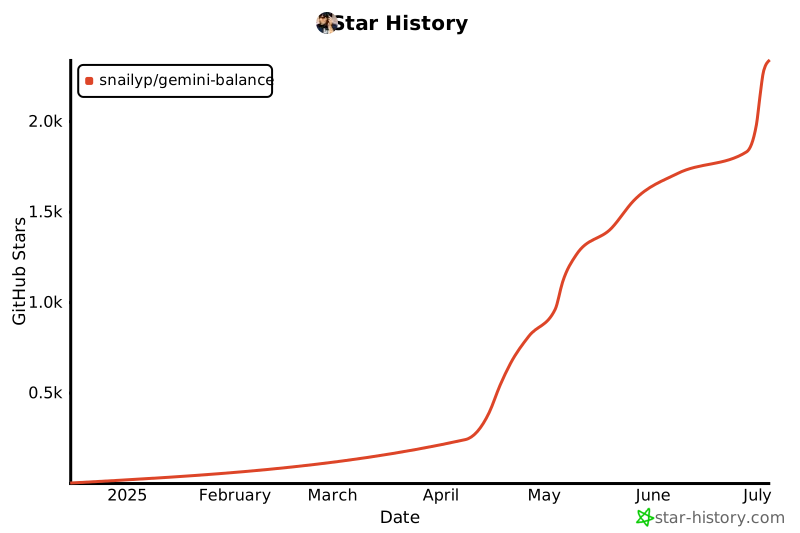](https://star-history.com/#snailyp/gemini-balance&Date)
|
||||
|
||||
## 💖 友情项目
|
||||
|
||||
* **[OneLine](https://github.com/chengtx809/OneLine)** by [chengtx809](https://github.com/chengtx809) - OneLine一线:AI驱动的热点事件时间轴生成工具
|
||||
|
||||
@@ -10,13 +10,14 @@ from pydantic_settings import BaseSettings
|
||||
from sqlalchemy import insert, update, select
|
||||
|
||||
from app.core.constants import API_VERSION, DEFAULT_CREATE_IMAGE_MODEL, DEFAULT_FILTER_MODELS, DEFAULT_MODEL, DEFAULT_STREAM_CHUNK_SIZE, DEFAULT_STREAM_LONG_TEXT_THRESHOLD, DEFAULT_STREAM_MAX_DELAY, DEFAULT_STREAM_MIN_DELAY, DEFAULT_STREAM_SHORT_TEXT_THRESHOLD, DEFAULT_TIMEOUT, MAX_RETRIES
|
||||
from app.log.logger import get_config_logger
|
||||
from app.log.logger import Logger
|
||||
# from app.log.logger import get_config_logger # 移除顶层导入
|
||||
# 延迟导入以避免循环依赖,仅在 sync_initial_settings 中使用
|
||||
# from app.database.connection import database
|
||||
# from app.database.models import Settings as SettingsModel
|
||||
# from app.database.services import get_all_settings # get_all_settings 可能不适合启动时调用,直接查询
|
||||
|
||||
logger = get_config_logger()
|
||||
# logger = get_config_logger() # 移除顶层初始化
|
||||
|
||||
|
||||
class Settings(BaseSettings):
|
||||
@@ -67,6 +68,9 @@ class Settings(BaseSettings):
|
||||
CHECK_INTERVAL_HOURS: int = 1 # 默认检查间隔为1小时
|
||||
TIMEZONE: str = "Asia/Shanghai" # 默认时区
|
||||
|
||||
# 日志配置
|
||||
LOG_LEVEL: str = "INFO" # 默认日志级别
|
||||
|
||||
def __init__(self, **kwargs):
|
||||
super().__init__(**kwargs)
|
||||
# 设置默认AUTH_TOKEN(如果未提供)
|
||||
@@ -78,6 +82,8 @@ settings = Settings()
|
||||
|
||||
def _parse_db_value(key: str, db_value: str, target_type: Type) -> Any:
|
||||
"""尝试将数据库字符串值解析为目标 Python 类型"""
|
||||
from app.log.logger import get_config_logger # 函数内导入
|
||||
logger = get_config_logger() # 函数内初始化
|
||||
try:
|
||||
if target_type == List[str]:
|
||||
# 尝试解析 JSON 列表,如果失败则按逗号分割
|
||||
@@ -110,6 +116,8 @@ async def sync_initial_settings():
|
||||
2. 将数据库设置合并到内存 settings (数据库优先)。
|
||||
3. 将最终的内存 settings 同步回数据库。
|
||||
"""
|
||||
from app.log.logger import get_config_logger # 函数内导入
|
||||
logger = get_config_logger() # 函数内初始化
|
||||
# 延迟导入以避免循环依赖和确保数据库连接已初始化
|
||||
from app.database.connection import database
|
||||
from app.database.models import Settings as SettingsModel
|
||||
@@ -258,6 +266,9 @@ async def sync_initial_settings():
|
||||
else:
|
||||
logger.info("No setting changes detected between memory and database during initial sync.")
|
||||
|
||||
# 刷新日志等级
|
||||
Logger.update_log_levels(final_memory_settings.get("LOG_LEVEL"))
|
||||
|
||||
except Exception as e:
|
||||
logger.error(f"An unexpected error occurred during initial settings sync: {e}")
|
||||
finally:
|
||||
|
||||
@@ -35,7 +35,7 @@ class RetryHandler:
|
||||
key_manager = kwargs.get("key_manager")
|
||||
if key_manager:
|
||||
old_key = kwargs.get(self.key_arg)
|
||||
new_key = await key_manager.handle_api_failure(old_key)
|
||||
new_key = await key_manager.handle_api_failure(old_key, attempt)
|
||||
kwargs[self.key_arg] = new_key
|
||||
logger.info(f"Switched to new API key: {new_key}")
|
||||
|
||||
|
||||
@@ -56,20 +56,28 @@ class Logger:
|
||||
|
||||
@staticmethod
|
||||
def setup_logger(
|
||||
name: str,
|
||||
level: str = "debug",
|
||||
name: str
|
||||
) -> logging.Logger:
|
||||
"""
|
||||
设置并获取logger
|
||||
:param name: logger名称
|
||||
:param level: 日志级别
|
||||
:return: logger实例
|
||||
"""
|
||||
# 导入 settings 对象
|
||||
from app.config.config import settings
|
||||
# 从全局配置获取日志级别
|
||||
log_level_str = settings.LOG_LEVEL.lower()
|
||||
level = LOG_LEVELS.get(log_level_str, logging.INFO)
|
||||
|
||||
if name in Logger._loggers:
|
||||
return Logger._loggers[name]
|
||||
# 如果 logger 已存在,检查并更新其级别(如果需要)
|
||||
existing_logger = Logger._loggers[name]
|
||||
if existing_logger.level != level:
|
||||
existing_logger.setLevel(level)
|
||||
return existing_logger
|
||||
|
||||
logger = logging.getLogger(name)
|
||||
logger.setLevel(LOG_LEVELS.get(level.lower(), logging.INFO))
|
||||
logger.setLevel(level)
|
||||
logger.propagate = False
|
||||
|
||||
# 添加控制台输出
|
||||
@@ -90,6 +98,25 @@ class Logger:
|
||||
return Logger._loggers.get(name)
|
||||
|
||||
|
||||
@staticmethod
|
||||
def update_log_levels(log_level: str):
|
||||
"""
|
||||
根据当前的全局配置更新所有已创建 logger 的日志级别。
|
||||
"""
|
||||
log_level_str = log_level.lower()
|
||||
new_level = LOG_LEVELS.get(log_level_str, logging.INFO)
|
||||
|
||||
updated_count = 0
|
||||
for logger_name, logger_instance in Logger._loggers.items():
|
||||
if logger_instance.level != new_level:
|
||||
logger_instance.setLevel(new_level)
|
||||
# 可选:记录级别变更日志,但注意避免在日志模块内部产生过多日志
|
||||
# print(f"Updated log level for logger '{logger_name}' to {log_level_str.upper()}")
|
||||
updated_count += 1
|
||||
# if updated_count > 0:
|
||||
# print(f"Updated log level for {updated_count} loggers to {log_level_str.upper()}.")
|
||||
|
||||
|
||||
# 预定义的loggers
|
||||
def get_openai_logger():
|
||||
return Logger.setup_logger("openai")
|
||||
|
||||
@@ -6,7 +6,7 @@ from fastapi import APIRouter, HTTPException, Request
|
||||
from fastapi.responses import RedirectResponse
|
||||
|
||||
from app.core.security import verify_auth_token
|
||||
from app.log.logger import get_config_routes_logger
|
||||
from app.log.logger import get_config_routes_logger, Logger # 导入 Logger 类
|
||||
from app.service.config.config_service import ConfigService
|
||||
|
||||
# 创建路由
|
||||
@@ -31,8 +31,13 @@ async def update_config(config_data: Dict[str, Any], request: Request):
|
||||
logger.warning("Unauthorized access attempt to config page")
|
||||
return RedirectResponse(url="/", status_code=302)
|
||||
try:
|
||||
return await ConfigService.update_config(config_data)
|
||||
result = await ConfigService.update_config(config_data)
|
||||
# 配置更新成功后,立即更新所有 logger 的级别
|
||||
Logger.update_log_levels(config_data["LOG_LEVEL"])
|
||||
logger.info("Log levels updated after configuration change.") # 添加日志记录
|
||||
return result
|
||||
except Exception as e:
|
||||
logger.error(f"Error updating config or log levels: {e}", exc_info=True) # 记录详细错误
|
||||
raise HTTPException(status_code=400, detail=str(e))
|
||||
|
||||
|
||||
|
||||
@@ -99,7 +99,7 @@ async def generate_content(
|
||||
"""非流式生成内容"""
|
||||
logger.info("-" * 50 + "gemini_generate_content" + "-" * 50)
|
||||
logger.info(f"Handling Gemini content generation request for model: {model_name}")
|
||||
logger.info(f"Request: \n{request.model_dump_json(indent=2)}")
|
||||
logger.debug(f"Request: \n{request.model_dump_json(indent=2)}")
|
||||
logger.info(f"Using API key: {api_key}")
|
||||
|
||||
if not model_service.check_model_support(model_name):
|
||||
@@ -130,7 +130,7 @@ async def stream_generate_content(
|
||||
"""流式生成内容"""
|
||||
logger.info("-" * 50 + "gemini_stream_generate_content" + "-" * 50)
|
||||
logger.info(f"Handling Gemini streaming content generation for model: {model_name}")
|
||||
logger.info(f"Request: \n{request.model_dump_json(indent=2)}")
|
||||
logger.debug(f"Request: \n{request.model_dump_json(indent=2)}")
|
||||
logger.info(f"Using API key: {api_key}")
|
||||
|
||||
if not model_service.check_model_support(model_name):
|
||||
|
||||
@@ -75,7 +75,7 @@ async def chat_completion(
|
||||
api_key = await key_manager.get_paid_key()
|
||||
logger.info("-" * 50 + "chat_completion" + "-" * 50)
|
||||
logger.info(f"Handling chat completion request for model: {request.model}")
|
||||
logger.info(f"Request: \n{request.model_dump_json(indent=2)}")
|
||||
logger.debug(f"Request: \n{request.model_dump_json(indent=2)}")
|
||||
logger.info(f"Using API key: {api_key}")
|
||||
|
||||
if not model_service.check_model_support(request.model):
|
||||
|
||||
@@ -290,7 +290,12 @@ function populateForm(config) {
|
||||
element.checked = value;
|
||||
} else {
|
||||
// 处理其他类型 (确保 value 不是 null 或 undefined)
|
||||
element.value = value ?? ''; // 使用空字符串作为默认值
|
||||
// 特别处理 LOG_LEVEL,确保大小写匹配 option 的 value
|
||||
if (key === 'LOG_LEVEL' && typeof value === 'string') {
|
||||
element.value = value.toUpperCase();
|
||||
} else {
|
||||
element.value = value ?? ''; // 使用空字符串作为默认值
|
||||
}
|
||||
}
|
||||
}
|
||||
// 如果既不是数组,也找不到对应 ID 的元素,则忽略该配置项
|
||||
@@ -531,6 +536,7 @@ function collectFormData() {
|
||||
if (input.type === 'number') {
|
||||
formData[input.name] = parseFloat(input.value);
|
||||
} else {
|
||||
// 确保 select 元素的值也被正确收集
|
||||
formData[input.name] = input.value;
|
||||
}
|
||||
}
|
||||
@@ -680,29 +686,17 @@ async function executeReset() {
|
||||
function showNotification(message, type = 'info') {
|
||||
const notification = document.getElementById('notification');
|
||||
notification.textContent = message;
|
||||
|
||||
// 设置适当的样式
|
||||
if (type === 'error') {
|
||||
notification.classList.add('bg-danger-500');
|
||||
notification.classList.remove('bg-black');
|
||||
} else {
|
||||
notification.classList.remove('bg-danger-500');
|
||||
notification.classList.add('bg-black');
|
||||
|
||||
// 可以为不同类型设置不同的颜色
|
||||
if (type === 'success') {
|
||||
notification.style.backgroundColor = '#22c55e'; // 绿色
|
||||
} else if (type === 'info') {
|
||||
notification.style.backgroundColor = '#3b82f6'; // 蓝色
|
||||
} else if (type === 'warning') {
|
||||
notification.style.backgroundColor = '#f59e0b'; // 橙色
|
||||
}
|
||||
}
|
||||
|
||||
// 应用过渡效果 - 与keys_status.js中一致
|
||||
|
||||
// 统一样式为黑色半透明,与 keys_status.js 保持一致
|
||||
notification.classList.remove('bg-danger-500');
|
||||
notification.classList.add('bg-black');
|
||||
notification.style.backgroundColor = 'rgba(0,0,0,0.8)';
|
||||
notification.style.color = '#fff';
|
||||
|
||||
// 应用过渡效果
|
||||
notification.style.opacity = "1";
|
||||
notification.style.transform = "translate(-50%, 0)";
|
||||
|
||||
|
||||
// 设置自动消失
|
||||
setTimeout(() => {
|
||||
notification.style.opacity = "0";
|
||||
|
||||
@@ -42,6 +42,11 @@
|
||||
@apply: bg-primary-600;
|
||||
background-color: #4F46E5;
|
||||
}
|
||||
/* 统一通知样式为黑色半透明,确保与 keys_status 一致 */
|
||||
.notification {
|
||||
background: rgba(0,0,0,0.8) !important;
|
||||
color: #fff !important;
|
||||
}
|
||||
</style>
|
||||
{% endblock %}
|
||||
|
||||
@@ -87,6 +92,9 @@
|
||||
<button class="tab-btn bg-white bg-opacity-50 text-gray-700 px-5 py-2 rounded-full font-medium text-sm hover:bg-opacity-70 transition-all duration-200" data-tab="scheduler">
|
||||
定时任务
|
||||
</button>
|
||||
<button class="tab-btn bg-white bg-opacity-50 text-gray-700 px-5 py-2 rounded-full font-medium text-sm hover:bg-opacity-70 transition-all duration-200" data-tab="logging">
|
||||
日志配置
|
||||
</button>
|
||||
</div>
|
||||
|
||||
<!-- Save Status Banner (Removed - using notification component now) -->
|
||||
@@ -285,7 +293,7 @@
|
||||
<select id="UPLOAD_PROVIDER" name="UPLOAD_PROVIDER" class="w-full px-4 py-3 rounded-lg border border-gray-300 focus:border-primary-500 focus:ring focus:ring-primary-200 focus:ring-opacity-50 bg-white">
|
||||
<option value="smms" selected>SM.MS</option>
|
||||
<option value="picgo">PicGo</option>
|
||||
<option value="cloudflare">Cloudflare</option>
|
||||
<option value="cloudflare_imgbed">Cloudflare</option>
|
||||
</select>
|
||||
<small class="text-gray-500 mt-1 block">图片上传服务提供商</small>
|
||||
</div>
|
||||
@@ -305,14 +313,14 @@
|
||||
</div>
|
||||
|
||||
<!-- Cloudflare图床URL -->
|
||||
<div class="mb-6 provider-config" data-provider="cloudflare">
|
||||
<div class="mb-6 provider-config" data-provider="cloudflare_imgbed">
|
||||
<label for="CLOUDFLARE_IMGBED_URL" class="block font-semibold mb-2 text-gray-700">Cloudflare图床URL</label>
|
||||
<input type="text" id="CLOUDFLARE_IMGBED_URL" name="CLOUDFLARE_IMGBED_URL" placeholder="https://xxxxxxx.pages.dev/upload" class="w-full px-4 py-3 rounded-lg border border-gray-300 focus:border-primary-500 focus:ring focus:ring-primary-200 focus:ring-opacity-50">
|
||||
<small class="text-gray-500 mt-1 block">Cloudflare图床的URL</small>
|
||||
</div>
|
||||
|
||||
<!-- Cloudflare认证码 -->
|
||||
<div class="mb-6 provider-config" data-provider="cloudflare">
|
||||
<div class="mb-6 provider-config" data-provider="cloudflare_imgbed">
|
||||
<label for="CLOUDFLARE_IMGBED_AUTH_CODE" class="block font-semibold mb-2 text-gray-700">Cloudflare认证码</label>
|
||||
<input type="text" id="CLOUDFLARE_IMGBED_AUTH_CODE" name="CLOUDFLARE_IMGBED_AUTH_CODE" placeholder="xxxxxxxxx" class="w-full px-4 py-3 rounded-lg border border-gray-300 focus:border-primary-500 focus:ring focus:ring-primary-200 focus:ring-opacity-50">
|
||||
<small class="text-gray-500 mt-1 block">Cloudflare图床的认证码</small>
|
||||
@@ -390,6 +398,26 @@
|
||||
<small class="text-gray-500 mt-1 block">定时任务使用的时区,格式如 "Asia/Shanghai" 或 "UTC"</small>
|
||||
</div>
|
||||
</div>
|
||||
|
||||
<!-- 日志配置 -->
|
||||
<div class="config-section bg-white bg-opacity-70 rounded-xl p-6 mb-6 shadow-lg" id="logging-section">
|
||||
<h2 class="text-xl font-bold mb-6 pb-3 border-b border-gray-200 flex items-center gap-2">
|
||||
<i class="fas fa-file-alt text-primary-600"></i> 日志配置
|
||||
</h2>
|
||||
|
||||
<!-- 日志级别 -->
|
||||
<div class="mb-6">
|
||||
<label for="LOG_LEVEL" class="block font-semibold mb-2 text-gray-700">日志级别</label>
|
||||
<select id="LOG_LEVEL" name="LOG_LEVEL" class="w-full px-4 py-3 rounded-lg border border-gray-300 focus:border-primary-500 focus:ring focus:ring-primary-200 focus:ring-opacity-50 bg-white">
|
||||
<option value="DEBUG">DEBUG</option>
|
||||
<option value="INFO">INFO</option>
|
||||
<option value="WARNING">WARNING</option>
|
||||
<option value="ERROR">ERROR</option>
|
||||
<option value="CRITICAL">CRITICAL</option>
|
||||
</select>
|
||||
<small class="text-gray-500 mt-1 block">设置应用程序的日志记录详细程度</small>
|
||||
</div>
|
||||
</div>
|
||||
|
||||
<!-- Action Buttons -->
|
||||
<div class="flex flex-col md:flex-row justify-center gap-4 mt-8">
|
||||
|
||||
@@ -1,9 +1,39 @@
|
||||
version: '3'
|
||||
|
||||
volumes:
|
||||
mysql_data:
|
||||
services:
|
||||
gemini-balance:
|
||||
build: .
|
||||
image: ghcr.io/snailyp/gemini-balance:latest
|
||||
container_name: gemini-balance
|
||||
restart: unless-stopped
|
||||
ports:
|
||||
- "8000:8000"
|
||||
env_file:
|
||||
- .env
|
||||
depends_on:
|
||||
mysql:
|
||||
condition: service_healthy
|
||||
healthcheck:
|
||||
test: ["CMD-SHELL", "python -c \"import requests; exit(0) if requests.get('http://localhost:8000/health').status_code == 200 else exit(1)\""]
|
||||
interval: 30s
|
||||
timeout: 5s
|
||||
retries: 3
|
||||
start_period: 10s
|
||||
mysql:
|
||||
image: mysql:8
|
||||
container_name: gemini-balance-mysql
|
||||
restart: unless-stopped
|
||||
environment:
|
||||
MYSQL_ROOT_PASSWORD: your_root_password
|
||||
MYSQL_DATABASE: ${MYSQL_DATABASE}
|
||||
MYSQL_USER: ${MYSQL_USER}
|
||||
MYSQL_PASSWORD: ${MYSQL_PASSWORD}
|
||||
# ports:
|
||||
# - "3306:3306"
|
||||
volumes:
|
||||
- mysql_data:/var/lib/mysql
|
||||
healthcheck:
|
||||
test: ["CMD", "mysqladmin", "ping", "-h", "127.0.0.1"]
|
||||
interval: 10s # 每隔10秒检查一次
|
||||
timeout: 5s # 每次检查的超时时间为5秒
|
||||
retries: 3 # 重试3次失败后标记为 unhealthy
|
||||
start_period: 30s # 容器启动后等待30秒再开始第一次健康检查
|
||||
Reference in New Issue
Block a user