mirror of
https://github.com/beilunyang/moemail.git
synced 2026-05-06 20:02:52 +08:00

623 lines
18 KiB
Markdown
623 lines
18 KiB
Markdown
|
||
<p align="center">
|
||
<img src="public/icons/icon-192x192.png" alt="MoeMail Logo" width="100" height="100">
|
||
<h1 align="center">MoeMail</h1>
|
||
</p>
|
||
|
||
<p align="center">
|
||
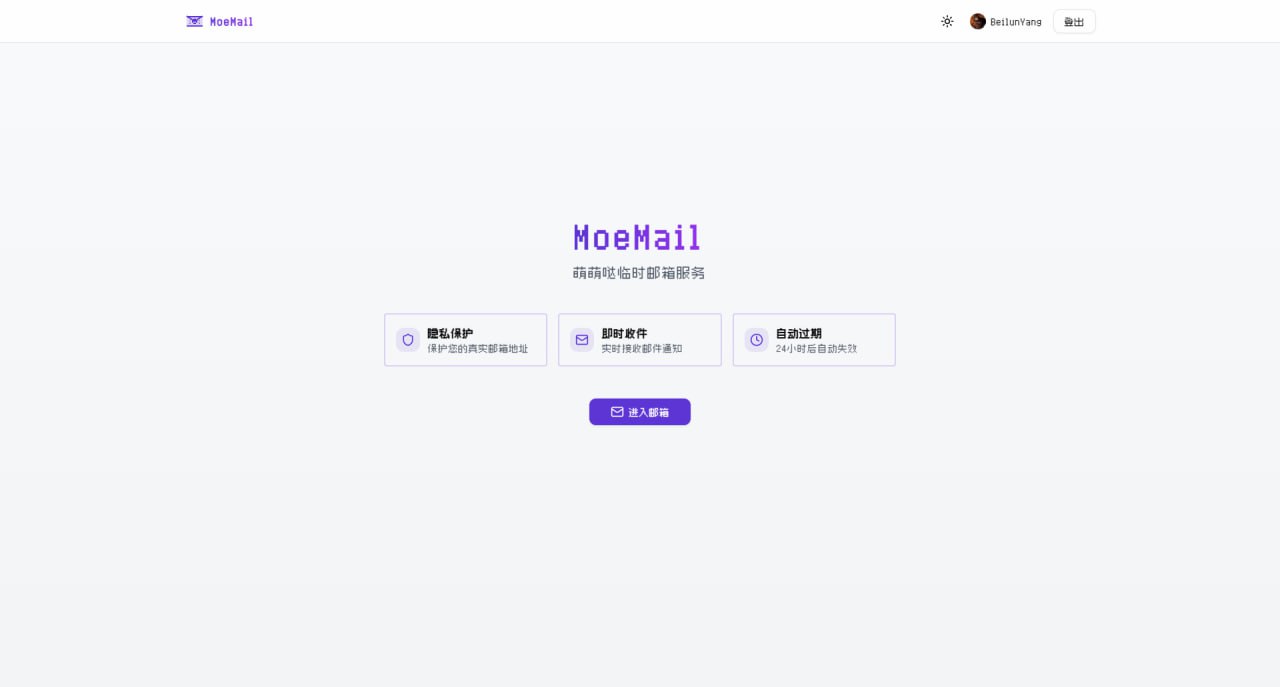
A cute temporary email service built with NextJS + Cloudflare technology stack 🎉
|
||
</p>
|
||
|
||
<p align="center">
|
||
<span>English</span> |
|
||
<a href="./README.zh-CN.md">简体中文</a>
|
||
</p>
|
||
|
||
<p align="center">
|
||
<a href="https://www.producthunt.com/products/moemail?embed=true&utm_source=badge-featured&utm_medium=badge&utm_campaign=badge-moemail" target="_blank" rel="noopener noreferrer"><img alt="MoeMail - OpenAPI‑first temp email, hosted & ready | Product Hunt" width="250" height="54" src="https://api.producthunt.com/widgets/embed-image/v1/featured.svg?post_id=1078475&theme=light&t=1770964043604"></a>
|
||
</p>
|
||
|
||
<p align="center">
|
||
<a href="#live-demo">Live Demo</a> •
|
||
<a href="#documentation">Documentation</a> •
|
||
<a href="#features">Features</a> •
|
||
<a href="#tech-stack">Tech Stack</a> •
|
||
<a href="#local-run">Local Run</a> •
|
||
<a href="#deployment">Deployment</a> •
|
||
<a href="#email-domain-configuration">Email Domain Config</a> •
|
||
<a href="#permission-system">Permission System</a> •
|
||
<a href="#system-settings">System Settings</a> •
|
||
<a href="#sending-emails">Sending Emails</a> •
|
||
<a href="#webhook-integration">Webhook Integration</a> •
|
||
<a href="#openapi">OpenAPI</a> •
|
||
<a href="#environment-variables">Environment Variables</a> •
|
||
<a href="#github-oauth-app-configuration">Github OAuth Config</a> •
|
||
<a href="#google-oauth-app-configuration">Google OAuth Config</a> •
|
||
<a href="#contribution">Contribution</a> •
|
||
<a href="#license">License</a> •
|
||
<a href="#community">Community</a> •
|
||
<a href="#support">Support</a>
|
||
</p>
|
||
|
||
## Live Demo
|
||
[https://moemail.app](https://moemail.app)
|
||
|
||
|
||
|
||
|
||
|
||
|
||
|
||
## Documentation
|
||
**Full Documentation**: [https://docs.moemail.app](https://docs.moemail.app)
|
||
|
||
The documentation site contains detailed usage guides, API documentation, deployment tutorials, and other complete information.
|
||
|
||
## Features
|
||
|
||
- 🔒 **Privacy Protection**: Protect your real email address from spam and unnecessary subscriptions
|
||
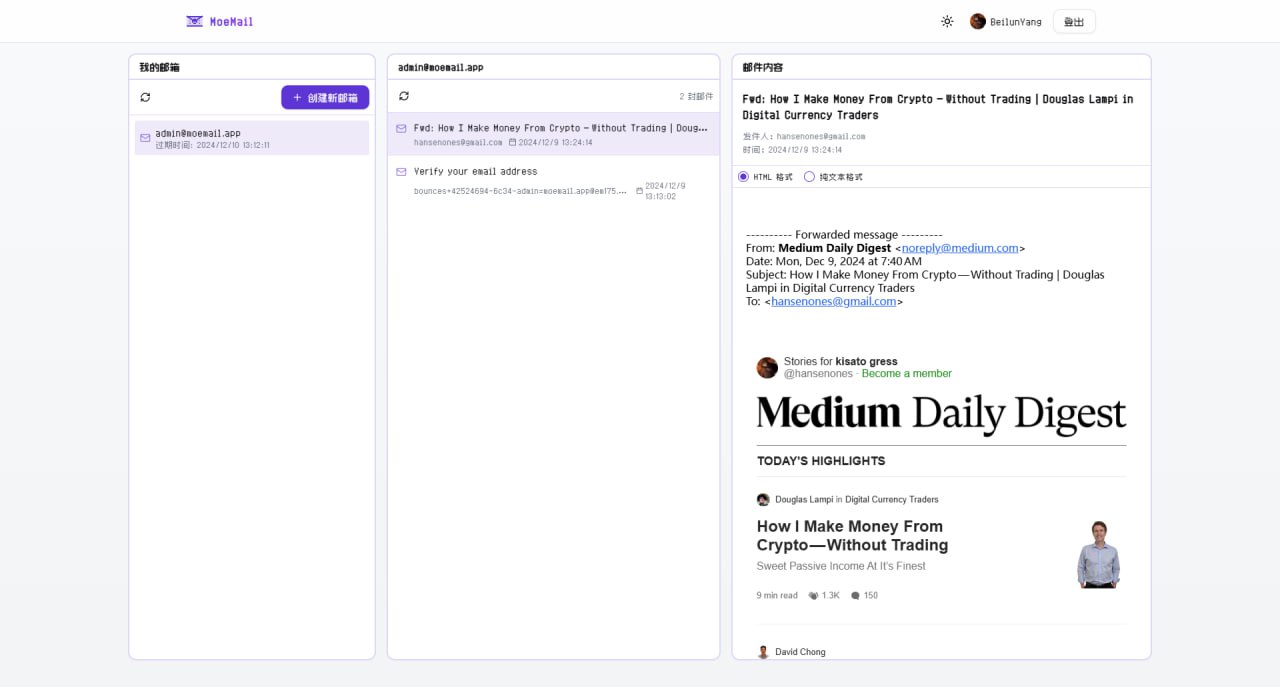
- ⚡ **Real-time Receipt**: Automatic polling, receive email notifications instantly
|
||
- ⏱️ **Flexible Validity**: Supports 1 hour, 24 hours, 3 days, or permanent validity
|
||
- 🎨 **Theme Switching**: Supports light and dark modes
|
||
- 📱 **Responsive Design**: Perfectly adapted for desktop and mobile devices
|
||
- 🔄 **Auto Cleanup**: Automatically cleans up expired mailboxes and emails
|
||
- 📱 **PWA Support**: Support PWA installation
|
||
- 💸 **Free Self-hosting**: Built on Cloudflare, capable of free self-hosting without any cost
|
||
- 🎉 **Cute UI**: Simple and cute UI interface
|
||
- 📤 **Sending Function**: Support sending emails using temporary addresses, based on Resend service
|
||
- 🔔 **Webhook Notification**: Support receiving new email notifications via webhook
|
||
- 🛡️ **Permission System**: Role-based access control system
|
||
- 🔑 **OpenAPI**: Support accessing OpenAPI via API Key
|
||
- 🌍 **Multi-language Support**: Supports Chinese and English interfaces, freely switchable
|
||
|
||
## Tech Stack
|
||
|
||
- **Framework**: [Next.js](https://nextjs.org/) (App Router)
|
||
- **Platform**: [Cloudflare Pages](https://pages.cloudflare.com/)
|
||
- **Database**: [Cloudflare D1](https://developers.cloudflare.com/d1/) (SQLite)
|
||
- **Authentication**: [NextAuth](https://authjs.dev/getting-started/installation?framework=Next.js) with GitHub/Google Login
|
||
- **Styling**: [Tailwind CSS](https://tailwindcss.com/)
|
||
- **UI Components**: Custom components based on [Radix UI](https://www.radix-ui.com/)
|
||
- **Email Handling**: [Cloudflare Email Workers](https://developers.cloudflare.com/email-routing/)
|
||
- **Type Safety**: [TypeScript](https://www.typescriptlang.org/)
|
||
- **ORM**: [Drizzle ORM](https://orm.drizzle.team/)
|
||
- **Internationalization**: [next-intl](https://next-intl-docs.vercel.app/)
|
||
|
||
## Local Run
|
||
|
||
### Prerequisites
|
||
|
||
- Node.js 18+
|
||
- Pnpm
|
||
- Wrangler CLI
|
||
- Cloudflare Account
|
||
|
||
### Installation
|
||
|
||
1. Clone the repository:
|
||
```bash
|
||
git clone https://github.com/beilunyang/moemail.git
|
||
cd moemail
|
||
```
|
||
|
||
2. Install dependencies:
|
||
```bash
|
||
pnpm install
|
||
```
|
||
|
||
3. Setup Wrangler:
|
||
```bash
|
||
cp wrangler.example.json wrangler.json
|
||
cp wrangler.email.example.json wrangler.email.json
|
||
cp wrangler.cleanup.example.json wrangler.cleanup.json
|
||
```
|
||
Set Cloudflare D1 database name and database ID.
|
||
|
||
4. Setup Environment Variables:
|
||
```bash
|
||
cp .env.example .env.local
|
||
```
|
||
Set `AUTH_GITHUB_ID`, `AUTH_GITHUB_SECRET`, `AUTH_SECRET`.
|
||
|
||
5. Create local database schema:
|
||
```bash
|
||
pnpm db:migrate-local
|
||
```
|
||
|
||
### Development
|
||
|
||
1. Start development server:
|
||
```bash
|
||
pnpm dev
|
||
```
|
||
|
||
2. Test Email Worker:
|
||
Currently cannot run and test locally, please use Wrangler to deploy the email worker and test.
|
||
```bash
|
||
pnpm deploy:email
|
||
```
|
||
|
||
3. Test Cleanup Worker:
|
||
```bash
|
||
pnpm dev:cleanup
|
||
pnpm test:cleanup
|
||
```
|
||
|
||
4. Generate Mock Data (Mailboxes and Messages):
|
||
```bash
|
||
pnpm generate-test-data
|
||
```
|
||
|
||
## Deployment
|
||
|
||
### Video Tutorial
|
||
https://www.youtube.com/watch?v=Vcw3nqsq2-E
|
||
|
||
### Local Wrangler Deployment
|
||
1. Create .env file
|
||
```bash
|
||
cp .env.example .env
|
||
```
|
||
2. Set [Environment Variables](#environment-variables) in the .env file.
|
||
|
||
3. Run deployment script
|
||
```bash
|
||
pnpm dlx tsx ./scripts/deploy/index.ts
|
||
```
|
||
|
||
### Github Actions Deployment
|
||
|
||
This project supports automated deployment using GitHub Actions. It supports the following triggers:
|
||
|
||
1. **Auto Trigger**: Automatically triggers deployment flow when a new tag is pushed.
|
||
2. **Manual Trigger**: Manually trigger in the GitHub Actions page.
|
||
|
||
#### Deployment Steps
|
||
|
||
1. Add the following Secrets in GitHub repository settings:
|
||
- `CLOUDFLARE_API_TOKEN`: Cloudflare API Token
|
||
- `CLOUDFLARE_ACCOUNT_ID`: Cloudflare Account ID
|
||
- `AUTH_GITHUB_ID`: GitHub OAuth App ID
|
||
- `AUTH_GITHUB_SECRET`: GitHub OAuth App Secret
|
||
- `AUTH_SECRET`: NextAuth Secret, used to encrypt session, please set a random string
|
||
- `CUSTOM_DOMAIN`: Custom domain for the website (Optional, if empty, uses Cloudflare Pages default domain)
|
||
- `PROJECT_NAME`: Pages project name (Optional, if empty, defaults to moemail)
|
||
- `DATABASE_NAME`: D1 database name (Optional, if empty, defaults to moemail-db)
|
||
- `KV_NAMESPACE_NAME`: Cloudflare KV namespace name, used for site settings (Optional, if empty, defaults to moemail-kv)
|
||
|
||
2. Choose trigger method:
|
||
|
||
**Method 1: Push Tag Trigger**
|
||
```bash
|
||
# Create a new tag
|
||
git tag v1.0.0
|
||
|
||
# Push tag to remote repository
|
||
git push origin v1.0.0
|
||
```
|
||
|
||
**Method 2: Manual Trigger**
|
||
- Go to the Actions page of the repository
|
||
- Select "Deploy" workflow
|
||
- Click "Run workflow"
|
||
|
||
3. Deployment progress can be viewed in the Actions tab of the repository.
|
||
|
||
#### Notes
|
||
- Ensure all Secrets are set correctly.
|
||
- When using tag trigger, the tag must start with `v` (e.g., v1.0.0).
|
||
|
||
[](https://deploy.workers.cloudflare.com/?url=https://github.com/beilunyang/moemail)
|
||
|
||
|
||
## Email Domain Configuration
|
||
|
||
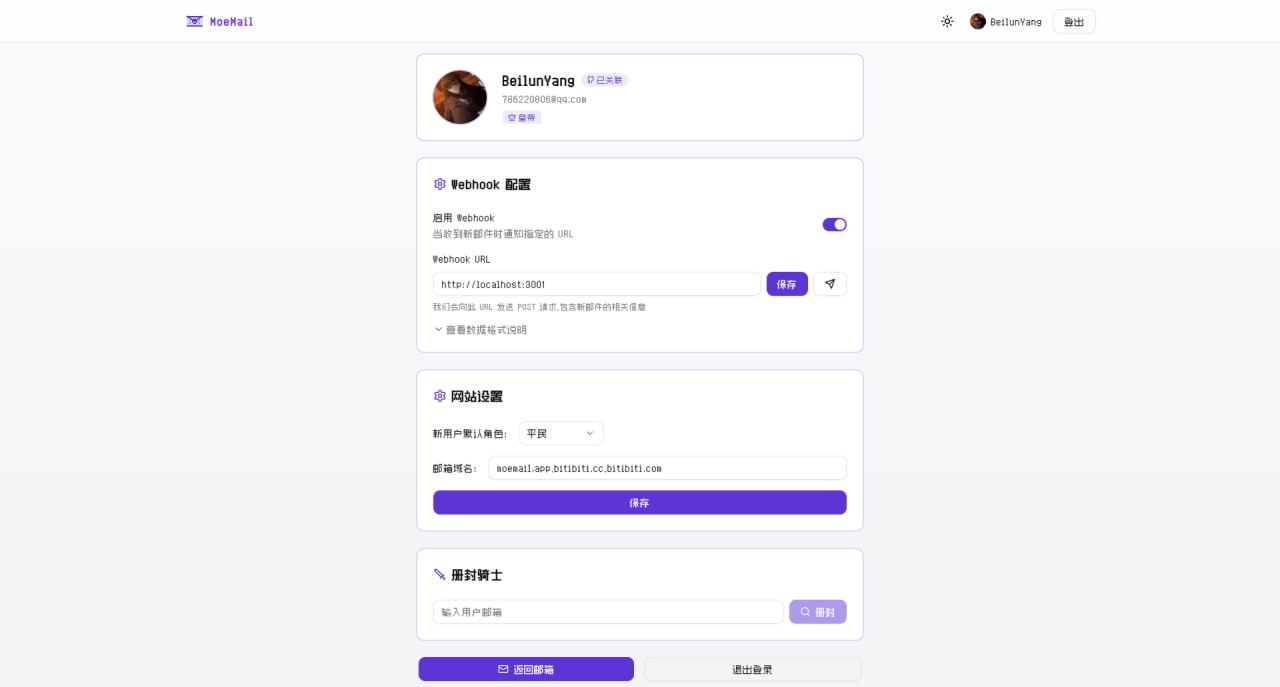
In the MoeMail User Profile page, you can configure the site's email domains. Supports multiple domain configurations, separated by commas.
|
||
|
||
|
||
### Cloudflare Email Routing Configuration
|
||
|
||
To make email domains effective, you also need to configure email routing in the Cloudflare console to forward received emails to the Email Worker.
|
||
|
||
1. Login to [Cloudflare Console](https://dash.cloudflare.com/)
|
||
2. Select your domain
|
||
3. Click "Email" -> "Email Routing" in the left menu
|
||
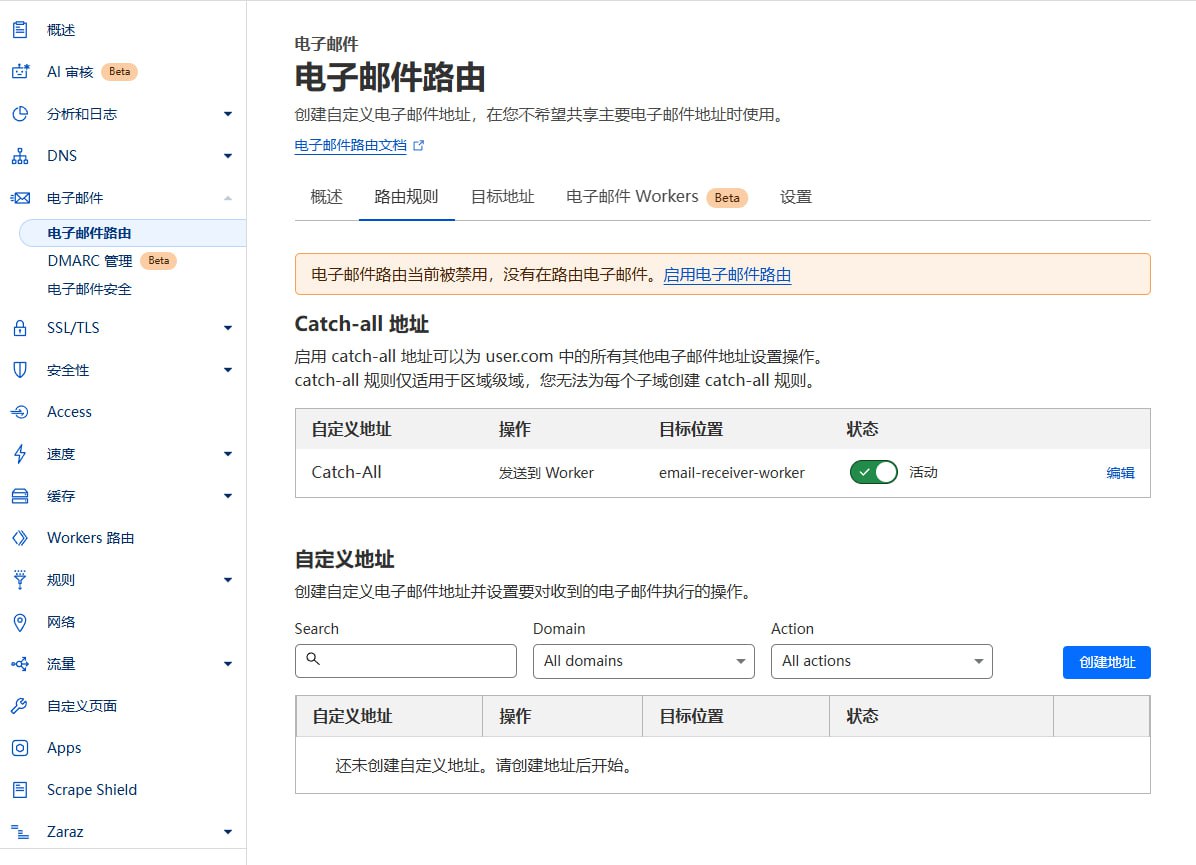
4. If it shows "Email Routing is currently disabled", please click "Enable Email Routing"
|
||
|
||
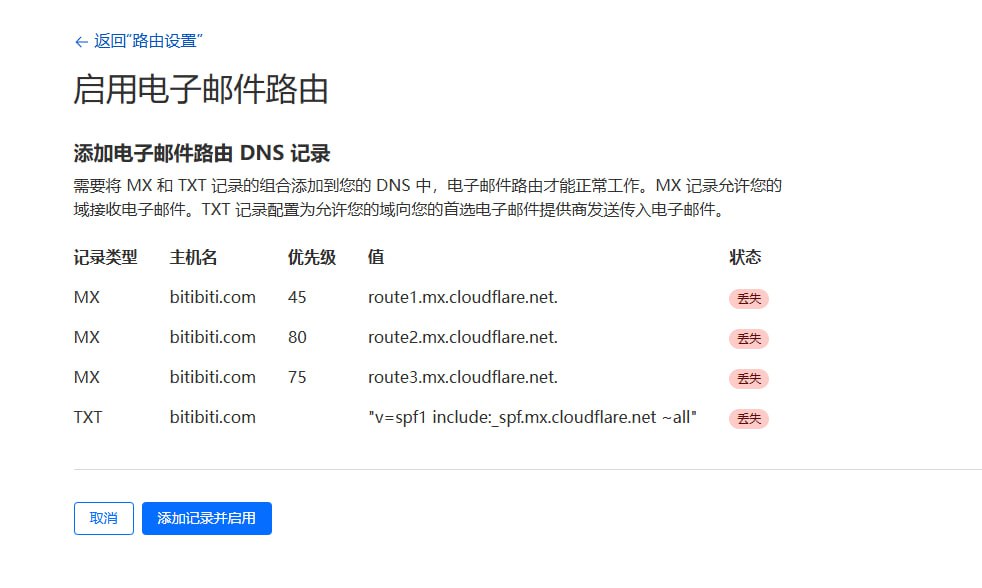
5. After clicking, it will prompt you to add Email Routing DNS records, click "Add records and enable"
|
||
|
||
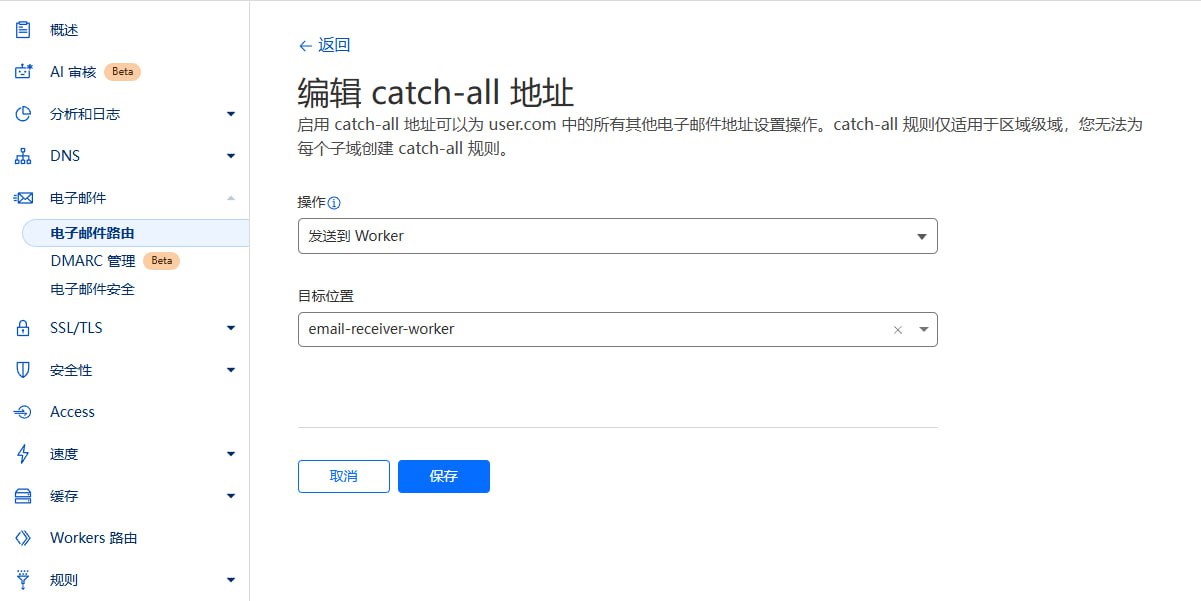
6. Configure Routing Rules:
|
||
- Catch-all address: Enable "Catch-all"
|
||
- Edit Catch-all address
|
||
- Action: Select "Send to Worker"
|
||
- Destination: Select the "email-receiver-worker" you just deployed
|
||
- Save
|
||
|
||
|
||
### Notes
|
||
- Ensure domain DNS is hosted on Cloudflare.
|
||
- Email Worker must be successfully deployed.
|
||
- If Catch-All status is unavailable (stuck loading), please click `Destination addresses` next to `Routing rules`, and bind an email address there.
|
||
|
||
## Permission System
|
||
|
||
The project uses a Role-Based Access Control (RBAC) system.
|
||
|
||
### Role Configuration
|
||
|
||
New user default roles are configured by the Emperor in the site settings in the User Profile:
|
||
- Duke: New users get temporary email, Webhook config permissions, and API Key management permissions.
|
||
- Knight: New users get temporary email and Webhook config permissions.
|
||
- Civilian: New users have no permissions, need to wait for Emperor to promote to Knight or Duke.
|
||
|
||
### Role Levels
|
||
|
||
The system includes four role levels:
|
||
|
||
1. **Emperor**
|
||
- Website Owner
|
||
- Has all permissions
|
||
- Only one Emperor per site
|
||
|
||
2. **Duke**
|
||
- Super User
|
||
- Can use temporary email features
|
||
- Can configure Webhook
|
||
- Can create API Key to call OpenAPI
|
||
- Can be demoted to Knight or Civilian by Emperor
|
||
|
||
3. **Knight**
|
||
- Advanced User
|
||
- Can use temporary email features
|
||
- Can configure Webhook
|
||
- Can be demoted to Civilian or promoted to Duke by Emperor
|
||
|
||
4. **Civilian**
|
||
- Regular User
|
||
- No permissions
|
||
- Can be promoted to Knight or Duke by Emperor
|
||
|
||
### Role Upgrade
|
||
|
||
1. **Become Emperor**
|
||
- The first user to visit `/api/roles/init-emperor` interface will become the Emperor (Website Owner).
|
||
- Once an Emperor exists, no other user can be promoted to Emperor.
|
||
|
||
2. **Role Changes**
|
||
- The Emperor can set other users as Duke, Knight, or Civilian in the User Profile page.
|
||
|
||
### Permission Details
|
||
|
||
- **Email Management**: Create and manage temporary emails
|
||
- **Webhook Management**: Configure Webhooks for email notifications
|
||
- **API Key Management**: Create and manage API access keys
|
||
- **User Management**: Promote/Demote user roles
|
||
- **System Settings**: Manage global system settings
|
||
|
||
## System Settings
|
||
|
||
System settings are stored in Cloudflare KV, including:
|
||
|
||
- `DEFAULT_ROLE`: Default role for new users, values: `CIVILIAN`, `KNIGHT`, `DUKE`
|
||
- `EMAIL_DOMAINS`: Supported email domains, comma-separated
|
||
- `ADMIN_CONTACT`: Administrator contact info
|
||
- `MAX_EMAILS`: Maximum number of emails per user
|
||
|
||
**Emperor** role can configure these in the User Profile page.
|
||
|
||
## Sending Emails
|
||
|
||
MoeMail supports sending emails using temporary addresses, based on [Resend](https://resend.com/) service.
|
||
|
||
### Features
|
||
|
||
- 📨 **Send from Temp Email**: Use created temporary emails as sender
|
||
- 🎯 **Role Limits**: Different roles have different daily sending limits
|
||
- 💌 **HTML Support**: Supports rich text email format
|
||
|
||
### Role Sending Limits
|
||
|
||
| Role | Daily Limit | Description |
|
||
|------|-------------|-------------|
|
||
| Emperor | Unlimited | Admin has no limits |
|
||
| Duke | 5/day | Default 5 emails per day |
|
||
| Knight | 2/day | Default 2 emails per day |
|
||
| Civilian | Forbidden | No sending permission |
|
||
|
||
> 💡 **Tip**: The Emperor can customize the daily limits for Dukes and Knights in the Mail Service Configuration.
|
||
|
||
### Configure Sending Service
|
||
|
||
1. **Get Resend API Key**
|
||
- Register at [Resend](https://resend.com/)
|
||
- Create API Key in console
|
||
- Copy API Key for later use
|
||
|
||
2. **Configure Service**
|
||
- Login as Emperor
|
||
- Go to User Profile
|
||
- In "Resend Service Configuration":
|
||
- Enable Sending Service switch
|
||
- Enter Resend API Key
|
||
- Set daily limits for Duke and Knight (Optional)
|
||
- Save configuration
|
||
|
||
3. **Verify Configuration**
|
||
- After saving, authorized users will see a "Send Email" button in the email list
|
||
- Click to open dialog and test
|
||
|
||
### How to Send
|
||
|
||
1. **Create Temp Email**
|
||
- Create a new temporary email in Mailbox page
|
||
|
||
2. **Send Email**
|
||
- Find the email in the list
|
||
- Click "Send Email" button next to it
|
||
- Fill in:
|
||
- Recipient address
|
||
- Subject
|
||
- Content (supports HTML)
|
||
- Click "Send"
|
||
|
||
3. **View History**
|
||
- Sent emails are saved in the message list of the corresponding mailbox
|
||
- View all sent/received emails in mailbox detail page
|
||
|
||
### Notes
|
||
|
||
- 📋 **Resend Limits**: Please note Resend's sending limits and pricing
|
||
- 🔐 **Domain Verification**: Using custom domains requires verification in Resend
|
||
- 🚫 **Anti-Spam**: Please follow email sending standards, avoid spamming
|
||
- 📊 **Quota Monitoring**: System counts daily usage, stops sending when limit reached
|
||
- 🔄 **Quota Reset**: Daily quota resets at 00:00
|
||
|
||
## Webhook Integration
|
||
|
||
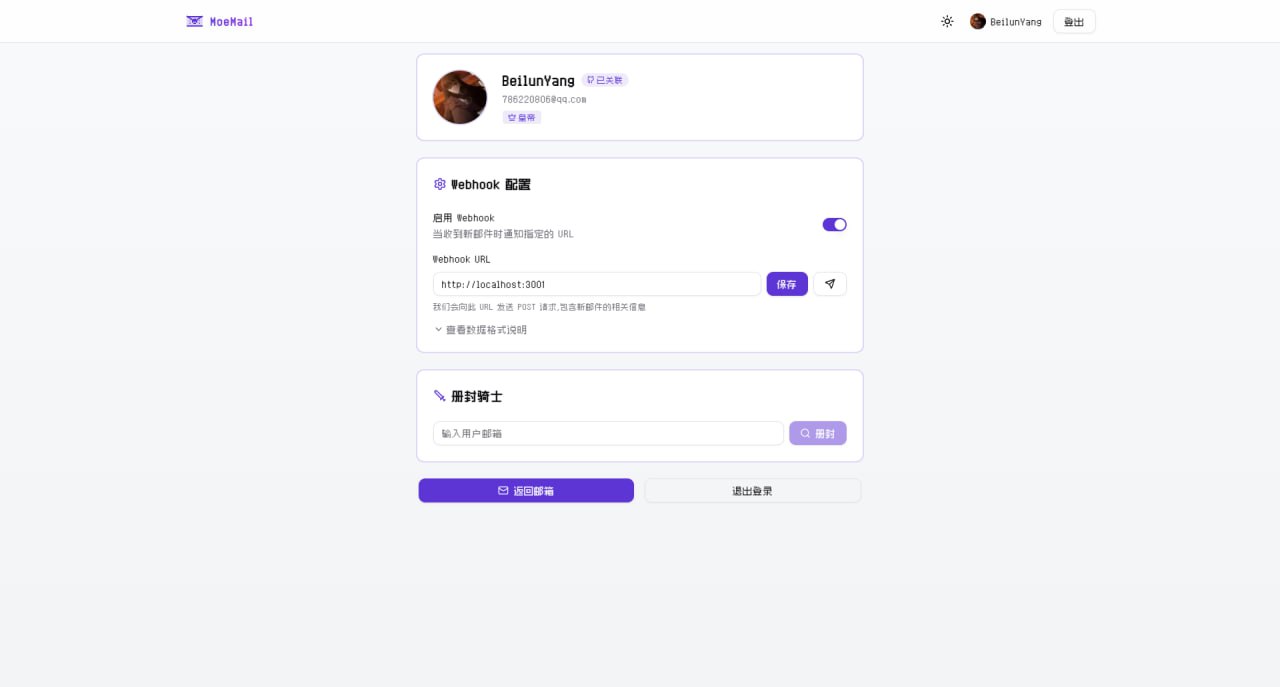
When a new email is received, the system sends a POST request to the configured and enabled Webhook URL.
|
||
|
||
### Request Header
|
||
```http
|
||
Content-Type: application/json
|
||
X-Webhook-Event: new_message
|
||
```
|
||
|
||
### Request Body
|
||
```json
|
||
{
|
||
"emailId": "email-uuid",
|
||
"messageId": "message-uuid",
|
||
"fromAddress": "sender@example.com",
|
||
"subject": "Email Subject",
|
||
"content": "Email Text Content",
|
||
"html": "Email HTML Content",
|
||
"receivedAt": "2024-01-01T12:00:00.000Z",
|
||
"toAddress": "your-email@moemail.app"
|
||
}
|
||
```
|
||
|
||
### Configuration
|
||
1. Click avatar to enter User Profile
|
||
2. Enable Webhook
|
||
3. Set notification URL
|
||
4. Click Test button
|
||
5. Save to receive notifications
|
||
|
||
### Testing
|
||
|
||
The project provides a simple test server:
|
||
|
||
```bash
|
||
pnpm webhook-test-server
|
||
```
|
||
|
||
The test server listens on port 3001 (http://localhost:3001) and prints received Webhook details.
|
||
|
||
For external testing, use Cloudflare Tunnel:
|
||
```bash
|
||
pnpx cloudflared tunnel --url http://localhost:3001
|
||
```
|
||
|
||
### Notes
|
||
- Webhook must respond within 10 seconds
|
||
- Non-2xx response triggers retry
|
||
|
||
## OpenAPI
|
||
|
||
The project provides OpenAPI interfaces, accessible via API Key. API Keys can be created in User Profile (Requires Duke or Emperor role).
|
||
|
||
### Using API Key
|
||
|
||
Add API Key to request header:
|
||
```http
|
||
X-API-Key: YOUR_API_KEY
|
||
```
|
||
|
||
### API Endpoints
|
||
|
||
#### Get System Config
|
||
```http
|
||
GET /api/config
|
||
```
|
||
Response:
|
||
```json
|
||
{
|
||
"defaultRole": "CIVILIAN",
|
||
"emailDomains": "moemail.app,example.com",
|
||
"adminContact": "admin@example.com",
|
||
"maxEmails": "10"
|
||
}
|
||
```
|
||
|
||
#### Generate Temp Email
|
||
```http
|
||
POST /api/emails/generate
|
||
Content-Type: application/json
|
||
|
||
{
|
||
"name": "test",
|
||
"expiryTime": 3600000,
|
||
"domain": "moemail.app"
|
||
}
|
||
```
|
||
Params:
|
||
- `name`: Prefix (optional)
|
||
- `expiryTime`: Validity in ms. 3600000(1h), 86400000(24h), 604800000(7d), 0(Permanent)
|
||
- `domain`: From config
|
||
|
||
Response:
|
||
```json
|
||
{
|
||
"id": "email-uuid-123",
|
||
"email": "test@moemail.app"
|
||
}
|
||
```
|
||
|
||
#### Get Email List
|
||
```http
|
||
GET /api/emails?cursor=xxx
|
||
```
|
||
|
||
#### Get Messages for Email
|
||
```http
|
||
GET /api/emails/{emailId}?cursor=xxx
|
||
```
|
||
|
||
#### Delete Email
|
||
```http
|
||
DELETE /api/emails/{emailId}
|
||
```
|
||
|
||
#### Get Single Message
|
||
```http
|
||
GET /api/emails/{emailId}/{messageId}
|
||
```
|
||
|
||
#### Create Email Share Link
|
||
```http
|
||
POST /api/emails/{emailId}/share
|
||
Content-Type: application/json
|
||
|
||
{
|
||
"expiresIn": 86400000
|
||
}
|
||
```
|
||
|
||
#### Get Email Share Links
|
||
```http
|
||
GET /api/emails/{emailId}/share
|
||
```
|
||
|
||
#### Delete Email Share Link
|
||
```http
|
||
DELETE /api/emails/{emailId}/share/{shareId}
|
||
```
|
||
|
||
#### Create Message Share Link
|
||
```http
|
||
POST /api/emails/{emailId}/messages/{messageId}/share
|
||
Content-Type: application/json
|
||
|
||
{
|
||
"expiresIn": 86400000
|
||
}
|
||
```
|
||
|
||
#### Get Message Share Links
|
||
```http
|
||
GET /api/emails/{emailId}/messages/{messageId}/share
|
||
```
|
||
|
||
#### Delete Message Share Link
|
||
```http
|
||
DELETE /api/emails/{emailId}/messages/{messageId}/share/{shareId}
|
||
```
|
||
|
||
## Environment Variables
|
||
|
||
### Authentication
|
||
- `AUTH_GITHUB_ID`: GitHub OAuth App ID
|
||
- `AUTH_GITHUB_SECRET`: GitHub OAuth App Secret
|
||
- `AUTH_GOOGLE_ID`: Google OAuth App ID
|
||
- `AUTH_GOOGLE_SECRET`: Google OAuth App Secret
|
||
- `AUTH_SECRET`: NextAuth Secret
|
||
|
||
### Cloudflare
|
||
- `CLOUDFLARE_API_TOKEN`: Cloudflare API Token
|
||
- `CLOUDFLARE_ACCOUNT_ID`: Cloudflare Account ID
|
||
- `DATABASE_NAME`: D1 Database Name
|
||
- `DATABASE_ID`: D1 Database ID (Optional, auto-fetched if empty)
|
||
- `KV_NAMESPACE_NAME`: KV Name
|
||
- `KV_NAMESPACE_ID`: KV ID (Optional, auto-fetched if empty)
|
||
- `CUSTOM_DOMAIN`: Custom domain
|
||
- `PROJECT_NAME`: Pages Project Name
|
||
|
||
## Github OAuth App Configuration
|
||
|
||
1. Login [Github Developer](https://github.com/settings/developers) create new OAuth App
|
||
2. Generate `Client ID` and `Client Secret`
|
||
3. Configure:
|
||
- `Application name`: `<your-app-name>`
|
||
- `Homepage URL`: `https://<your-domain>`
|
||
- `Authorization callback URL`: `https://<your-domain>/api/auth/callback/github`
|
||
|
||
## Google OAuth App Configuration
|
||
|
||
1. Visit [Google Cloud Console](https://console.cloud.google.com/) create project
|
||
2. Configure OAuth consent screen
|
||
3. Create OAuth Client ID
|
||
- Type: Web application
|
||
- Authorized Javascript origins: `https://<your-domain>`
|
||
- Authorized redirect URIs: `https://<your-domain>/api/auth/callback/google`
|
||
4. Get `Client ID` and `Client Secret`
|
||
5. Configure env vars `AUTH_GOOGLE_ID` and `AUTH_GOOGLE_SECRET`
|
||
|
||
## Contribution
|
||
|
||
Welcome to submit Pull Requests or Issues to help improve this project.
|
||
|
||
## License
|
||
|
||
[MIT](LICENSE)
|
||
|
||
## Community
|
||
<table>
|
||
<tr style="max-width: 360px">
|
||
<td>
|
||
<img src="https://pic.otaku.ren/20250309/AQADAcQxGxQjaVZ-.jpg" />
|
||
</td>
|
||
<td>
|
||
<img src="https://pic.otaku.ren/20250309/AQADCMQxGxQjaVZ-.jpg" />
|
||
</td>
|
||
</tr>
|
||
<tr style="max-width: 360px">
|
||
<td>
|
||
Follow official account for more project updates, AI, Blockchain, and Indie Dev news.
|
||
</td>
|
||
<td>
|
||
Add WeChat, remark "MoeMail" to join the WeChat community group.
|
||
</td>
|
||
</tr>
|
||
</table>
|
||
|
||
## Support
|
||
|
||
If you like this project, please give it a Star ⭐️
|
||
Or sponsor it
|
||
<br />
|
||
<br />
|
||
<img src="https://pic.otaku.ren/20240212/AQADPrgxGwoIWFZ-.jpg" style="width: 400px;"/>
|
||
<br />
|
||
<br />
|
||
<a href="https://www.buymeacoffee.com/beilunyang" target="_blank"><img src="https://cdn.buymeacoffee.com/buttons/v2/default-blue.png" alt="Buy Me A Coffee" style="width: 400px;" ></a>
|
||
|
||
## Star History
|
||
|
||
<a href="https://www.star-history.com/#beilunyang/moemail&Date">
|
||
<picture>
|
||
<source media="(prefers-color-scheme: dark)" srcset="https://api.star-history.com/svg?repos=beilunyang/moemail&type=Date&theme=dark" />
|
||
<source media="(prefers-color-scheme: light)" srcset="https://api.star-history.com/svg?repos=beilunyang/moemail&type=Date" />
|
||
<img alt="Star History Chart" src="https://api.star-history.com/svg?repos=beilunyang/moemail&type=Date" />
|
||
</picture>
|
||
</a>
|